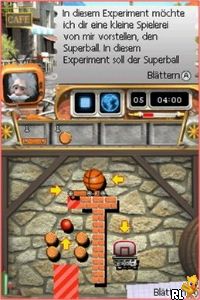
Crazy Machines 2 (Europe) (En,Fr,De,Es,It)
0 1 0
Crazy Machines 2 (Europe) (En,Fr,De,Es,It) is a classic Nintendo DS puzzle game that invites players into a sandbox of mechanical creativity and problem-solving. With its focus on physics-based contraptions, the game challenges you to design intricate Rube Goldberg-style machines to achieve specific goals. Originally a PC puzzle game, this Nintendo DS version distills the core mechanics into a portable format, perfect for quick sessions or extended problem-solving marathons. Its blend of logical thinking and experimentation makes it a compelling choice for players who enjoy tinkering and mechanical puzzles on the go.
Why Crazy Machines 2 Is Worth Playing
This classic from the Nintendo DS era stands out with its straightforward yet deep puzzle design. The game’s visuals lean towards a cartoonish, almost toy-like aesthetic that complements its whimsical approach to physics. The interface is deliberately simple, letting players focus on the creative process without unnecessary clutter. Its atmosphere encourages experimentation—seeing how different objects and mechanisms interact offers a satisfying sense of discovery. What keeps players engaged is the variety of puzzles and the freedom to approach each challenge in multiple ways, fostering replayability and creative problem-solving.
Despite its age, Crazy Machines 2 retains a charm that appeals to puzzle enthusiasts. Its mechanics translate well to the handheld, making it easy to pick up and put down without losing track of progress. The game’s level design balances challenge with accessibility, pushing players to think critically while offering enough hints of humor and visual appeal to stay motivated. Whether you’re a casual player or a dedicated puzzle solver, the game’s open-ended nature invites experimentation, rewarding players who enjoy tinkering with different solutions.
Tips to Get Ahead
Getting a grip on the game’s mechanics can make a big difference. Here are some practical tips to help you progress more smoothly:
- Start with the simplest solutions before trying complex contraptions—sometimes less is more.
- Use objects in multiple ways; don’t hesitate to experiment with different placements.
- Pay attention to the physics interactions—timing and positioning are often crucial.
- Break down the puzzle into smaller steps if you’re stuck—solve each part separately.
- Save your progress frequently to avoid losing creative breakthroughs.
- Look for alternative methods—there’s rarely only one way to complete a puzzle.
Things to Know Before You Start
How difficult is Crazy Machines 2?
The game offers a balanced challenge. It’s accessible enough for casual players but includes puzzles that require critical thinking, making it suitable for a variety of skill levels.
How long does a typical session last?
Sessions are generally short, often 10-20 minutes per puzzle, but you might find yourself experimenting with different solutions for hours if you enjoy tinkering.
Is Crazy Machines 2 more of a casual puzzle or a demanding challenge?
It leans toward casual puzzle solving with some complexity, making it a good choice for players who enjoy relaxed experimentation and creative problem-solving.
Jump into Crazy Machines 2 and see how many crazy contraptions you can create. Its straightforward mechanics and open-ended puzzles make it a fun browser experience that rewards inventive thinking and patience. Perfect for quick breaks or hours of tinkering, this classic offers a timeless puzzle challenge for players on any device.
Related games: you can also try Baby Pals (Europe) (En,Fr,De,Es,It) and Bakusou Dekotora Densetsu Black (Japan), or browse all other games in the Nintendo DS category.
How to Play Crazy Machines 2 (Europe) (En,Fr,De,Es,It)?
Arrange objects and activate mechanisms to complete each puzzle goal by experimenting with physics and timing. Solve each level by creating effective contraptions using available parts.
Game Controls
Use the keyboard to select, place, and activate objects; arrow keys or WASD move the cursor; space or Enter interacts.
You may be interested in:
-
 Nintendo DS
♥ 1
Casper’s Scare School – Classroom Capers (USA)
Nintendo DS
♥ 1
Casper’s Scare School – Classroom Capers (USA) -
 Nintendo DS
♥ 1
Zunou Nouryoku Koujou Machine – Touch de Zunoo DS (Japan)
Nintendo DS
♥ 1
Zunou Nouryoku Koujou Machine – Touch de Zunoo DS (Japan) -
 Nintendo DS
♥ 1
Zunou ni Asekaku Game Series! Vol. 1 – Cool 104 Joker & Setline (Japan)
Nintendo DS
♥ 1
Zunou ni Asekaku Game Series! Vol. 1 – Cool 104 Joker & Setline (Japan) -
 Nintendo DS
♥ 9
Zuma’s Revenge (USA)
Nintendo DS
♥ 9
Zuma’s Revenge (USA) -
 Nintendo DS
♥ 1
Zubo (USA) (En,Fr,Es)
Nintendo DS
♥ 1
Zubo (USA) (En,Fr,Es) -
 Nintendo DS
♥ 1
Zubo (Europe) (En,Fr,De,Es,It,Nl,Sv)
Nintendo DS
♥ 1
Zubo (Europe) (En,Fr,De,Es,It,Nl,Sv) -
 Nintendo DS
♥ 1
Zorro – Quest for Justice (USA) (En,Fr,De,Es,It)
Nintendo DS
♥ 1
Zorro – Quest for Justice (USA) (En,Fr,De,Es,It) -
 Nintendo DS
♥ 1
Zorro – Quest for Justice (Europe) (En,Fr,De,Es,It)
Nintendo DS
♥ 1
Zorro – Quest for Justice (Europe) (En,Fr,De,Es,It)
Comments (0)
No comments yet. Be the first to comment!