Custom Beat Battle – Draglade 2 (Japan)
0 1 0
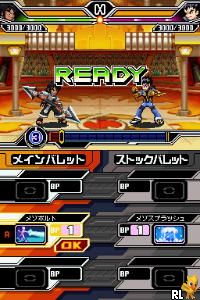
Custom Beat Battle – Draglade 2 (Japan) is a classic Nintendo DS game that combines rhythm-based combat with strategic gameplay. It’s different from typical fighting games because it uses music cues to guide your moves, creating a fresh experience on the handheld. The game emphasizes timing, recognizing patterns, and making tactical choices, all set against colorful visuals and lively sound design. Since it was released mainly in Japan, some in-game text and menus might be in Japanese, which could be a small hurdle for non-Japanese speakers.
Custom Beat Battle – Draglade 2: Gameplay Overview
The main idea is to fight using rhythm. You press buttons in sync with musical beats, and doing so correctly unleashes powerful attacks or defenses. The better your timing, the more effective your moves. This mix of sound and action encourages you to get a good sense of rhythm, because chaining perfect hits can lead to combos and strategic gains. During fights, you choose different styles and attack patterns, which change how your character responds to the music cues. The game’s soundtrack shifts with your actions, giving audio hints to help you keep your rhythm. This blend of music and combat makes for an engaging experience that rewards precise timing and pattern recognition.
Modes, Levels and Progression
The game offers various modes that keep things interesting beyond just fighting one-on-one. There are story missions where you unlock new characters, styles, and stages, along with challenge modes that test your reflexes in different scenarios. As you go further, the rhythm sequences get trickier, gradually ramping up the difficulty. This setup provides a good balance for beginners learning the basics and for experienced players looking for a challenge. Some stages introduce environmental hazards or special conditions that require adjusting your tactics. Unlockable content, like new characters and customization options, keeps you motivated to improve and explore different strategies across the game’s many modes.
Winning Strategies
Getting your timing right is key. Practice recognizing when beats happen and responding accordingly.
- Watch your opponent’s attack patterns to anticipate their moves and respond with well-timed counters.
- Try out different styles to see which fit your rhythm and strategic approach best.
- Keep a steady rhythm, even during hectic moments, to build attack combos and defend effectively.
- Use challenge modes to sharpen your timing and reaction skills outside regular fights.
- Pay attention to changes in the soundtrack, as they often hint at upcoming attack patterns.
Common Questions About Custom Beat Battle – Draglade 2
Are there multiple difficulty levels or modes?
While the main focus is on rhythm battles, the game gradually ramps up the challenge with more complex patterns and faster sequences as you progress.
How much content is there for replayability?
There’s a decent amount of battles, challenge options, and unlockable characters, encouraging you to replay and try different styles to unlock everything.
Is it suitable for all ages or skill levels?
The game’s focus on rhythm makes it accessible for casual players, but mastering timing and tackling tougher sequences can keep more experienced gamers engaged.
Custom Beat Battle – Draglade 2 offers a fun mix of music, strategy, and progression. Playing it in your browser can be a convenient way to enjoy a Nintendo DS classic without any hassle, all while exploring its layered mechanics and modes.
Related games: you can also try 1500 DS Spirits Vol. 6 – Trump (Japan) and Agatha Christie – The ABC Murders (USA) (En,Fr,Es), or browse all other games in the Nintendo DS category.
How to Play Custom Beat Battle – Draglade 2 (Japan)?
Press buttons in time with the music beats to attack or defend. Recognize patterns, choose styles, and improve your rhythm to win battles and unlock content.
Game Controls
Arrow keys act as the D-pad; Enter is Start; on-screen mapped keys handle the action buttons.
You may be interested in:
-
 Nintendo DS
♥ 1
Casper’s Scare School – Classroom Capers (USA)
Nintendo DS
♥ 1
Casper’s Scare School – Classroom Capers (USA) -
 Nintendo DS
♥ 1
Zunou Nouryoku Koujou Machine – Touch de Zunoo DS (Japan)
Nintendo DS
♥ 1
Zunou Nouryoku Koujou Machine – Touch de Zunoo DS (Japan) -
 Nintendo DS
♥ 1
Zunou ni Asekaku Game Series! Vol. 1 – Cool 104 Joker & Setline (Japan)
Nintendo DS
♥ 1
Zunou ni Asekaku Game Series! Vol. 1 – Cool 104 Joker & Setline (Japan) -
 Nintendo DS
♥ 9
Zuma’s Revenge (USA)
Nintendo DS
♥ 9
Zuma’s Revenge (USA) -
 Nintendo DS
♥ 1
Zubo (USA) (En,Fr,Es)
Nintendo DS
♥ 1
Zubo (USA) (En,Fr,Es) -
 Nintendo DS
♥ 1
Zubo (Europe) (En,Fr,De,Es,It,Nl,Sv)
Nintendo DS
♥ 1
Zubo (Europe) (En,Fr,De,Es,It,Nl,Sv) -
 Nintendo DS
♥ 1
Zorro – Quest for Justice (USA) (En,Fr,De,Es,It)
Nintendo DS
♥ 1
Zorro – Quest for Justice (USA) (En,Fr,De,Es,It) -
 Nintendo DS
♥ 1
Zorro – Quest for Justice (Europe) (En,Fr,De,Es,It)
Nintendo DS
♥ 1
Zorro – Quest for Justice (Europe) (En,Fr,De,Es,It)
Comments (0)
No comments yet. Be the first to comment!