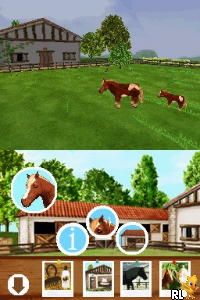
Discovery Kids – Pony Paradise (USA) (En,Fr,Es)
0 1 0
Discovery Kids – Pony Paradise (USA) (En,Fr,Es) is a charming Nintendo DS classic that offers a simple, joyful experience centered around caring for and interacting with ponies. Its straightforward gameplay makes it easy for players of all ages to enjoy, especially those new to virtual pet and farm-style games. With easy-to-understand mechanics, it creates a relaxing digital environment for pony lovers and young gamers alike, all playable directly in your browser without any downloads.
What Is Discovery Kids – Pony Paradise?
This game belongs to the simulation genre, focusing on nurturing ponies and managing a small virtual farm. Players can feed, groom, and play with their ponies, building a bond through simple yet satisfying interactions. The game keeps things lighthearted and emphasizes gentle, caring tasks, making it perfect for casual play and short sessions.
Designed for the Nintendo DS, it uses the console’s touch interface for easy interaction. The goal is to keep your ponies happy and healthy while decorating their environment and unlocking new accessories or items. Overall, it’s a relaxed experience that values attention and care without requiring complex strategies.
What Keeps You Coming Back
A key aspect is the variety of customization options. Players can decorate stables, choose pony accessories, and personalize their farmstead, encouraging repeated visits to unlock new styles and items. The game’s gentle progression system rewards ongoing care and attention, motivating players to check back regularly.
It also offers simple mini-games and activities that add variety without complicating the core experience. Its friendly, colorful visuals and calming soundtrack create a peaceful environment, making it perfect for quick, stress-free sessions. The straightforward gameplay loop combined with creative customization makes it easy to keep returning to improve your pony paradise.
Handy Tips
Start by familiarizing yourself with grooming and feeding routines — they’re essential for keeping your ponies happy. Make sure to regularly check on your ponies’ needs to avoid neglect. Explore all customization options to find hidden items and accessories. Save your progress often to keep your decorations safe. Use mini-games to earn extra coins or items, which can be spent on upgrades and decorations. Keep an eye on your pony’s mood indicators for the best care results.
Player FAQ
Is Discovery Kids – Pony Paradise good for younger players?
Absolutely, the game’s simple mechanics and gentle theme make it suitable for children, especially those just starting with virtual pets or simulation games. Its intuitive touch controls on the Nintendo DS are easy to learn and play directly in your browser.
Can I play Discovery Kids – Pony Paradise offline or on mobile devices?
This version runs directly in your browser, so it’s available instantly and doesn’t need an internet connection once loaded. It’s a browser-based experience and isn’t a mobile app, making it perfect for quick, casual play sessions on your PC or compatible device.
How long does a typical play session last?
The game is designed for short, relaxing sessions. Whether you spend a few minutes caring for your ponies or longer decorating your farm, there’s no penalty for stopping whenever you like.
Discovery Kids – Pony Paradise offers a simple, charming virtual farm experience suitable for all ages. Its accessible gameplay and focus on caring for ponies make it a nice choice for quick, lighthearted fun. Playing in your browser means you can enjoy this classic from the Nintendo DS era anytime without hassle.
Related games: you can also try Bubble Bobble Revolution (USA) and Amazing Adventures – The Forgotten Ruins (USA), or browse all other games in the Nintendo DS category.
How to Play Discovery Kids – Pony Paradise (USA) (En,Fr,Es)?
Feed, groom, and care for your ponies, decorate their environment, and unlock new items by completing simple activities and mini-games to keep your ponies happy and your farm growing.
Game Controls
Arrow keys or WASD move; space or Enter interacts with objects and menus.
You may be interested in:
-
 Nintendo DS
♥ 1
Casper’s Scare School – Classroom Capers (USA)
Nintendo DS
♥ 1
Casper’s Scare School – Classroom Capers (USA) -
 Nintendo DS
♥ 1
Zunou Nouryoku Koujou Machine – Touch de Zunoo DS (Japan)
Nintendo DS
♥ 1
Zunou Nouryoku Koujou Machine – Touch de Zunoo DS (Japan) -
 Nintendo DS
♥ 1
Zunou ni Asekaku Game Series! Vol. 1 – Cool 104 Joker & Setline (Japan)
Nintendo DS
♥ 1
Zunou ni Asekaku Game Series! Vol. 1 – Cool 104 Joker & Setline (Japan) -
 Nintendo DS
♥ 9
Zuma’s Revenge (USA)
Nintendo DS
♥ 9
Zuma’s Revenge (USA) -
 Nintendo DS
♥ 1
Zubo (USA) (En,Fr,Es)
Nintendo DS
♥ 1
Zubo (USA) (En,Fr,Es) -
 Nintendo DS
♥ 1
Zubo (Europe) (En,Fr,De,Es,It,Nl,Sv)
Nintendo DS
♥ 1
Zubo (Europe) (En,Fr,De,Es,It,Nl,Sv) -
 Nintendo DS
♥ 1
Zorro – Quest for Justice (USA) (En,Fr,De,Es,It)
Nintendo DS
♥ 1
Zorro – Quest for Justice (USA) (En,Fr,De,Es,It) -
 Nintendo DS
♥ 1
Zorro – Quest for Justice (Europe) (En,Fr,De,Es,It)
Nintendo DS
♥ 1
Zorro – Quest for Justice (Europe) (En,Fr,De,Es,It)
Comments (0)
No comments yet. Be the first to comment!