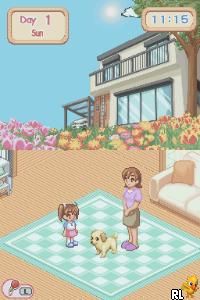
Dogz (USA)
0 10 1
Dogz (USA) is a charming simulation game originally made for the Nintendo DS, giving a straightforward way to care for virtual dogs. It focuses on pet management and nurturing gameplay, making it appealing to players of all ages who enjoy digital pet-raising activities. Its simple mechanics and emphasis on customization create a relaxing yet engaging experience that you can play directly in your browser, no downloads needed.
Dogz: Gameplay Overview
The main idea behind Dogz is taking care of a virtual dog through activities that mirror real pet ownership. You can feed, groom, and play with your dog, helping it stay happy and healthy. There are plenty of accessories, outfits, and toys to personalize your pet, adding a creative touch. Controls are easy to use, with tap-based actions that work well on the browser, making the game smooth and intuitive.
The game is built around routine tasks like feeding, cleaning, and playing, which shape the dog’s mood and look. Keeping a consistent care schedule is encouraged. There are mini-games and activities that can boost your dog’s happiness or unlock new customization options, giving a sense of progress. While it doesn’t have complex challenges or levels, it rewards attentive care and creative expression, making it simple enough for casual players and younger audiences.
Modes, Levels and Progression
Dogz doesn’t have traditional levels or story modes but offers plenty of ways to customize your pet and care for it over time. As you keep caring for your dog, you unlock new accessories, outfits, and toys, which adds variety. It encourages trying out different looks and styles, making it fun to revisit and experiment with your pet’s appearance.
Progress mainly comes from collecting items and keeping your dog happy and healthy. There are no strict time limits or difficulty spikes, so it’s accessible for everyone. Since the game runs in real-time, you can check back on your pet to see how it’s grown and changed, encouraging multiple play sessions. The focus stays on nurturing and creativity rather than leveling up or scoring points.
Winning Strategies
Consistent care and attention will keep your dog happy and unlock more customization options. Regular feeding and grooming are key. Try out different accessories to find styles you like. Using a variety of toys and outfits can keep your dog engaged and boost its happiness. Checking in often helps you unlock new items and see your pet’s progress. Mixing and matching accessories can create unique looks, and paying attention to your dog’s mood can help you tailor your care routines for better results. Exploring all the customization options can lead to fun surprises along the way.
Common Questions About Dogz
How does the difficulty scale in Dogz?
Answer: The game moves at a gentle pace with no difficulty spikes; care tasks are simple and manageable, making it suitable for players of all ages and experience levels.
Are there different modes or levels to unlock?
Answer: Instead of traditional modes or levels, Dogz offers ongoing customization and pet care options that grow as you play, adding depth through collecting items and expressing your style.
How long can I expect to play in one session?
Answer: Since the game is about routine care and style choices, sessions can be as short or long as you like—whether you spend a few minutes or more, there’s no fixed end point.
Dogz offers a simple, charming pet simulation that highlights caring, creativity, and personalization. Its easy mechanics and open-ended approach make it a relaxing game you can pick up repeatedly, all while enjoying the nostalgia of a Nintendo DS favorite, now playable right in your browser.
Related games: you can also try Cory in the House (USA) and Digimon World – Dusk (USA), or browse all other games in the Nintendo DS category.
How to Play Dogz (USA)?
Care for your virtual dog by feeding, grooming, and playing with it to keep it happy and healthy. Unlock new items and customize your pet as you consistently care for it over time.
Game Controls
Arrow keys or WASD move; space or Enter to select and interact.
You may be interested in:
-
 Nintendo DS
♥ 1
Casper’s Scare School – Classroom Capers (USA)
Nintendo DS
♥ 1
Casper’s Scare School – Classroom Capers (USA) -
 Nintendo DS
♥ 1
Zunou Nouryoku Koujou Machine – Touch de Zunoo DS (Japan)
Nintendo DS
♥ 1
Zunou Nouryoku Koujou Machine – Touch de Zunoo DS (Japan) -
 Nintendo DS
♥ 1
Zunou ni Asekaku Game Series! Vol. 1 – Cool 104 Joker & Setline (Japan)
Nintendo DS
♥ 1
Zunou ni Asekaku Game Series! Vol. 1 – Cool 104 Joker & Setline (Japan) -
 Nintendo DS
♥ 9
Zuma’s Revenge (USA)
Nintendo DS
♥ 9
Zuma’s Revenge (USA) -
 Nintendo DS
♥ 1
Zubo (USA) (En,Fr,Es)
Nintendo DS
♥ 1
Zubo (USA) (En,Fr,Es) -
 Nintendo DS
♥ 1
Zubo (Europe) (En,Fr,De,Es,It,Nl,Sv)
Nintendo DS
♥ 1
Zubo (Europe) (En,Fr,De,Es,It,Nl,Sv) -
 Nintendo DS
♥ 1
Zorro – Quest for Justice (USA) (En,Fr,De,Es,It)
Nintendo DS
♥ 1
Zorro – Quest for Justice (USA) (En,Fr,De,Es,It) -
 Nintendo DS
♥ 1
Zorro – Quest for Justice (Europe) (En,Fr,De,Es,It)
Nintendo DS
♥ 1
Zorro – Quest for Justice (Europe) (En,Fr,De,Es,It)
Comments (0)
No comments yet. Be the first to comment!