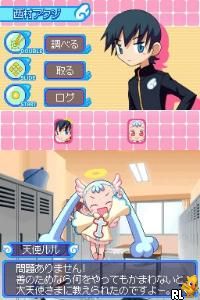
Doki Doki Majo Shinpan! (Japan)
0 2 1
Doki Doki Majo Shinpan! (Japan) is a classic Nintendo DS game that mixes quirky humor with a unique gameplay style. As a title from the era of dual screens and stylus controls, it’s easy to pick up for short play sessions or longer ones. Its simple mechanics and amusing premise make it accessible for newcomers, while its nostalgic charm appeals to those who remember handheld gaming from the mid-2000s.
What Is Doki Doki Majo Shinpan!?
This game falls into the adventure and puzzle genres on the Nintendo DS. The main goal is to identify characters based on visual clues and quick judgments—a mechanic that combines observation with a bit of humor. The story takes place in a whimsical world where you need to figure out who is a witch and who isn’t, leading to funny and unpredictable moments. It’s a lighthearted experience that encourages quick thinking and pattern recognition, making each session feel like a playful challenge.
Gameplay involves analyzing how characters look and behave to determine their true nature. The stylus and dual screens create an intuitive, tactile experience—players tap, swipe, and choose options to move through different scenarios. While the game isn’t story-heavy, its charm comes from funny interactions and the satisfaction of correctly guessing characters. It’s great for quick bursts of fun or casual play, with each round offering new surprises and visual gags.
What Keeps You Coming Back
The game offers replay value thanks to its variety of characters and situations, encouraging players to sharpen their judgment skills. Different outcomes and humorous endings motivate multiple playthroughs to see everything. Plus, collecting various characters and scenarios adds to its appeal, making it tempting to replay and explore all options.
Its simple mechanics, paired with unpredictable character responses, keep each session feeling fresh. The game rewards sharp observation and quick decisions, and discovering new interactions or jokes helps keep things interesting. The quirky art style and playful sound effects make it enjoyable for those who like light puzzle gameplay with a humorous edge.
Handy Tips
Getting started is straightforward, but these tips can help you enjoy it more:
- Pay attention to details like clothing and accessories to improve your judgment.
- Use quick reflexes—hesitation can cause mistakes or missed answers.
- Try different choices to see all possible endings and scenarios.
- Keep an eye on the visual clues on both screens for better insights.
- Take your time analyzing characters if you’re unsure—rushing can lead to errors.
Player FAQ
Is Doki Doki Majo Shinpan! easy for newcomers?
Yes, its straightforward gameplay and simple mechanics make it accessible, especially for those familiar with Nintendo DS controls. It’s a casual game that doesn’t require previous experience.
Can younger players enjoy Doki Doki Majo Shinpan!?
While suitable for a wide age range thanks to its light humor and puzzle elements, parents should note that the premise involves identifying witches, which might be confusing for very young children.
Do I need an internet connection to play Doki Doki Majo Shinpan!?
No, it runs entirely on the Nintendo DS and can be played offline, making it perfect for quick sessions wherever you are.
Doki Doki Majo Shinpan! offers a simple, fun experience that captures the charm of the Nintendo DS era. Its playful mechanics and quirky visuals make it enjoyable for anyone interested in light puzzle games with a humorous touch.
Related games: you can also try Call of Duty 4 – Modern Warfare (Spain) and Crash – Mind over Mutant (Europe) (En,Fr,De,Es,It,Nl), or browse all other games in the Nintendo DS category.
How to Play Doki Doki Majo Shinpan! (Japan)?
Look at characters carefully, then choose who is a witch or not based on visual clues. Make quick decisions to uncover different endings and enjoy the humorous surprises.
Game Controls
Arrow keys move the cursor; Enter selects options; mouse clicks can be used for interaction.
You may be interested in:
-
 Nintendo DS
♥ 1
Casper’s Scare School – Classroom Capers (USA)
Nintendo DS
♥ 1
Casper’s Scare School – Classroom Capers (USA) -
 Nintendo DS
♥ 1
Zunou Nouryoku Koujou Machine – Touch de Zunoo DS (Japan)
Nintendo DS
♥ 1
Zunou Nouryoku Koujou Machine – Touch de Zunoo DS (Japan) -
 Nintendo DS
♥ 1
Zunou ni Asekaku Game Series! Vol. 1 – Cool 104 Joker & Setline (Japan)
Nintendo DS
♥ 1
Zunou ni Asekaku Game Series! Vol. 1 – Cool 104 Joker & Setline (Japan) -
 Nintendo DS
♥ 9
Zuma’s Revenge (USA)
Nintendo DS
♥ 9
Zuma’s Revenge (USA) -
 Nintendo DS
♥ 1
Zubo (USA) (En,Fr,Es)
Nintendo DS
♥ 1
Zubo (USA) (En,Fr,Es) -
 Nintendo DS
♥ 1
Zubo (Europe) (En,Fr,De,Es,It,Nl,Sv)
Nintendo DS
♥ 1
Zubo (Europe) (En,Fr,De,Es,It,Nl,Sv) -
 Nintendo DS
♥ 1
Zorro – Quest for Justice (USA) (En,Fr,De,Es,It)
Nintendo DS
♥ 1
Zorro – Quest for Justice (USA) (En,Fr,De,Es,It) -
 Nintendo DS
♥ 1
Zorro – Quest for Justice (Europe) (En,Fr,De,Es,It)
Nintendo DS
♥ 1
Zorro – Quest for Justice (Europe) (En,Fr,De,Es,It)
Comments (0)
No comments yet. Be the first to comment!