Easy Piano (USA) (En,Fr,Es)
0 1 0
Easy Piano (USA) (En,Fr,Es) is a simple music game that first appeared on the Nintendo DS. Its friendly interface and straightforward mechanics mean anyone can pick it up and start playing, even without previous experience with piano or rhythm games. As a classic from the Nintendo DS era, it offers a relaxed musical experience you can enjoy directly in your browser, without any downloads.
What Is Easy Piano?
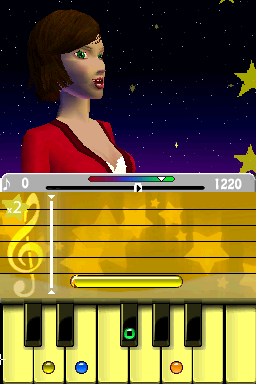
This game is part of the music genre, focusing on playing melodies by matching notes as they pop up on the screen. Your goal is to copy the tunes accurately by pressing the right buttons, which mimic piano keys in a fun and easy way. The game is designed to be clear and simple, making it suitable for players of all ages or those new to digital music games. It encourages pattern recognition and timing, providing a gentle way to get started with playing rhythms like a piano.
As you play, you’ll come across familiar songs arranged for beginners. It’s like a simplified piano lesson, where visual cues help you hit the right notes in order. It’s great for casual players who want a laid-back environment to enjoy music, or for those just starting out who want a taste of playing melodies without needing a real instrument. The interface is clean, and the controls are minimal, so it’s easy for anyone to try.
What Keeps You Coming Back
The game has a nice selection of tunes, from well-known classics to simple original pieces, which makes replaying enjoyable. Its straightforward gameplay allows you to jump right in and try to improve your timing and accuracy on familiar songs. It also tracks your progress, giving a small sense of achievement as you get better at different melodies. The variety and gradually increasing difficulty help keep things interesting without feeling overwhelming.
Because it’s designed for relaxed play, you can revisit songs to beat your previous scores or simply enjoy the calming experience of playing familiar tunes. There’s no pressure to perform perfectly, making it good for quick practice sessions or longer, more focused play. The game also supports quick resets and easy navigation, encouraging you to try different songs or repeat sections until you’re happy with your performance.
Handy Tips
If you’re starting out, try the slower tempo settings to get a feel for the notes and timing. Don’t rush; accuracy matters more than speed at first. Use the visual cues as your guide and aim to match the notes as closely as you can. Play songs repeatedly to get more comfortable with them. Keep your device steady for better accuracy, especially with more complex melodies. And don’t hesitate to explore different tunes so you can find your favorites and keep things fresh.
Player FAQ
Is Easy Piano suitable for young children?
Yes, the controls are simple, and the melodies are slow enough for beginners of all ages, including kids just learning the basics of rhythm and melody.
Can I play Easy Piano offline or in my browser without an internet connection?
Since it runs directly in your browser, you can play without needing an internet connection after it loads. That makes it handy for quick practice or playing on the go.
How long does a typical session last in Easy Piano?
Most sessions are short, focusing on individual songs. You might play for a few minutes or longer if you want to practice several tunes or work on your timing with your favorites.
Easy Piano offers a relaxed way to enjoy music, perfect for anyone looking for straightforward melodies and simple gameplay. Its variety of songs and easy controls make it a lasting choice for those interested in a free, browser-based piano game.
Related games: you can also try Dora the Explorer – Dora Saves the Snow Princess (USA) and Big Word Puzzle Book (Europe) (En,Fr,De,Es,It), or browse all other games in the Nintendo DS category.
How to Play Easy Piano (USA) (En,Fr,Es)?
Match the falling notes by pressing the correct keys in time with the music to play simple melodies and improve your accuracy and rhythm.
Game Controls
Keyboard keys are used to hit notes; follow visual cues for timing.
You may be interested in:
-
 Nintendo DS
♥ 1
Casper’s Scare School – Classroom Capers (USA)
Nintendo DS
♥ 1
Casper’s Scare School – Classroom Capers (USA) -
 Nintendo DS
♥ 1
Zunou Nouryoku Koujou Machine – Touch de Zunoo DS (Japan)
Nintendo DS
♥ 1
Zunou Nouryoku Koujou Machine – Touch de Zunoo DS (Japan) -
 Nintendo DS
♥ 1
Zunou ni Asekaku Game Series! Vol. 1 – Cool 104 Joker & Setline (Japan)
Nintendo DS
♥ 1
Zunou ni Asekaku Game Series! Vol. 1 – Cool 104 Joker & Setline (Japan) -
 Nintendo DS
♥ 9
Zuma’s Revenge (USA)
Nintendo DS
♥ 9
Zuma’s Revenge (USA) -
 Nintendo DS
♥ 1
Zubo (USA) (En,Fr,Es)
Nintendo DS
♥ 1
Zubo (USA) (En,Fr,Es) -
 Nintendo DS
♥ 1
Zubo (Europe) (En,Fr,De,Es,It,Nl,Sv)
Nintendo DS
♥ 1
Zubo (Europe) (En,Fr,De,Es,It,Nl,Sv) -
 Nintendo DS
♥ 1
Zorro – Quest for Justice (USA) (En,Fr,De,Es,It)
Nintendo DS
♥ 1
Zorro – Quest for Justice (USA) (En,Fr,De,Es,It) -
 Nintendo DS
♥ 1
Zorro – Quest for Justice (Europe) (En,Fr,De,Es,It)
Nintendo DS
♥ 1
Zorro – Quest for Justice (Europe) (En,Fr,De,Es,It)
Comments (0)
No comments yet. Be the first to comment!