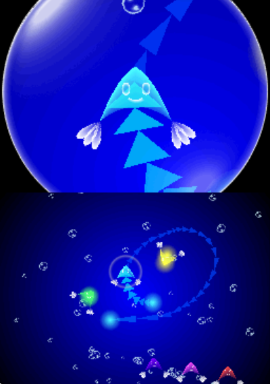
Electroplankton (Japan)
0 1 0
Electroplankton (Japan) is a distinctive Nintendo DS game that offers a different kind of gaming experience. Its straightforward controls and focus on sound and visual creation make it accessible for newcomers. Instead of traditional levels, it invites you into a playful, ambient world where your actions produce captivating patterns and melodies. It runs smoothly in your browser, no downloads necessary.
What Is Electroplankton?
Electroplankton is a digital art and music creation program that fits into the interactive simulation category. It doesn’t have levels or specific goals; rather, it’s about experimenting with various plankton-like creatures that generate sounds and visuals when touched or moved. The game encourages exploration, allowing you to shape the environment to produce your own soundscapes and visual displays. Its emphasis on spontaneous creativity keeps each session feeling fresh and personal.
Originally made for the Nintendo DS, it uses the device’s touch controls for easy interaction. The interface is simple but engaging, with different plankton characters each offering a unique way to produce sounds and visuals. Playing involves tapping, dragging, or shaking the stylus to see what melodies or animations come out. It’s easy enough for beginners but offers enough depth to keep curious players experimenting over time.
What Keeps You Coming Back
The appeal lies in its calming atmosphere and the variety of sound and visual combinations. Each plankton responds differently based on how you interact, encouraging you to discover new effects and patterns. Its simple mechanics mean you can spend a few minutes creating a quick soundscape or settle in for longer artistic sessions. The relaxing music and mesmerizing visuals make it a nice break from more intense games.
Replayability comes from the different types of plankton and how unpredictably they react. There’s no fixed way to play, so each time feels unique. Some enjoy trying to recreate certain sounds or visuals, while others simply like watching the patterns change. Since it’s an open-ended, non-competitive experience, it’s easy to come back whenever you want to relax or experiment with new ideas.
Handy Tips
If you want to get the most out of Electroplankton, here are some tips:
- Mix different plankton to discover new sounds and visuals.
- Shake the device or tap repeatedly to see how effects change.
- Take a moment to observe the patterns; slow interactions can create more harmonious sounds.
- Use the stylus gently to avoid overwhelming the effects with too much input.
- Combine various plankton types during a session for layered textures and melodies.
- Pause now and then to appreciate how the visuals and sounds naturally evolve.
Player FAQ
Is Electroplankton easy for beginners?
Yes. Its simple touch controls and open-ended style make it suitable for players of all ages and skill levels, especially in this browser version.
Is it safe for younger players?
Definitely. The game involves no complex mechanics or violence; it’s mainly about making sounds and visuals, so kids and casual players will enjoy it too.
Does it need an internet connection to play?
No. The game runs directly in your browser, so once it loads, you can enjoy it offline without any issues.
Electroplankton provides a calming, creative experience centered on sound and visuals. Playing it feels like exploring a tiny, interactive art installation, all right in your browser. Its simplicity and depth make it a compelling choice for anyone interested in experimental digital art.
Related games: you can also try Big Bang Mini (Europe) (En,Fr,De,Es,It) and Adi l'Entraineur – Mathematiques, Francais CM1-CM2 (France), or browse all other games in the Nintendo DS category.
How to Play Electroplankton (Japan)?
Tap, drag, or shake to interact with plankton, creating sounds and visuals. Experiment freely to produce unique patterns and melodies in this open-ended artistic environment.
Game Controls
Arrow keys act as the D-pad; Enter is Start; on-screen mapped keys handle the action buttons.
You may be interested in:
-
 Nintendo DS
♥ 1
Casper’s Scare School – Classroom Capers (USA)
Nintendo DS
♥ 1
Casper’s Scare School – Classroom Capers (USA) -
 Nintendo DS
♥ 1
Zunou Nouryoku Koujou Machine – Touch de Zunoo DS (Japan)
Nintendo DS
♥ 1
Zunou Nouryoku Koujou Machine – Touch de Zunoo DS (Japan) -
 Nintendo DS
♥ 1
Zunou ni Asekaku Game Series! Vol. 1 – Cool 104 Joker & Setline (Japan)
Nintendo DS
♥ 1
Zunou ni Asekaku Game Series! Vol. 1 – Cool 104 Joker & Setline (Japan) -
 Nintendo DS
♥ 9
Zuma’s Revenge (USA)
Nintendo DS
♥ 9
Zuma’s Revenge (USA) -
 Nintendo DS
♥ 1
Zubo (USA) (En,Fr,Es)
Nintendo DS
♥ 1
Zubo (USA) (En,Fr,Es) -
 Nintendo DS
♥ 1
Zubo (Europe) (En,Fr,De,Es,It,Nl,Sv)
Nintendo DS
♥ 1
Zubo (Europe) (En,Fr,De,Es,It,Nl,Sv) -
 Nintendo DS
♥ 1
Zorro – Quest for Justice (USA) (En,Fr,De,Es,It)
Nintendo DS
♥ 1
Zorro – Quest for Justice (USA) (En,Fr,De,Es,It) -
 Nintendo DS
♥ 1
Zorro – Quest for Justice (Europe) (En,Fr,De,Es,It)
Nintendo DS
♥ 1
Zorro – Quest for Justice (Europe) (En,Fr,De,Es,It)
Comments (0)
No comments yet. Be the first to comment!