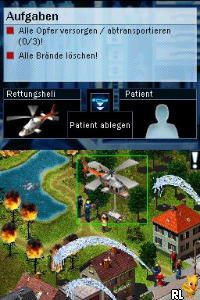
Emergency DS (Germany)
0 1 0
Emergency DS (Germany) is a classic Nintendo DS game that’s surprisingly easy to pick up and enjoy right in your browser. The game offers a straightforward, engaging experience rooted in its era, making it accessible for players of all skill levels. Its simple controls and clear objectives mean you can jump in and start playing without fuss or complicated tutorials.
What Is Emergency DS?
This Nintendo DS classic falls into the simulation and emergency management genre. The core of the game involves responding to various urgent situations, managing resources, and making quick decisions to resolve crises. It’s designed to give players a sense of what it’s like to be on the front lines of emergency response, with scenarios that require careful planning and rapid action.
During gameplay, players face a variety of incidents that need immediate attention. The gameplay typically revolves around coordinating emergency services, such as fire, police, or medical teams, to handle incidents efficiently. The mechanics focus on clear, immediate feedback and a straightforward interface, making it accessible for players new to simulation games or those simply looking for a quick, casual challenge.
What Keeps You Coming Back
What makes Emergency DS appealing is its variety of scenarios and the challenge of managing multiple emergencies at once. Each situation demands a different approach and strategic thinking, encouraging players to try out different tactics. The quick sessions mean you can finish a scenario in a short time, which helps keep the game interesting across multiple tries.
Plus, the game’s design keeps players engaged through its increasing difficulty and the satisfaction of resolving crises efficiently. The clear feedback from the game makes it easy to learn from each attempt, whether you succeed or not. This encourages trying again and refining your strategies for handling emergencies in more complex situations.
Handy Tips
If you want to get the most out of Emergency DS, keep these tips in mind:
- Prioritize incidents based on severity to use your resources wisely.
- Keep track of your available units and deploy them quickly to emerging crises.
- Balance your attention between multiple incidents to prevent any one from getting out of hand.
- Familiarize yourself with each scenario’s layout to plan your response routes more efficiently.
- Don’t hesitate to restart if a scenario feels unmanageable; each attempt teaches you something new.
- Use quick decision mechanics to stay ahead of rapidly developing emergencies.
Player FAQ
Is Emergency DS easy for beginners to learn?
Yes, thanks to its simple controls and clear objectives, it’s accessible even if you’re new to simulation games or just playing casually.
Can younger players enjoy Emergency DS?
Most likely. The gameplay is straightforward and doesn’t involve violence, so it can suit a wide age range. Younger players might need some guidance to understand the scenarios fully.
Do I need an internet connection to play Emergency DS?
No, since the game runs right in your browser and is a Nintendo DS classic emulated here, you don’t need to be online after you load it up.
Playing Emergency DS on this site gives quick access to a well-made emergency management experience. Its simplicity and brief gameplay sessions make it a good choice for casual players who want a quick challenge or a nostalgic reminder of Nintendo DS classics. Enjoy managing crises whenever you like with this browser-based version of Emergency DS.
Related games: you can also try Biz Nouryoku DS Series – Miryoku Kaikaku (Japan) and Denjirou Sensei no Fushigi na Jikkenshitsu (Japan), or browse all other games in the Nintendo DS category.
How to Play Emergency DS (Germany)?
Respond quickly to emergencies by deploying units to handle incidents efficiently. Manage multiple crises, prioritize severity, and complete scenarios to improve your response skills.
Game Controls
Arrow keys control movement; Enter and other keys perform actions; keyboard replaces the original game controls.
You may be interested in:
-
 Nintendo DS
♥ 1
Casper’s Scare School – Classroom Capers (USA)
Nintendo DS
♥ 1
Casper’s Scare School – Classroom Capers (USA) -
 Nintendo DS
♥ 1
Zunou Nouryoku Koujou Machine – Touch de Zunoo DS (Japan)
Nintendo DS
♥ 1
Zunou Nouryoku Koujou Machine – Touch de Zunoo DS (Japan) -
 Nintendo DS
♥ 1
Zunou ni Asekaku Game Series! Vol. 1 – Cool 104 Joker & Setline (Japan)
Nintendo DS
♥ 1
Zunou ni Asekaku Game Series! Vol. 1 – Cool 104 Joker & Setline (Japan) -
 Nintendo DS
♥ 9
Zuma’s Revenge (USA)
Nintendo DS
♥ 9
Zuma’s Revenge (USA) -
 Nintendo DS
♥ 1
Zubo (USA) (En,Fr,Es)
Nintendo DS
♥ 1
Zubo (USA) (En,Fr,Es) -
 Nintendo DS
♥ 1
Zubo (Europe) (En,Fr,De,Es,It,Nl,Sv)
Nintendo DS
♥ 1
Zubo (Europe) (En,Fr,De,Es,It,Nl,Sv) -
 Nintendo DS
♥ 1
Zorro – Quest for Justice (USA) (En,Fr,De,Es,It)
Nintendo DS
♥ 1
Zorro – Quest for Justice (USA) (En,Fr,De,Es,It) -
 Nintendo DS
♥ 1
Zorro – Quest for Justice (Europe) (En,Fr,De,Es,It)
Nintendo DS
♥ 1
Zorro – Quest for Justice (Europe) (En,Fr,De,Es,It)
Comments (0)
No comments yet. Be the first to comment!