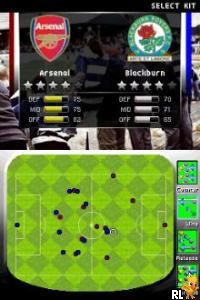
FIFA 07 (Europe) (En,Fr,De,Es,It,Nl)
0 17 0
FIFA 07 (Europe) (En,Fr,De,Es,It,Nl) is a classic Nintendo DS football game that gives you a taste of the popular soccer franchise in a portable format. Its compact design captures the energy of the pitch, letting players jump into fast-paced matches either on their handheld console or via the browser-based emulator. This version, made for the Nintendo DS, keeps the core gameplay and atmosphere of the original, making it a nostalgic pick for fans and newcomers alike.
Step Into the World of FIFA 07
On the Nintendo DS, FIFA 07 offers a simplified but familiar view of soccer, with sprites and environments optimized for the dual screens. The visuals lean toward clear, colorful graphics that highlight speed and clarity rather than hyper-realism. The sound design includes lively crowd noises, referee whistles, and commentary snippets that change with the game, creating a lively stadium vibe wherever you’re playing.
The presentation aims to mimic the feel of a real match, with highlight replays and camera angles that shift smoothly during play. Its easy-to-navigate interface makes controlling the game straightforward, even on a smaller screen, while the music and sound effects add to the energetic sporting atmosphere. Playing FIFA 07 through this browser emulator offers a nostalgic look at a portable football experience — compact, simple, and full of action.
How the Gameplay Hooks You
FIFA 07’s gameplay focuses on quick matches that reward good timing, positioning, and tactical choices. The pacing encourages you to stay alert, balancing attack and defense in matches that can last a few minutes or longer depending on your mood. The controls are simple, designed to work with the DS’s buttons, making passing, shooting, and defending easy to pick up.
Progression comes from winning matches and unlocking new teams and tournaments, giving you a sense of achievement. Its straightforward mechanics and accessible difficulty make it good for casual play, but there’s enough depth for more experienced players to learn advanced tactics. Building your team, competing in tournaments, and honing your skills keeps the game interesting without feeling overwhelming.
Pro Tips for FIFA 07
Getting the most out of FIFA 07 on this emulator is about understanding its fast pace and mastering the controls. Here are some suggestions:
- Position your defenders well to intercept passes and stop counterattacks.
- Use quick, well-timed passes to break through defenses and create scoring chances.
- Keep an eye on stamina — players tire quickly, which impacts their speed and accuracy.
- Try out different teams early on to see which styles suit you best.
- Take advantage of set pieces like free kicks and corners for easier goals.
- If the game allows, adjust difficulty settings to match your skill level and keep things challenging but fair.
Frequently Asked Questions
Can I play FIFA 07 in short sessions without losing progress?
Yes, matches can be quick, and your progress is saved after each game, making it easy to jump in and out.
Does FIFA 07 feel repetitive after a while?
While the gameplay is simple, winning matches, unlocking teams, and taking part in tournaments help keep things varied, so it doesn’t get dull quickly.
Is this game suitable for newcomers or younger players?
Definitely. Its straightforward controls and accessible gameplay make it a good choice for beginners and younger fans who want a fun, casual football experience on their browser.
FIFA 07 offers a portable, fast-paced football experience that runs smoothly in your browser. It’s a good pick for quick matches or casual soccer fun anytime you want to play.
Related games: you can also try Chessmaster – The Art of Learning (Europe) (En,Fr,De,Es,It,Nl) and Asphalt – Urban GT 2 (USA) (En,Fr,Es), or browse all other games in the Nintendo DS category.
How to Play FIFA 07 (Europe) (En,Fr,De,Es,It,Nl)?
Win matches by scoring more goals than your opponent through passing, shooting, and defending. Play quick, timed games to improve your team and unlock new tournaments.
Game Controls
Arrow keys control movement; action buttons are mapped to keyboard keys for passing, shooting, and defending.
You may be interested in:
-
 Nintendo DS
♥ 1
Casper’s Scare School – Classroom Capers (USA)
Nintendo DS
♥ 1
Casper’s Scare School – Classroom Capers (USA) -
 Nintendo DS
♥ 1
Zunou Nouryoku Koujou Machine – Touch de Zunoo DS (Japan)
Nintendo DS
♥ 1
Zunou Nouryoku Koujou Machine – Touch de Zunoo DS (Japan) -
 Nintendo DS
♥ 1
Zunou ni Asekaku Game Series! Vol. 1 – Cool 104 Joker & Setline (Japan)
Nintendo DS
♥ 1
Zunou ni Asekaku Game Series! Vol. 1 – Cool 104 Joker & Setline (Japan) -
 Nintendo DS
♥ 9
Zuma’s Revenge (USA)
Nintendo DS
♥ 9
Zuma’s Revenge (USA) -
 Nintendo DS
♥ 1
Zubo (USA) (En,Fr,Es)
Nintendo DS
♥ 1
Zubo (USA) (En,Fr,Es) -
 Nintendo DS
♥ 1
Zubo (Europe) (En,Fr,De,Es,It,Nl,Sv)
Nintendo DS
♥ 1
Zubo (Europe) (En,Fr,De,Es,It,Nl,Sv) -
 Nintendo DS
♥ 1
Zorro – Quest for Justice (USA) (En,Fr,De,Es,It)
Nintendo DS
♥ 1
Zorro – Quest for Justice (USA) (En,Fr,De,Es,It) -
 Nintendo DS
♥ 1
Zorro – Quest for Justice (Europe) (En,Fr,De,Es,It)
Nintendo DS
♥ 1
Zorro – Quest for Justice (Europe) (En,Fr,De,Es,It)
Comments (0)
No comments yet. Be the first to comment!