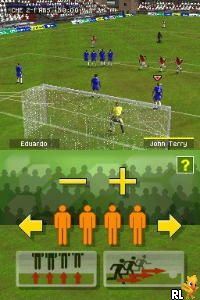
FIFA 09 (Europe) (En,Fr,De,Es,It)
0 16 2
FIFA 09 (Europe) (En,Fr,De,Es,It) is a sports simulation game that captures the essence of soccer gameplay on the Nintendo DS. As a classic from its era, it provides players with an accessible yet engaging way to enjoy the popular football franchise on a handheld device. The game stands out with its simplified controls and portable design, making it easy to pick up and play wherever you are.
FIFA 09: Gameplay Overview
This version of FIFA delivers the core soccer experience with straightforward gameplay mechanics. You can control your team during matches using controls designed for the handheld, focusing on passing, shooting, and basic defensive moves. It uses a third-person view from above, which helps you see the field clearly and make tactical decisions.
The main gameplay involves choosing teams, setting formations, and jumping into matches that start and end quickly. The controls are intuitive, so you can jump right into the action without needing to memorize complicated button combos. While it doesn’t have all the depth of console versions, FIFA 09 still offers enough strategic options to keep soccer fans entertained during short gaming sessions, whether at home or on the move.
Modes, Levels and Progression
FIFA 09 includes several modes to keep things interesting. You can play quick matches or organize tournaments, selecting from different national teams or club sides. There’s also a basic league mode where you can simulate seasons and test your managerial skills. Progress mainly comes from winning matches and tournaments, which can unlock small in-game rewards or boost team morale depending on what you choose.
While it doesn’t have extensive customization or RPG-like progression, the variety in match types and team options encourages replayability. The difficulty adjusts somewhat based on the AI, providing a challenge that matches your skill level. Overall, FIFA 09 strikes a good balance between accessibility and depth, appealing to casual players and soccer fans alike.
Winning Strategies
Keep possession to control the game’s rhythm and create scoring chances. Quick passes can help you get past defenders and find open space.
- Adjust your formation based on what the opponent is doing to find weaknesses.
- Take advantage of set pieces like free kicks and corners to increase your chances of scoring.
- Practice timed shots to improve your accuracy at key moments.
- Defend by staying close to important players and switching defenders quickly to cover gaps.
- Manage stamina by substituting tired players, especially during longer matches or tournaments.
Common Questions About FIFA 09
How does the difficulty level work in FIFA 09?
The game offers a moderate challenge that slightly adjusts based on how well you’re doing, making matches engaging without being frustrating. It’s suitable for both newcomers and more experienced players seeking quick, competitive matches.
Are there different game modes or levels of play?
Yes, you can choose quick matches, tournaments, and league play. The game doesn’t have story modes or deep customization, but it offers enough variety to keep things interesting through different match types.
How much replay value does FIFA 09 have on the Nintendo DS?
The replay value mainly comes from trying different teams and strategies, since the game’s modes are somewhat limited. It’s great for short bursts or quick, competitive games rather than long-term progression or unlockables.
FIFA 09 remains a solid choice for those after a portable soccer game on the Nintendo DS. Its straightforward controls and varied modes make it suitable for casual play, with enough depth to keep players coming back for more matches.
Related games: you can also try Ben 10 – Omniverse (USA) (En,Fr,Es) and Challenge Me – Brain Puzzles 2 (USA) (En,Fr,Es), or browse all other games in the Nintendo DS category.
How to Play FIFA 09 (Europe) (En,Fr,De,Es,It)?
Choose your team, pass, shoot, and defend to win matches. Play quick games or tournaments, focus on possession and tactics to outscore your opponent.
Game Controls
Arrow keys control movement; action buttons are mapped to keyboard keys for passing, shooting, and defending.
You may be interested in:
-
 Nintendo DS
♥ 1
Casper’s Scare School – Classroom Capers (USA)
Nintendo DS
♥ 1
Casper’s Scare School – Classroom Capers (USA) -
 Nintendo DS
♥ 1
Zunou Nouryoku Koujou Machine – Touch de Zunoo DS (Japan)
Nintendo DS
♥ 1
Zunou Nouryoku Koujou Machine – Touch de Zunoo DS (Japan) -
 Nintendo DS
♥ 1
Zunou ni Asekaku Game Series! Vol. 1 – Cool 104 Joker & Setline (Japan)
Nintendo DS
♥ 1
Zunou ni Asekaku Game Series! Vol. 1 – Cool 104 Joker & Setline (Japan) -
 Nintendo DS
♥ 9
Zuma’s Revenge (USA)
Nintendo DS
♥ 9
Zuma’s Revenge (USA) -
 Nintendo DS
♥ 1
Zubo (USA) (En,Fr,Es)
Nintendo DS
♥ 1
Zubo (USA) (En,Fr,Es) -
 Nintendo DS
♥ 1
Zubo (Europe) (En,Fr,De,Es,It,Nl,Sv)
Nintendo DS
♥ 1
Zubo (Europe) (En,Fr,De,Es,It,Nl,Sv) -
 Nintendo DS
♥ 1
Zorro – Quest for Justice (USA) (En,Fr,De,Es,It)
Nintendo DS
♥ 1
Zorro – Quest for Justice (USA) (En,Fr,De,Es,It) -
 Nintendo DS
♥ 1
Zorro – Quest for Justice (Europe) (En,Fr,De,Es,It)
Nintendo DS
♥ 1
Zorro – Quest for Justice (Europe) (En,Fr,De,Es,It)
Comments (0)
No comments yet. Be the first to comment!