Fifi and the Flowertots (Europe)
0 1 0
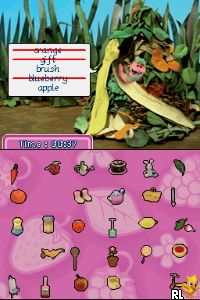
Fifi and the Flowertots (Europe) is a Nintendo DS game based on the animated series, mixing educational content with light puzzle and adventure elements. As a title from the Nintendo DS era, it provides a family-friendly experience that encourages interaction with cute characters and simple tasks. The game connects the beloved characters to a series of activities that are perfect for younger players or anyone looking for a casual gaming session in their browser.
Fifi and the Flowertots: Gameplay Overview
This Nintendo DS game features straightforward gameplay centered around guiding characters through various tasks, often involving collecting, sorting, or solving puzzles. It uses both screens to show the action and extra information like hints or inventory, with players mainly using the stylus to tap or drag items to move forward.
The main loop involves completing mini-games or challenges that are easy to pick up but still engaging. These activities help develop sequencing, pattern recognition, and basic problem-solving skills. The pace is gentle, with each task designed to keep players entertained without feeling overwhelming or complicated. It encourages exploring the game environment and rewards curiosity and attention to detail.
Modes, Levels and Progression
The game features a series of levels that gradually become more challenging and complex, giving a natural sense of progression. Each stage introduces new tasks or variations of familiar activities, keeping things fresh and encouraging players to improve their skills. As players finish levels, they unlock new mini-games or access different areas, adding to replay value.
The variety in content is maintained through different themes and settings, reflecting the cheerful aesthetic of the series. The game doesn’t have multiple modes but focuses on a structured level progression, making it suitable for both short play sessions and longer, focused gameplay. Players can revisit levels to improve scores or simply enjoy the characters and activities again.
Winning Strategies
Try to understand the pattern or goal of each mini-game before rushing to complete it. Taking a moment to observe can help save time and avoid mistakes.
- Use the stylus carefully to manipulate objects, especially in tasks that require fine control.
- Pay attention to visual cues and hints during activities to reduce retries.
- Repetition helps memorize sequences or object locations, speeding up completion.
- Take your time and approach each level calmly, especially on tougher challenges.
- Explore the areas thoroughly to find hidden items or shortcuts that can make progress easier.
Common Questions About Fifi and the Flowertots
How does the difficulty change as I play?
The game begins with simple tasks suitable for all ages and gradually introduces more complex puzzles and multi-step activities. The difficulty curve is gentle, making it accessible for younger players but still engaging for older ones.
Are there different modes or just one series of levels?
The game mainly follows a linear path through levels and activities. It doesn’t have multiple modes but offers enough variety within its levels to keep players interested over multiple sessions.
How much replay value is there?
You can revisit levels to improve scores or enjoy familiar activities again. Unlocking new mini-games and trying different approaches also adds motivation for repeated play.
Fifi and the Flowertots offers a gentle, charming experience tied to its animated series, making it suitable for casual players and fans of the characters alike. Its simple gameplay and delightful presentation mean you can enjoy it repeatedly, whether in short bursts or longer sessions in your browser.
Related games: you can also try Deal or No Deal (USA) and Eindeloos Mahjong (Netherlands) (En,Nl), or browse all other games in the Nintendo DS category.
How to Play Fifi and the Flowertots (Europe)?
Guide characters through simple puzzles and mini-games by tapping and dragging with the keyboard, completing tasks to unlock new areas and activities. Focus on pattern recognition and careful observation to progress smoothly.
Game Controls
Arrow keys control movement; keyboard keys simulate the stylus for tapping and dragging.
You may be interested in:
-
 Nintendo DS
♥ 1
Casper’s Scare School – Classroom Capers (USA)
Nintendo DS
♥ 1
Casper’s Scare School – Classroom Capers (USA) -
 Nintendo DS
♥ 1
Zunou Nouryoku Koujou Machine – Touch de Zunoo DS (Japan)
Nintendo DS
♥ 1
Zunou Nouryoku Koujou Machine – Touch de Zunoo DS (Japan) -
 Nintendo DS
♥ 1
Zunou ni Asekaku Game Series! Vol. 1 – Cool 104 Joker & Setline (Japan)
Nintendo DS
♥ 1
Zunou ni Asekaku Game Series! Vol. 1 – Cool 104 Joker & Setline (Japan) -
 Nintendo DS
♥ 9
Zuma’s Revenge (USA)
Nintendo DS
♥ 9
Zuma’s Revenge (USA) -
 Nintendo DS
♥ 1
Zubo (USA) (En,Fr,Es)
Nintendo DS
♥ 1
Zubo (USA) (En,Fr,Es) -
 Nintendo DS
♥ 1
Zubo (Europe) (En,Fr,De,Es,It,Nl,Sv)
Nintendo DS
♥ 1
Zubo (Europe) (En,Fr,De,Es,It,Nl,Sv) -
 Nintendo DS
♥ 1
Zorro – Quest for Justice (USA) (En,Fr,De,Es,It)
Nintendo DS
♥ 1
Zorro – Quest for Justice (USA) (En,Fr,De,Es,It) -
 Nintendo DS
♥ 1
Zorro – Quest for Justice (Europe) (En,Fr,De,Es,It)
Nintendo DS
♥ 1
Zorro – Quest for Justice (Europe) (En,Fr,De,Es,It)
Comments (0)
No comments yet. Be the first to comment!