Gakken DS – Shin TOEIC Test Kanzen Kouryaku (Japan)
0 1 0
Gakken DS – Shin TOEIC Test Kanzen Kouryaku (Japan) is a classic Nintendo DS educational game designed to help players improve their TOEIC test skills. If you’re studying for the exam or just looking to boost your English skills, this game provides structured practice in a handheld format you might find familiar. It appeals to learners who prefer self-paced study with interactive exercises, all available free through the emulator on this site.
Getting Into Gakken DS – Shin TOEIC Test Kanzen Kouryaku
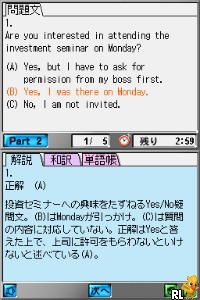
The main gameplay involves answering various TOEIC-style questions across sections like listening, reading, and vocabulary. You can choose a practice mode or a test simulation and work through questions at your own speed. The questions are presented simply, mimicking real TOEIC conditions, which helps you develop test-taking strategies and manage your time well.
During a session, you pick a specific section or go for a full practice test. The interface shows questions with multiple-choice answers, and you get immediate feedback on your responses. Your progress is tracked, so you can spot weak areas and review answers later. The game’s design encourages regular practice, making it useful for daily study or focused review sessions.
Standout Features
This Nintendo DS classic features clear visuals that keep the focus on the questions rather than distracting graphics. Its interface is straightforward, so new players can easily navigate different modes and question types without confusion. Progress is shown through scores and summaries, motivating you to improve with each attempt.
The variety of questions and difficulty levels makes replaying engaging, adapting to your growing skills. The timed exercises help you simulate real exam conditions, and since it covers multiple sections of the TOEIC, you can tailor your practice to your needs—whether you want to improve listening or reading skills. Being able to review answers and track performance over time makes it a helpful tool for ongoing progress.
Strategy and Tips
Focus on areas where you need improvement and review mistakes regularly. Timed practice sessions can help you get used to exam pressure. Don’t rush through questions—taking your time to understand each one can boost your accuracy. Completing full practice tests from time to time gives a sense of your overall readiness. Use the review feature to analyze errors and learn from them. Consistent practice beats sporadic cramming.
- Start with easier questions to build confidence before trying harder ones.
- Use the review function to revisit questions you got wrong and understand why.
- Set a timer to simulate real exam conditions and improve your time management.
- Learn vocabulary and idioms that often show up on the TOEIC.
- Balance your practice between listening and reading for a complete prep.
Quick Questions
Question?
How do I get started with Gakken DS – Shin TOEIC Test Kanzen Kouryaku on this site?
Once the emulator loads, just select the game and it will start in your browser—no downloads needed.
Question?
What’s a common mistake beginners make with this game?
Many try to answer too many questions quickly instead of focusing on understanding their mistakes. Take your time and review incorrect answers carefully.
Question?
Can I use Gakken DS – Shin TOEIC Test Kanzen Kouryaku on mobile or touch devices?
Yes, since it runs in your browser, it works well on touchscreen devices, making it easy to practice on the go without extra apps or downloads.
Gakken DS – Shin TOEIC Test Kanzen Kouryaku offers a straightforward way to prepare for the TOEIC, combining familiar handheld gameplay with useful test practice. Its simple design and focus on core skills make it a helpful resource for anyone aiming to improve their English for the exam.
Related games: you can also try Fort Boyard – Le Jeu (France) (Rev 1) and Bella Sara (USA) (En,Fr,De,Es,It), or browse all other games in the Nintendo DS category.
How to Play Gakken DS – Shin TOEIC Test Kanzen Kouryaku (Japan)?
Answer TOEIC-style questions by selecting the correct options across listening, reading, and vocabulary sections. Practice at your own pace, review mistakes, and track your progress to improve your skills.
Game Controls
Arrow keys navigate; Enter confirms selections; other keys handle menu and mode changes.
You may be interested in:
-
 Nintendo DS
♥ 1
Casper’s Scare School – Classroom Capers (USA)
Nintendo DS
♥ 1
Casper’s Scare School – Classroom Capers (USA) -
 Nintendo DS
♥ 1
Zunou Nouryoku Koujou Machine – Touch de Zunoo DS (Japan)
Nintendo DS
♥ 1
Zunou Nouryoku Koujou Machine – Touch de Zunoo DS (Japan) -
 Nintendo DS
♥ 1
Zunou ni Asekaku Game Series! Vol. 1 – Cool 104 Joker & Setline (Japan)
Nintendo DS
♥ 1
Zunou ni Asekaku Game Series! Vol. 1 – Cool 104 Joker & Setline (Japan) -
 Nintendo DS
♥ 9
Zuma’s Revenge (USA)
Nintendo DS
♥ 9
Zuma’s Revenge (USA) -
 Nintendo DS
♥ 1
Zubo (USA) (En,Fr,Es)
Nintendo DS
♥ 1
Zubo (USA) (En,Fr,Es) -
 Nintendo DS
♥ 1
Zubo (Europe) (En,Fr,De,Es,It,Nl,Sv)
Nintendo DS
♥ 1
Zubo (Europe) (En,Fr,De,Es,It,Nl,Sv) -
 Nintendo DS
♥ 1
Zorro – Quest for Justice (USA) (En,Fr,De,Es,It)
Nintendo DS
♥ 1
Zorro – Quest for Justice (USA) (En,Fr,De,Es,It) -
 Nintendo DS
♥ 1
Zorro – Quest for Justice (Europe) (En,Fr,De,Es,It)
Nintendo DS
♥ 1
Zorro – Quest for Justice (Europe) (En,Fr,De,Es,It)
Comments (0)
No comments yet. Be the first to comment!