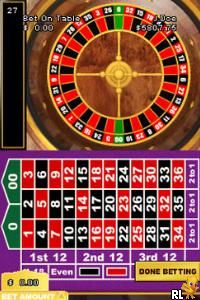
Golden Nugget Casino DS (Europe) (En,Fr,De)
0 1 0
Golden Nugget Casino DS (Europe) (En, Fr, De) is a classic Nintendo DS game that captures the feel of a real casino floor within the handheld’s dual-screen design. Its vintage look and simple gameplay evoke the atmosphere of traditional gambling venues, all tailored for portable play. Released in Europe with multiple language options, it provides an accessible way to enjoy casino-style gaming without any real-money risks.
Step Into the World of Golden Nugget Casino DS
The visuals stick to a clean, somewhat minimalist style, with bright card tables, roulette wheels, and slot machines that resemble those found in actual casinos. The soundtrack features ambient sounds like chips clicking, roulette wheels spinning, and lively chatter, which help create an authentic casino vibe. The dual screens keep things organized: one shows the game table or slot machine, while the other displays game info, stats, or betting options, making everything clear and easy to follow. This setup feels familiar yet simple, perfect for players who enjoy the quiet thrill of gambling simulations.
The interface is intuitive, with touch controls and button inputs that make moving around straightforward. Its art and sound choices focus on clarity and ease of play, avoiding unnecessary clutter. Fans of classic Nintendo DS titles might find this environment nostalgic yet practical for testing luck and strategy, all accessible without downloads or installations.
How the Gameplay Hooks You
Golden Nugget Casino DS lets you play various casino games like poker, blackjack, roulette, and slots. The main idea is placing bets, making decisions, and seeing the results unfold in real time. The pacing is steady, with each round giving immediate feedback, so it works well for short gaming sessions or longer ones. The mechanics are simple enough to jump into quickly, but there’s enough depth for strategic choices if you want to get more involved.
Progress isn’t about story or levels but about managing your virtual bankroll and trying different games. The straightforward gameplay encourages repeated play, whether you’re aiming to beat the house or maximize your winnings. Its relaxed rhythm allows players to enjoy each move without feeling overwhelmed, making it a good choice for casual gaming on the move.
Pro Tips for Golden Nugget Casino DS
Start with small bets to manage your virtual bankroll and prolong your play.
Check the odds and house edge for each game to make smarter choices.
Use the pause feature to think through your next move in games like poker or blackjack.
Try different betting strategies to see what fits your style—luck can be unpredictable.
Watch your bankroll to prevent sudden losses—manage your risks carefully.
Try out various games to find which ones you enjoy or do best at.
Frequently Asked Questions
Can I play Golden Nugget Casino DS in short gaming sessions?
Yes, it’s designed to be easy to start and stop, making it great for quick play.
Does the game get repetitive after a while?
While the core gameplay stays the same, the variety of casino games keeps things fresh, especially if you like testing your luck across different types.
Is Golden Nugget Casino DS accessible on mobile devices or just on this browser?
Since it runs directly in your browser, you can play on any device with a compatible browser, including tablets and smartphones, without needing to download anything.
Playing Golden Nugget Casino DS here offers a nostalgic, straightforward gambling simulation. Its simple design and authentic feel make it a good pick for players looking for casual fun or quick practice at casino games.
Related games: you can also try Cooking Mama (Korea) and Best of Tests DS (Europe) (En,Fr,De,Es,It,Pt), or browse all other games in the Nintendo DS category.
How to Play Golden Nugget Casino DS (Europe) (En,Fr,De)?
Place bets on different casino games, make decisions, and try to increase your virtual winnings while managing your bankroll. The game ends when you choose to stop or run out of funds.
Game Controls
Arrow keys for navigation; Enter to select and confirm actions.
You may be interested in:
-
 Nintendo DS
♥ 1
Casper’s Scare School – Classroom Capers (USA)
Nintendo DS
♥ 1
Casper’s Scare School – Classroom Capers (USA) -
 Nintendo DS
♥ 1
Zunou Nouryoku Koujou Machine – Touch de Zunoo DS (Japan)
Nintendo DS
♥ 1
Zunou Nouryoku Koujou Machine – Touch de Zunoo DS (Japan) -
 Nintendo DS
♥ 1
Zunou ni Asekaku Game Series! Vol. 1 – Cool 104 Joker & Setline (Japan)
Nintendo DS
♥ 1
Zunou ni Asekaku Game Series! Vol. 1 – Cool 104 Joker & Setline (Japan) -
 Nintendo DS
♥ 9
Zuma’s Revenge (USA)
Nintendo DS
♥ 9
Zuma’s Revenge (USA) -
 Nintendo DS
♥ 1
Zubo (USA) (En,Fr,Es)
Nintendo DS
♥ 1
Zubo (USA) (En,Fr,Es) -
 Nintendo DS
♥ 1
Zubo (Europe) (En,Fr,De,Es,It,Nl,Sv)
Nintendo DS
♥ 1
Zubo (Europe) (En,Fr,De,Es,It,Nl,Sv) -
 Nintendo DS
♥ 1
Zorro – Quest for Justice (USA) (En,Fr,De,Es,It)
Nintendo DS
♥ 1
Zorro – Quest for Justice (USA) (En,Fr,De,Es,It) -
 Nintendo DS
♥ 1
Zorro – Quest for Justice (Europe) (En,Fr,De,Es,It)
Nintendo DS
♥ 1
Zorro – Quest for Justice (Europe) (En,Fr,De,Es,It)
Comments (0)
No comments yet. Be the first to comment!