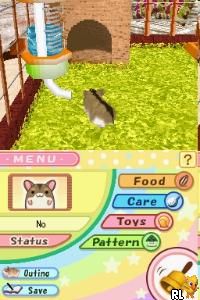
Hamsterz Life (Europe)
0 1 0
Hamsterz Life (Europe) is a charming Nintendo DS game that puts you in charge of caring for cute hamsters. As a classic from the Nintendo DS era, it appeals to players who enjoy nurturing, management, and casual gameplay. If you like simple controls and a lighthearted look, this game offers a relaxing experience you can enjoy right in your browser.
Getting Into Hamsterz Life
The main idea of Hamsterz Life is taking care of a hamster you can customize and watch grow. You start by choosing how your hamster looks and its personality, then move on to daily tasks like feeding, cleaning, playing, and decorating its space. The game is built around small chores that keep your hamster happy and healthy, creating a routine you can follow at your own pace.
Play sessions usually involve checking on your hamster to do these activities. There are no tricky mechanics or levels—just a simple simulation that encourages routine and observation. You can explore different areas like the living space or garden to find new items or activities that add variety. The game doesn’t pressure you with strict time limits, so you can pick it up for a few minutes or longer whenever you feel like it.
Standout Features
Visually, Hamsterz Life has a cute, cartoonish style that captures the playful side of pet care without too many details. The simple graphics and cheerful animations create a warm, inviting feeling suitable for all ages. As you play, you unlock new accessories and decoration options, letting you personalize your hamster’s space and make it your own.
One of the game’s strengths is its replay value. Since there are no fixed goals or timers, you can try different hamster styles, habitats, and accessories. It promotes a relaxed, ongoing relationship with your virtual pet, so each session is a chance to check in and see how your hamster is doing. This open-ended style means you can return whenever you want a low-pressure, adorable distraction.
Strategy and Tips
To get the most out of Hamsterz Life, focus on balancing your hamster’s needs and having fun with the customization options. Keep your hamster fed and clean to keep it happy, and try out different decorations to see what makes it comfortable.
- Check on your hamster daily to keep it happy and avoid neglecting its needs.
- Try different accessories and habitat setups to see what your hamster likes best.
- Visit the garden area to find new items and unlock more customization choices.
- Take your time—this game is meant for casual play, so enjoy each feature at your own pace.
- If possible, save your progress often so you can experiment with different styles without losing your work.
Quick Questions
How do I start caring for my hamster in the game?
Start by choosing your hamster’s look, then check its needs regularly—feeding and cleaning are simple tasks you can do from the main menu.
What’s a common mistake new players make?
Many beginners forget to perform daily care tasks consistently, which can make their hamster unhappy or cause them to miss out on customization options.
Can I play Hamsterz Life on mobile or touch devices?
This version runs right in your browser, so it works on mobile devices with touch controls. It’s perfect for quick, casual play without needing to download anything.
Hamsterz Life offers a cozy, straightforward pet-raising experience that’s great for quick breaks or longer relaxing sessions. Its focus on routine, customization, and cheerful visuals makes it a nice choice for fans of virtual pet sims. You can enjoy this classic game without any trouble, right in your browser, making it easy to add to your collection of nostalgic Nintendo DS titles.
Related games: you can also try Alvin and the Chipmunks (USA) (En,Fr) and Front Mission 1st (Japan), or browse all other games in the Nintendo DS category.
How to Play Hamsterz Life (Europe)?
Take care of your hamster by feeding, cleaning, and decorating its space. Check on it regularly to keep it happy and customize its environment for fun and relaxation.
Game Controls
Arrow keys or WASD move; Enter or space select and interact.
You may be interested in:
-
 Nintendo DS
♥ 1
Casper’s Scare School – Classroom Capers (USA)
Nintendo DS
♥ 1
Casper’s Scare School – Classroom Capers (USA) -
 Nintendo DS
♥ 1
Zunou Nouryoku Koujou Machine – Touch de Zunoo DS (Japan)
Nintendo DS
♥ 1
Zunou Nouryoku Koujou Machine – Touch de Zunoo DS (Japan) -
 Nintendo DS
♥ 1
Zunou ni Asekaku Game Series! Vol. 1 – Cool 104 Joker & Setline (Japan)
Nintendo DS
♥ 1
Zunou ni Asekaku Game Series! Vol. 1 – Cool 104 Joker & Setline (Japan) -
 Nintendo DS
♥ 9
Zuma’s Revenge (USA)
Nintendo DS
♥ 9
Zuma’s Revenge (USA) -
 Nintendo DS
♥ 1
Zubo (USA) (En,Fr,Es)
Nintendo DS
♥ 1
Zubo (USA) (En,Fr,Es) -
 Nintendo DS
♥ 1
Zubo (Europe) (En,Fr,De,Es,It,Nl,Sv)
Nintendo DS
♥ 1
Zubo (Europe) (En,Fr,De,Es,It,Nl,Sv) -
 Nintendo DS
♥ 1
Zorro – Quest for Justice (USA) (En,Fr,De,Es,It)
Nintendo DS
♥ 1
Zorro – Quest for Justice (USA) (En,Fr,De,Es,It) -
 Nintendo DS
♥ 1
Zorro – Quest for Justice (Europe) (En,Fr,De,Es,It)
Nintendo DS
♥ 1
Zorro – Quest for Justice (Europe) (En,Fr,De,Es,It)
Comments (0)
No comments yet. Be the first to comment!