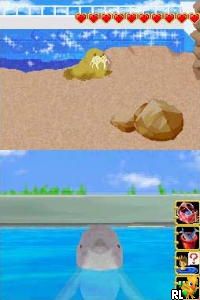
I Love Dolphin (Japan)
0 1 0
I Love Dolphin (Japan) is a charming Nintendo DS classic that puts players in the role of a dolphin trainer, caring for and guiding dolphins through various activities. Its simple controls and straightforward gameplay make it accessible for all ages, especially for those looking for a relaxing, casual experience. This game is easy to pick up and offers a gentle introduction to simulation-style gameplay focused on animal care and interaction.
What Is I Love Dolphin?
This game belongs to the simulation genre, where the main goal is to care for and interact with dolphins. Players can feed, train, and play with their marine friends, experiencing a variety of mini-games and activities that mimic real dolphin behaviors. The core experience involves building a bond with the dolphins while completing tasks that keep the virtual marine life happy and healthy.
Made for the Nintendo DS, it makes good use of the handheld’s touch screen and stylus, allowing players to interact naturally with the dolphins. The gameplay revolves around simple routines and mini-games, which can be completed in short sessions. It doesn’t require complex strategies or high difficulty, making it suitable for casual players and younger audiences interested in marine life or animal care simulations.
What Keeps You Coming Back
The game’s relaxing pace and gentle progression encourage repeated play sessions. Players often return to see how their dolphins respond to different activities or to try out new training routines. There’s also a collection aspect—unlocking new dolphins, accessories, and mini-games—which adds to the replay value.
The visual style and soothing sound design create a calming environment. Since it’s a straightforward simulation, players can enjoy short, stress-free play sessions without feeling overwhelmed. The variety of mini-games keeps things fresh, so no two sessions feel exactly the same.
Handy Tips
Start by familiarizing yourself with the touchscreen controls, as they are key to interacting with the dolphins. Keep an eye on the dolphins’ mood indicators to know when they’re happy or need attention.
- Try different training activities to see what each dolphin responds to best, which can improve your interactions.
- Use the mini-games to earn rewards and unlock new content, but remember to care for your dolphins regularly.
- Pay attention to environmental and sound cues—these often signal when a dolphin wants to play or needs attention.
- Manage your playtime sessions to prevent fatigue for your dolphins, helping them stay healthy and happy.
Player FAQ
Is I Love Dolphin easy for beginners or young players?
Yes, it’s designed to be accessible for all ages, including children. Its simple mechanics and relaxed pace make it easy for newcomers to enjoy.
Can I play I Love Dolphin offline or without an internet connection?
Absolutely. The game runs entirely on your device through the emulator, with no internet needed once it’s loaded. It’s perfect for casual play without online dependencies.
Is I Love Dolphin suitable for players with visual or motor impairments?
This game relies heavily on touchscreen interaction, which can work well for some but might be challenging for others. It’s generally suitable for players who can comfortably use the stylus or touch controls, but it doesn’t have many accessibility options.
Playing I Love Dolphin offers a peaceful experience rooted in caring for virtual dolphins. Its straightforward gameplay and calming atmosphere make it a good choice for those looking for a gentle, engaging simulation. This Nintendo DS classic remains a charming option for anyone who enjoys animal-themed games and relaxed play sessions.
Related games: you can also try Animal Planet – Vet Life (USA) and Boku to Sim no Machi – Agent – Nazo no Kaitou kara Hihou o Mamore Daisakusen! (Japan) (En,Ja), or browse all other games in the Nintendo DS category.
How to Play I Love Dolphin (Japan)?
Care for and train dolphins by feeding, playing, and completing mini-games to build bonds and unlock new content, all through simple touch and routine tasks.
Game Controls
Arrow keys and Enter control navigation and actions; mouse or touch screen used for interaction.
You may be interested in:
-
 Nintendo DS
♥ 1
Casper’s Scare School – Classroom Capers (USA)
Nintendo DS
♥ 1
Casper’s Scare School – Classroom Capers (USA) -
 Nintendo DS
♥ 1
Zunou Nouryoku Koujou Machine – Touch de Zunoo DS (Japan)
Nintendo DS
♥ 1
Zunou Nouryoku Koujou Machine – Touch de Zunoo DS (Japan) -
 Nintendo DS
♥ 1
Zunou ni Asekaku Game Series! Vol. 1 – Cool 104 Joker & Setline (Japan)
Nintendo DS
♥ 1
Zunou ni Asekaku Game Series! Vol. 1 – Cool 104 Joker & Setline (Japan) -
 Nintendo DS
♥ 9
Zuma’s Revenge (USA)
Nintendo DS
♥ 9
Zuma’s Revenge (USA) -
 Nintendo DS
♥ 1
Zubo (USA) (En,Fr,Es)
Nintendo DS
♥ 1
Zubo (USA) (En,Fr,Es) -
 Nintendo DS
♥ 1
Zubo (Europe) (En,Fr,De,Es,It,Nl,Sv)
Nintendo DS
♥ 1
Zubo (Europe) (En,Fr,De,Es,It,Nl,Sv) -
 Nintendo DS
♥ 1
Zorro – Quest for Justice (USA) (En,Fr,De,Es,It)
Nintendo DS
♥ 1
Zorro – Quest for Justice (USA) (En,Fr,De,Es,It) -
 Nintendo DS
♥ 1
Zorro – Quest for Justice (Europe) (En,Fr,De,Es,It)
Nintendo DS
♥ 1
Zorro – Quest for Justice (Europe) (En,Fr,De,Es,It)
Comments (0)
No comments yet. Be the first to comment!