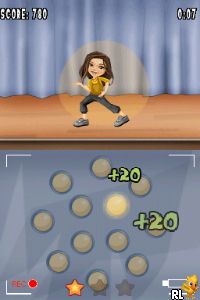
iCarly (USA) (En,Fr) (NDSi Enhanced)
0 1 0
iCarly (USA) (En,Fr) (NDSi Enhanced) is a Nintendo DS game inspired by the popular teen sitcom. It’s designed for fans of the show as well as casual players, offering a lighthearted look at the characters and humor. Since it runs directly in your browser, you can enjoy this nostalgic title without downloading or installing anything—perfect for quick entertainment or a trip down memory lane.
Getting Into iCarly (USA)
The game focuses on managing and producing episodes for the iCarly web show. You take on the role of a character from the series, with gameplay centered around mini-games and tasks that mimic behind-the-scenes work of making online content. You’ll choose scripts, film scenes, and edit clips, all done through simple touch controls suited for the Nintendo DS platform.
The game progresses through different levels, each representing a new episode or challenge. Completing tasks moves the story forward and unlocks new content, like additional characters or mini-games. Most sessions last around 10-15 minutes, so it’s easy to pick up and pause whenever needed. It’s designed to be casual and accessible, fitting well with the DS’s audience of younger or more relaxed players.
Standout Features
The visuals capture the cartoonish charm of the TV series with bright, colorful sprites and simple animations. This keeps the experience light and easy to follow, especially on the DS’s dual screens. The game encourages replaying by unlocking new mini-games, outfits, and dialogue options as you complete challenges, adding to its replay value.
You can revisit completed episodes or try different strategies to improve your scores and unlock more content. The straightforward design makes it easy to jump in at any time, and the variety of mini-games helps keep things interesting without feeling overwhelming or overly complicated.
Strategy and Tips
If you’re new to the game, try to master the mini-games early on to improve your success rate. Completing tasks efficiently will help you unlock more content faster. Pay attention to dialogue and hints during tasks to better understand what each mini-game requires.
- Focus on accuracy rather than rushing through mini-games to unlock rewards.
- Try different choices during episode scripting to see how they change the outcome.
- Replay earlier episodes to gather all rewards and unlockables.
- Keep an eye on the timer during tasks to avoid losing retries.
- If available, use the pause button to plan your next move or take a break.
Quick Questions
How do I start playing iCarly (USA) on this site?
The game loads instantly in your browser, so you can begin playing right away without any downloads or setup.
What is a common mistake for beginners?
Trying to rush through mini-games without paying attention to instructions often leads to failure. Focus on accuracy first.
Can I play iCarly (USA) on a mobile device or touchscreen?
Yes, the controls are designed for touch, and it works well on touchscreen devices through the browser emulator.
iCarly (USA) offers a simple, enjoyable experience for fans of the show or anyone looking for casual gameplay in their browser. Its easy mechanics and nostalgic feel make it a good choice for quick, light entertainment without any hassle.
Related games: you can also try Easy Piano (USA) (En,Fr,Es) and Dragon Ball Kai – Saiyajin Raishuu (Japan), or browse all other games in the Nintendo DS category.
How to Play iCarly (USA) (En,Fr) (NDSi Enhanced)?
Manage and produce episodes for the iCarly web show by completing mini-games, choosing scripts, filming scenes, and editing clips to unlock new content and progress through different challenges.
Game Controls
Arrow keys act as the D-pad; Enter is Start; other keys handle action buttons.
You may be interested in:
-
 Nintendo DS
♥ 1
Casper’s Scare School – Classroom Capers (USA)
Nintendo DS
♥ 1
Casper’s Scare School – Classroom Capers (USA) -
 Nintendo DS
♥ 1
Zunou Nouryoku Koujou Machine – Touch de Zunoo DS (Japan)
Nintendo DS
♥ 1
Zunou Nouryoku Koujou Machine – Touch de Zunoo DS (Japan) -
 Nintendo DS
♥ 1
Zunou ni Asekaku Game Series! Vol. 1 – Cool 104 Joker & Setline (Japan)
Nintendo DS
♥ 1
Zunou ni Asekaku Game Series! Vol. 1 – Cool 104 Joker & Setline (Japan) -
 Nintendo DS
♥ 9
Zuma’s Revenge (USA)
Nintendo DS
♥ 9
Zuma’s Revenge (USA) -
 Nintendo DS
♥ 1
Zubo (USA) (En,Fr,Es)
Nintendo DS
♥ 1
Zubo (USA) (En,Fr,Es) -
 Nintendo DS
♥ 1
Zubo (Europe) (En,Fr,De,Es,It,Nl,Sv)
Nintendo DS
♥ 1
Zubo (Europe) (En,Fr,De,Es,It,Nl,Sv) -
 Nintendo DS
♥ 1
Zorro – Quest for Justice (USA) (En,Fr,De,Es,It)
Nintendo DS
♥ 1
Zorro – Quest for Justice (USA) (En,Fr,De,Es,It) -
 Nintendo DS
♥ 1
Zorro – Quest for Justice (Europe) (En,Fr,De,Es,It)
Nintendo DS
♥ 1
Zorro – Quest for Justice (Europe) (En,Fr,De,Es,It)
Comments (0)
No comments yet. Be the first to comment!