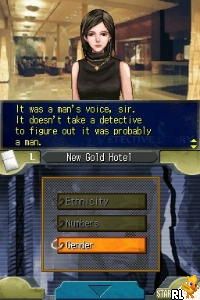
Jake Hunter Detective Story – Memories of the Past (USA)
0 1 0
Jake Hunter Detective Story – Memories of the Past (USA) is a Nintendo DS game that offers a straightforward mystery experience within a nostalgic handheld format. It’s simple to start playing, making it accessible for newcomers to visual novels or detective tales. The interface is uncomplicated, and the engaging story invites casual sessions. Since it’s playable directly in your browser, there’s no need for downloads—you can jump right in.
What Is Jake Hunter Detective Story – Memories of the Past?
This title falls into the visual novel and adventure categories, emphasizing story choices and puzzle-solving. You take on the role of a detective trying to piece together a series of mysterious events, where your decisions shape how the story unfolds. Gameplay mainly involves reading dialogue, inspecting clues, and making choices that drive your investigation.
Designed for the Nintendo DS, the game uses stylus controls and straightforward navigation suited for touch screens. Its main focus is gathering clues, questioning characters, and navigating branching storylines, so each playthrough can be different depending on your choices. Its pacing suits players who enjoy story-rich gameplay with a moderate challenge.
What Keeps You Coming Back
A big part of its appeal is the story that encourages multiple plays. Different choices can lead to alternative endings, revealing new details or perspectives. The branching paths keep the mystery fresh and invite you to explore different options, which adds to replay value.
The detective mechanics—collecting clues and making deductions—add some depth beyond just reading. Character interactions are well-paced, with dialogue that offers hints and helps develop personalities. This blend of story and puzzle-solving appeals to those who like piecing together a mystery step-by-step, encouraging revisits to see what might change.
Handy Tips
If you’re new to Jake Hunter Detective Story – Memories of the Past, here are some tips to help you get started:
- Pay close attention to dialogue; it often contains clues for your investigation.
- Use the clues you find to narrow down suspects and avoid false leads.
- Make sure to save your progress regularly so you don’t lose important decisions or discoveries.
- Try different conversation options to unlock alternative storylines.
- Take your time examining scenes carefully; missing details can matter later.
- If you get stuck, revisit previous choices or clues to see if you overlooked something.
Player FAQ
Is Jake Hunter Detective Story – Memories of the Past beginner-friendly?
Yes. Its simple interface and mechanics make it easy for new players, especially those unfamiliar with visual novels or detective stories.
Is this game suitable for younger players?
Since it’s mainly text-based with no mature themes, most ages can enjoy it. Younger players who like story-driven puzzles should find it accessible, though some reading might be a bit challenging for very young children.
Do I need an internet connection to play?
No. Because it runs directly in your browser, there are no downloads or connections needed after loading.
Rooted in its Nintendo DS origins, Jake Hunter Detective Story – Memories of the Past offers a compelling mystery experience that’s easy to pick up. Its branching stories and detective mechanics keep things engaging, making it a good choice for anyone looking for a story-driven puzzle to revisit whenever the mood strikes.
Related games: you can also try Guitar Hero – On Tour – Decades (Europe) and Finde die Unterschiede – Foto Frenzy (Europe) (En,Fr,De,Es,It), or browse all other games in the Nintendo DS category.
How to Play Jake Hunter Detective Story – Memories of the Past (USA)?
Read dialogue, find clues, and choose options to solve the mystery and uncover different endings. Explore scenes carefully and make decisions to progress the story.
Game Controls
Arrow keys for navigation; Enter to select; action keys mapped to on-screen buttons.
You may be interested in:
-
 Nintendo DS
♥ 1
Casper’s Scare School – Classroom Capers (USA)
Nintendo DS
♥ 1
Casper’s Scare School – Classroom Capers (USA) -
 Nintendo DS
♥ 1
Zunou Nouryoku Koujou Machine – Touch de Zunoo DS (Japan)
Nintendo DS
♥ 1
Zunou Nouryoku Koujou Machine – Touch de Zunoo DS (Japan) -
 Nintendo DS
♥ 1
Zunou ni Asekaku Game Series! Vol. 1 – Cool 104 Joker & Setline (Japan)
Nintendo DS
♥ 1
Zunou ni Asekaku Game Series! Vol. 1 – Cool 104 Joker & Setline (Japan) -
 Nintendo DS
♥ 9
Zuma’s Revenge (USA)
Nintendo DS
♥ 9
Zuma’s Revenge (USA) -
 Nintendo DS
♥ 1
Zubo (USA) (En,Fr,Es)
Nintendo DS
♥ 1
Zubo (USA) (En,Fr,Es) -
 Nintendo DS
♥ 1
Zubo (Europe) (En,Fr,De,Es,It,Nl,Sv)
Nintendo DS
♥ 1
Zubo (Europe) (En,Fr,De,Es,It,Nl,Sv) -
 Nintendo DS
♥ 1
Zorro – Quest for Justice (USA) (En,Fr,De,Es,It)
Nintendo DS
♥ 1
Zorro – Quest for Justice (USA) (En,Fr,De,Es,It) -
 Nintendo DS
♥ 1
Zorro – Quest for Justice (Europe) (En,Fr,De,Es,It)
Nintendo DS
♥ 1
Zorro – Quest for Justice (Europe) (En,Fr,De,Es,It)
Comments (0)
No comments yet. Be the first to comment!