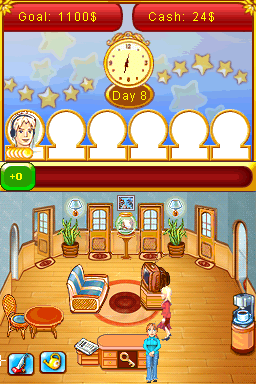
Jane’s Hotel (USA) (En,Fr,Es)
0 2 0
Jane’s Hotel (USA) (En,Fr,Es) is a classic Nintendo DS game that mixes time management with hotel simulation. Its simple gameplay and charming visuals make it an easy pick for players looking for a relaxing, casual experience rooted in the handheld console’s era. As a browser-based emulation, it gives a nostalgic taste of the DS’s touch controls and straightforward interface without needing downloads or installations.
Why Jane’s Hotel Is Worth Playing
This game stands out thanks to its clean, cartoonish graphics that bring to mind lighthearted hotel management. The visuals are minimal but effective, helping players focus on the main task of running a hotel by managing rooms, guests, and staff smoothly. The interface is intuitive, making it easy for newcomers to jump right into the game without a steep learning curve. Its relaxed pace encourages strategic thinking, rewarding careful attention to guest needs and resource management.
What keeps players coming back is the satisfaction of balancing multiple hotel tasks at once. The game offers a steady flow of challenges, with new guests, upgrades, and mini-goals appearing as you develop your hotel. The simple mechanics make it suitable for short play sessions, perfect for quick breaks or longer, laid-back gaming. It’s a light management sim that values patience and organization over frantic action, making it good for casual players and those nostalgic for the DS era’s straightforward games.
Tips to Get Ahead
To do well in Jane’s Hotel, prioritize guest satisfaction to earn tips and reputation points. Keep rooms clean and beds stocked to avoid complaints. Invest early in upgrades to speed up service and boost profits. Pay attention to guest preferences to assign suitable rooms and staff. Use your earnings wisely to expand and improve your hotel’s facilities. Find a good balance between quick fixes and long-term investments to steadily grow your hotel’s success.
- Complete guest requests quickly to increase tips and keep satisfaction high.
- Plan your room assignments based on guest preferences to reduce complaints.
- Upgrade your hotel facilities regularly to unlock new features and efficiencies.
- Manage staff shifts carefully to keep things running smoothly during busy times.
- Save your earnings for key expansions instead of unnecessary decorations early on.
- Don’t forget cleaning and maintenance; happy guests leave better reviews.
Things to Know Before You Start
Is Jane’s Hotel difficult for casual players?
Its difficulty level is gentle, focusing on steady management rather than high-pressure challenges, making it accessible for most players.
How long does a typical session last in Jane’s Hotel?
Sessions are usually short, around 15-30 minutes, which works well for players wanting quick, satisfying gameplay without a big time commitment.
Can I play Jane’s Hotel offline or on mobile devices?
This version runs directly in your browser, so it works on any device with internet access, though it’s optimized for desktop use. Playing on mobile might be less comfortable because of controls.
Getting into Jane’s Hotel means engaging with a charming, easy-to-pick-up hotel management game that rewards patience and strategic planning. Its accessible gameplay and relaxing vibe make it a nice choice for anyone interested in classic DS titles, now playable free in your browser. Jump in and see how well you can run your own hotel in this nostalgic simulation.
Related games: you can also try Bakugan – Battle Brawlers – Battle Trainer (Europe) (En,Fr,De,Es,It,Nl,Sv) and Emergency Room – Real Life Rescues (USA), or browse all other games in the Nintendo DS category.
How to Play Jane’s Hotel (USA) (En,Fr,Es)?
Manage your hotel by checking in guests, cleaning rooms, and upgrading facilities to keep guests happy and earn tips. Balance tasks to grow your hotel steadily while satisfying guest needs.
Game Controls
Arrow keys act as the D-pad; Enter is Start; on-screen mapped keys handle the action buttons.
You may be interested in:
-
 Nintendo DS
♥ 1
Casper’s Scare School – Classroom Capers (USA)
Nintendo DS
♥ 1
Casper’s Scare School – Classroom Capers (USA) -
 Nintendo DS
♥ 1
Zunou Nouryoku Koujou Machine – Touch de Zunoo DS (Japan)
Nintendo DS
♥ 1
Zunou Nouryoku Koujou Machine – Touch de Zunoo DS (Japan) -
 Nintendo DS
♥ 1
Zunou ni Asekaku Game Series! Vol. 1 – Cool 104 Joker & Setline (Japan)
Nintendo DS
♥ 1
Zunou ni Asekaku Game Series! Vol. 1 – Cool 104 Joker & Setline (Japan) -
 Nintendo DS
♥ 9
Zuma’s Revenge (USA)
Nintendo DS
♥ 9
Zuma’s Revenge (USA) -
 Nintendo DS
♥ 1
Zubo (USA) (En,Fr,Es)
Nintendo DS
♥ 1
Zubo (USA) (En,Fr,Es) -
 Nintendo DS
♥ 1
Zubo (Europe) (En,Fr,De,Es,It,Nl,Sv)
Nintendo DS
♥ 1
Zubo (Europe) (En,Fr,De,Es,It,Nl,Sv) -
 Nintendo DS
♥ 1
Zorro – Quest for Justice (USA) (En,Fr,De,Es,It)
Nintendo DS
♥ 1
Zorro – Quest for Justice (USA) (En,Fr,De,Es,It) -
 Nintendo DS
♥ 1
Zorro – Quest for Justice (Europe) (En,Fr,De,Es,It)
Nintendo DS
♥ 1
Zorro – Quest for Justice (Europe) (En,Fr,De,Es,It)
Comments (0)
No comments yet. Be the first to comment!