Kimi ni Todoke – Sodateru Omoi (Japan)
0 1 0
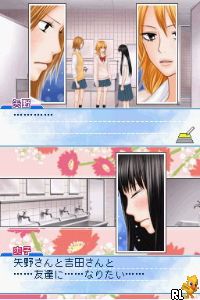
Kimi ni Todoke – Sodateru Omoi (Japan) is a classic Nintendo DS game that invites players into a story-focused experience. As a visual novel, it emphasizes storytelling, character interactions, and decision-making, making it popular among fans of romance and slice-of-life stories. Running on the Nintendo DS, this game brings back memories for those who enjoyed handheld gaming in the early 2000s, and it’s available directly in your browser, with no downloads required.
Getting Into Kimi ni Todoke – Sodateru Omoi
The game involves reading dialogue, making choices, and exploring different story paths based on your decisions. Each session usually includes engaging with characters through text scenes, where your responses influence how events develop. There are no complicated mechanics or action scenes; instead, the focus is on reading and selecting options that affect relationships and story outcomes.
Most gameplay sessions last around 20 to 30 minutes, so you can enjoy it in small bursts or longer sittings. You’ll move through static scene illustrations and dialogue boxes, choosing from prompts to guide the story. The pacing encourages a relaxed experience, prioritizing character development and story progression over challenges or skill-based gameplay.
Standout Features
Visually, Kimi ni Todoke – Sodateru Omoi features simple but charming 2D character sprites and static backgrounds that evoke a nostalgic DS look. The artwork supports the storytelling without distracting from the text, helping players focus on dialogue and character emotions. The game’s branching storylines mean you can play multiple times to see different endings and explore all story routes.
Replay value comes from its choices and multiple endings. Different decisions can lead to new scenes and character interactions, encouraging players to revisit and see different outcomes. The straightforward visual style combined with an engaging story makes each playthrough meaningful, especially for fans of visual novels and story-heavy games.
Strategy and Tips
If you’re new to this kind of game, start by reading dialogue carefully and thinking about your choices, as they can greatly influence the story. Take your time with character interactions.
- Save often if possible, so you can try different choices without losing progress.
- Pay attention to character cues; small hints can help you make better decisions later.
- Explore all dialogue options to unlock hidden scenes and get to know the characters better.
- Revisit story branches after finishing a route to see how different choices change the ending.
- Keep track of key decisions that lead to specific endings, so you can aim for certain storylines on repeat playthroughs.
Quick Questions
How do I get started with Kimi ni Todoke – Sodateru Omoi?
Just select the game and start reading the introductory scenes; it will guide you through the initial choices smoothly.
What is a common mistake for beginners?
Rushing through dialogue without paying attention to choices can cause you to miss out on story branches and character interactions.
Does it work well on mobile or touch devices?
Since it runs directly in your browser, it works nicely on touchscreens and portable devices, making it easy to play anywhere.
Kimi ni Todoke – Sodateru Omoi offers a heartfelt visual novel experience on the Nintendo DS platform that’s simple to access and engaging. Playing it online makes it easy to enjoy this story-rich game, especially for fans of narrative-driven gameplay and nostalgic handheld titles.
Related games: you can also try Digimon World Championship (USA) and American Girl – Julie Finds a Way (USA), or browse all other games in the Nintendo DS category.
How to Play Kimi ni Todoke – Sodateru Omoi (Japan)?
Read dialogue, choose responses to influence relationships and story outcomes, and explore different story paths through decisions. Play until you reach an ending, then try different choices for new scenes.
Game Controls
Arrow keys navigate; Enter confirms selections; other keys handle dialogue and choices.
You may be interested in:
-
 Nintendo DS
♥ 1
Casper’s Scare School – Classroom Capers (USA)
Nintendo DS
♥ 1
Casper’s Scare School – Classroom Capers (USA) -
 Nintendo DS
♥ 1
Zunou Nouryoku Koujou Machine – Touch de Zunoo DS (Japan)
Nintendo DS
♥ 1
Zunou Nouryoku Koujou Machine – Touch de Zunoo DS (Japan) -
 Nintendo DS
♥ 1
Zunou ni Asekaku Game Series! Vol. 1 – Cool 104 Joker & Setline (Japan)
Nintendo DS
♥ 1
Zunou ni Asekaku Game Series! Vol. 1 – Cool 104 Joker & Setline (Japan) -
 Nintendo DS
♥ 9
Zuma’s Revenge (USA)
Nintendo DS
♥ 9
Zuma’s Revenge (USA) -
 Nintendo DS
♥ 1
Zubo (USA) (En,Fr,Es)
Nintendo DS
♥ 1
Zubo (USA) (En,Fr,Es) -
 Nintendo DS
♥ 1
Zubo (Europe) (En,Fr,De,Es,It,Nl,Sv)
Nintendo DS
♥ 1
Zubo (Europe) (En,Fr,De,Es,It,Nl,Sv) -
 Nintendo DS
♥ 1
Zorro – Quest for Justice (USA) (En,Fr,De,Es,It)
Nintendo DS
♥ 1
Zorro – Quest for Justice (USA) (En,Fr,De,Es,It) -
 Nintendo DS
♥ 1
Zorro – Quest for Justice (Europe) (En,Fr,De,Es,It)
Nintendo DS
♥ 1
Zorro – Quest for Justice (Europe) (En,Fr,De,Es,It)
Comments (0)
No comments yet. Be the first to comment!