Korg DS-10 Synthesizer (USA)
0 1 0
The Korg DS-10 Synthesizer (USA) stands out among Nintendo DS titles because it lets you create electronic music using the console’s touch interface. It’s designed for anyone interested in making music or curious about synthesizers, turning your DS into a portable studio. Whether you’re experimenting with sounds, learning the basics of synthesis, or simply enjoying crafting tunes, it’s accessible even without prior experience.
Getting Into Korg DS-10 Synthesizer
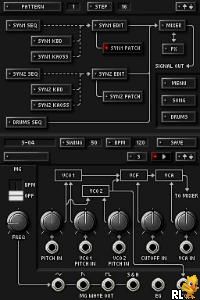
The main gameplay involves designing and tweaking sounds through easy-to-use interfaces. It offers several modes—like a sequencer, a mixer, and a live performance setup—giving you different ways to compose and modify music. Usually, you start by selecting waveforms, adjusting settings, and arranging sequences on a grid, which helps you understand how synthesizers create sounds.
Most players begin with the sequencer to make loops or melodies and then move to the mixer to balance levels and add effects. The game encourages experimentation, with real-time feedback when you adjust controls. It’s easy to get caught up in layering sounds or refining patterns, making each session feel like a creative adventure. While beginners will find it straightforward, the depth of sound design means more experienced users can keep exploring over time.
Standout Features
The visuals resemble a vintage synthesizer interface, with clear, colorful layouts that mimic real hardware. The game emphasizes hands-on interaction—dragging sliders, tapping buttons, and arranging notes—so even on a small screen, it feels tactile. This design helps make the mechanics of synthesis easier to understand and more engaging visually.
Progress isn’t based on levels or missions but on how comfortable you become with the tools. You can keep refining your sounds or try to recreate specific styles, which adds replay value. Since it runs directly in your browser, you can experiment whenever inspiration strikes, without needing additional software or hardware. It’s a straightforward and satisfying way to explore electronic music or just enjoy making sounds creatively.
Strategy and Tips
Start simple by experimenting with basic waveforms and adjustments before adding complex effects. Use the sequencer’s grid to create interesting rhythmic patterns.
- Save your favorite setups often so you don’t lose your progress after trying out new things.
- Balance your sounds early on with the mixer, so your tracks stay clear even as you add layers.
- Try out different effects and modulation options to add variety to your music.
- Listen to your tracks on different speakers or headphones to see how they sound across various playback methods.
- Keep notes or take screenshots of settings that sound good, so you can revisit them later for new projects.
Quick Questions
How do I get started if I’ve never used a synthesizer before?
The interface is designed with beginners in mind, offering guided menus and visual cues that help you understand how sound parameters work. Start with the preset sounds and tweak them little by little to see what each control does.
What is a common mistake for new players?
Many beginners try to do too much at once, overloading tracks with effects or complex sequences. Starting simple and building up gradually makes the process more manageable and enjoyable.
Can I play this on mobile or touch-only devices?
Since it runs right in your browser, it works on any device with a compatible browser and touch support. The interface is optimized for touch, so you can easily manipulate controls without needing extra hardware.
Korg DS-10 Synthesizer offers a focused way to explore electronic sound design on your Nintendo DS. Whether you’re just starting out or working on complete tracks, it provides real tools to spark your musical creativity directly through your browser.
Related games: you can also try Coraline (Europe) (En,Fr,De,Es,It) and Imagine – My Restaurant (Europe) (En,Fr,De,Es,It), or browse all other games in the Nintendo DS category.
How to Play Korg DS-10 Synthesizer (USA)?
Use the keyboard to select and tweak sounds, arrange sequences, and mix tracks to create your electronic music. Experiment with different settings and layers to craft unique tunes.
Game Controls
Arrow keys navigate menus; other keys control sound parameters, play, and record.
You may be interested in:
-
 Nintendo DS
♥ 1
Casper’s Scare School – Classroom Capers (USA)
Nintendo DS
♥ 1
Casper’s Scare School – Classroom Capers (USA) -
 Nintendo DS
♥ 1
Zunou Nouryoku Koujou Machine – Touch de Zunoo DS (Japan)
Nintendo DS
♥ 1
Zunou Nouryoku Koujou Machine – Touch de Zunoo DS (Japan) -
 Nintendo DS
♥ 1
Zunou ni Asekaku Game Series! Vol. 1 – Cool 104 Joker & Setline (Japan)
Nintendo DS
♥ 1
Zunou ni Asekaku Game Series! Vol. 1 – Cool 104 Joker & Setline (Japan) -
 Nintendo DS
♥ 9
Zuma’s Revenge (USA)
Nintendo DS
♥ 9
Zuma’s Revenge (USA) -
 Nintendo DS
♥ 1
Zubo (USA) (En,Fr,Es)
Nintendo DS
♥ 1
Zubo (USA) (En,Fr,Es) -
 Nintendo DS
♥ 1
Zubo (Europe) (En,Fr,De,Es,It,Nl,Sv)
Nintendo DS
♥ 1
Zubo (Europe) (En,Fr,De,Es,It,Nl,Sv) -
 Nintendo DS
♥ 1
Zorro – Quest for Justice (USA) (En,Fr,De,Es,It)
Nintendo DS
♥ 1
Zorro – Quest for Justice (USA) (En,Fr,De,Es,It) -
 Nintendo DS
♥ 1
Zorro – Quest for Justice (Europe) (En,Fr,De,Es,It)
Nintendo DS
♥ 1
Zorro – Quest for Justice (Europe) (En,Fr,De,Es,It)
Comments (0)
No comments yet. Be the first to comment!