Lock’s Quest (USA) (En,Fr)
0 1 0
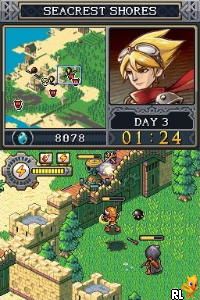
Lock’s Quest (USA) (En,Fr) is a classic Nintendo DS game that mixes tower defense with real-time strategy. It features base-building, resource management, and tactical combat, which appeals to players who enjoy planning and a bit of a challenge. You can play it right in your browser without downloading anything, making it easy to try out whenever you like.
Getting Into Lock’s Quest
The main idea is to protect your base by building defenses and sending out units to stop waves of enemies. During each session, you’ll gather resources to upgrade your defenses and actively fight off enemies trying to break through. You’ll switch between placing defenses strategically during build phases and taking direct control during fights, keeping things lively and varied.
The game has a campaign mode with increasingly difficult levels, pushing you to adapt your tactics and improve your defenses. It’s designed for quick, intense play sessions, but the difficulty gradually increases, encouraging you to refine your approach. The real-time nature can be fast-paced, especially during big enemy waves, but the game keeps a steady difficulty curve that rewards careful planning and quick reactions.
Standout Features
The visuals are colorful and clean, typical of Nintendo DS titles, with clear sprites and easily recognizable enemy types. The interface is simple, so you can quickly access building and unit deployment options, which is handy during hectic defense moments. The art style helps keep things clear, even when battles get busy, making it accessible for players of all skill levels.
As you progress, you’ll upgrade your defenses and units, and there are various structures and units to choose from. This encourages trying different strategies and replaying levels to improve your scores or test new tactics. The game’s balanced difficulty and strategic depth add to its longevity, especially if you enjoy fine-tuning your approach or aiming for higher scores.
Strategy and Tips
If you want to do well in Lock’s Quest, managing resources and timing your actions are key. Find a good balance between building and deploying units during each wave.
- Upgrade your main defenses early on to handle tougher enemies later.
- Place your units and structures where they can cover multiple enemy paths for efficiency.
- Keep track of your resources and avoid spending everything at once; saving some for critical moments can make a difference.
- Pay attention to enemy patterns; knowing their routes helps you place defenses more effectively.
- If a level feels overwhelming, try repositioning or upgrading specific defenses—it can really turn things around.
- If possible, repair defenses between waves to keep your defenses strong for the next attack.
Quick Questions
How do I get started with Lock’s Quest?
Start by completing the early levels to learn the mechanics and get a handle on resource management and defense placement.
What’s a common mistake for beginners?
Many new players overbuild defenses or spend resources too quickly, leaving them vulnerable later. Focus on steady upgrades instead of rushing everything at once.
Can I play Lock’s Quest comfortably on a mobile or touch screen device?
Since it runs in your browser, it works well with touch controls, making it playable on mobile devices. Just make sure your browser supports the in-browser emulator for smooth gameplay.
Overall, Lock’s Quest offers a strategic challenge that rewards thoughtful planning and quick decisions. It’s a well-designed game for anyone who enjoys defending bases with tactical depth, and you can play it directly in your browser whenever you’re in the mood for a test of your skills.
Related games: you can also try Cedric – L'Anniversaire de Chen (France) and Deep Aquarium – Kiseki no Shinkai (Japan), or browse all other games in the Nintendo DS category.
How to Play Lock’s Quest (USA) (En,Fr)?
Build defenses and send units to stop waves of enemies from breaking through your base. Manage resources, upgrade structures, and adapt tactics during fast-paced combat to protect your territory.
Game Controls
Arrow keys move the cursor; space or Enter to select and place structures; other keys for actions.
You may be interested in:
-
 Nintendo DS
♥ 1
Casper’s Scare School – Classroom Capers (USA)
Nintendo DS
♥ 1
Casper’s Scare School – Classroom Capers (USA) -
 Nintendo DS
♥ 1
Zunou Nouryoku Koujou Machine – Touch de Zunoo DS (Japan)
Nintendo DS
♥ 1
Zunou Nouryoku Koujou Machine – Touch de Zunoo DS (Japan) -
 Nintendo DS
♥ 1
Zunou ni Asekaku Game Series! Vol. 1 – Cool 104 Joker & Setline (Japan)
Nintendo DS
♥ 1
Zunou ni Asekaku Game Series! Vol. 1 – Cool 104 Joker & Setline (Japan) -
 Nintendo DS
♥ 9
Zuma’s Revenge (USA)
Nintendo DS
♥ 9
Zuma’s Revenge (USA) -
 Nintendo DS
♥ 1
Zubo (USA) (En,Fr,Es)
Nintendo DS
♥ 1
Zubo (USA) (En,Fr,Es) -
 Nintendo DS
♥ 1
Zubo (Europe) (En,Fr,De,Es,It,Nl,Sv)
Nintendo DS
♥ 1
Zubo (Europe) (En,Fr,De,Es,It,Nl,Sv) -
 Nintendo DS
♥ 1
Zorro – Quest for Justice (USA) (En,Fr,De,Es,It)
Nintendo DS
♥ 1
Zorro – Quest for Justice (USA) (En,Fr,De,Es,It) -
 Nintendo DS
♥ 1
Zorro – Quest for Justice (Europe) (En,Fr,De,Es,It)
Nintendo DS
♥ 1
Zorro – Quest for Justice (Europe) (En,Fr,De,Es,It)
Comments (0)
No comments yet. Be the first to comment!