Mijn Dierenpension (Netherlands) (En,Nl)
0 1 0
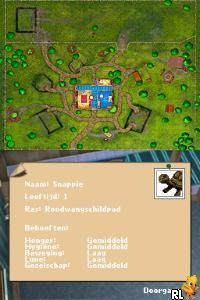
Mijn Dierenpension (Netherlands) (En,Nl) is a charming Nintendo DS game that focuses on caring for animals in a pet boarding facility. Its simple mechanics and cozy theme make it easy for players of all ages to enjoy. Since it runs directly in your browser, you can start playing instantly without worrying about downloads, which adds to its convenience.
Mijn Dierenpension: Gameplay Overview
In this simulation game, you manage a pet boarding house where different animals come for care. Your main tasks are feeding, cleaning, and making sure the animals are comfortable. How happy they are depends on how well you take care of them, and that influences how successful your facility is. The controls are straightforward—you select options to tend to animals, decorate the space, and handle daily chores.
The game centers around balancing the needs of multiple animals while expanding your pet pension. As you progress, you unlock new rooms and features, allowing you to take care of more animals or upgrade your setup. The difficulty gradually increases, introducing new challenges like managing more animals at once or handling special requests. The visuals are simple but charming, with icons and animations that clearly show what needs to be done.
Modes, Levels and Progression
Mijn Dierenpension is a single-player game focused on building and maintaining a successful pet boarding business. There aren’t different modes, but as you care for animals and reach milestones, you unlock new features, animals, and decorations. This sense of progress makes it fun to revisit and try different strategies or expand further.
While there aren’t traditional levels, the game’s structure rewards you for expanding your facility and managing more animals. The time you spend with the game varies—some quick sessions for daily chores, or longer ones if you want to fully upgrade your pet pension. Over time, you’ll see your space grow into a larger, more functional place for animals to stay.
Winning Strategies
For a smoother experience, try managing tasks efficiently:
- Pay attention to each animal’s needs and respond quickly to keep them happy.
- Upgrade your facilities regularly to increase capacity and speed up chores.
- Organize tasks in batches during busy times rather than tackling them one by one.
- Add decorations to boost animal happiness and attract more clients.
- Balance spending on upgrades with saving resources for unexpected needs or special requests.
Common Questions About Mijn Dierenpension
How does the difficulty change as I play?
The game slowly introduces more animals and care requirements as you expand, making management a bit more challenging but still accessible for casual players.
Are there different modes or difficulty levels?
No, the game focuses on facility management with progression driven by expansions and upgrades rather than separate difficulty settings.
How much replay value does it have?
You can revisit the game to unlock new features, experiment with different layouts, or aim for higher scores, which keeps it interesting over time.
Playing Mijn Dierenpension in your browser provides a relaxing simulation that emphasizes caring for animals and managing resources. Its straightforward mechanics and gradual growth make it suitable for casual gamers looking for a peaceful, pet-themed game without time pressures. The simplicity of the game and its steady progression help keep it engaging through repeated sessions, letting you enjoy watching your pet pension grow.
Related games: you can also try G-Force (USA) (En,Fr,Es) and Contact (Europe) (En,Fr,De,Es,It), or browse all other games in the Nintendo DS category.
How to Play Mijn Dierenpension (Netherlands) (En,Nl)?
Manage a pet boarding house by feeding, cleaning, and caring for animals to keep them happy and grow your facility. Expand your space and unlock new features through regular chores and upgrades.
Game Controls
Arrow keys for navigation; Enter or spacebar to select and perform actions.
You may be interested in:
-
 Nintendo DS
♥ 1
Casper’s Scare School – Classroom Capers (USA)
Nintendo DS
♥ 1
Casper’s Scare School – Classroom Capers (USA) -
 Nintendo DS
♥ 1
Zunou Nouryoku Koujou Machine – Touch de Zunoo DS (Japan)
Nintendo DS
♥ 1
Zunou Nouryoku Koujou Machine – Touch de Zunoo DS (Japan) -
 Nintendo DS
♥ 1
Zunou ni Asekaku Game Series! Vol. 1 – Cool 104 Joker & Setline (Japan)
Nintendo DS
♥ 1
Zunou ni Asekaku Game Series! Vol. 1 – Cool 104 Joker & Setline (Japan) -
 Nintendo DS
♥ 9
Zuma’s Revenge (USA)
Nintendo DS
♥ 9
Zuma’s Revenge (USA) -
 Nintendo DS
♥ 1
Zubo (USA) (En,Fr,Es)
Nintendo DS
♥ 1
Zubo (USA) (En,Fr,Es) -
 Nintendo DS
♥ 1
Zubo (Europe) (En,Fr,De,Es,It,Nl,Sv)
Nintendo DS
♥ 1
Zubo (Europe) (En,Fr,De,Es,It,Nl,Sv) -
 Nintendo DS
♥ 1
Zorro – Quest for Justice (USA) (En,Fr,De,Es,It)
Nintendo DS
♥ 1
Zorro – Quest for Justice (USA) (En,Fr,De,Es,It) -
 Nintendo DS
♥ 1
Zorro – Quest for Justice (Europe) (En,Fr,De,Es,It)
Nintendo DS
♥ 1
Zorro – Quest for Justice (Europe) (En,Fr,De,Es,It)
Comments (0)
No comments yet. Be the first to comment!