Mind Your Language – Apprends le Francais! (Europe) (En,Fr,De,Es,It)
0 1 0
Getting Into Mind Your Language – Apprends le Francais!
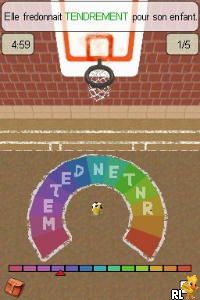
Mind Your Language – Apprends le Francais! is a classic Nintendo DS game that provides a simple way to learn French. It’s designed for anyone wanting to pick up basic vocabulary and phrases through interactive exercises. The game makes practicing a language feel more like playing than studying, which can be helpful if you’re new to learning a language or just want to reinforce what you already know.
On this Nintendo DS, the gameplay mainly involves completing lessons focused on vocabulary, pronunciation, and simple sentence structure. It usually presents multiple-choice questions, matching exercises, and fill-in-the-blank activities. The sessions are short, making it easy to practice even if you only have a few minutes. The game encourages repetition and gradual progress, letting you learn at your own speed. It’s perfect for quick practice or for keeping your skills sharp while having fun.
Standout Features
The visuals are simple but clear, with colorful menus and easy-to-navigate interfaces. The design is practical, focusing on usability rather than flashy graphics, so it’s accessible for players of all ages. Its straightforward approach helps keep things engaging without overwhelming you with complicated visuals or mechanics.
Progress in Mind Your Language – Apprends le Francais! is straightforward but satisfying. As you complete lessons, you unlock new vocabulary and exercises, gradually building your skills. The game offers replayability through different quizzes and question formats, which helps reinforce what you’ve learned. Since it’s a browser-based version of a Nintendo DS classic, it performs reliably and is quick to load, making it simple to practice anytime you like.
Strategy and Tips
Start with basic vocabulary lessons to set a solid foundation before moving on to more challenging exercises. Short, consistent practice sessions tend to be more effective than irregular, longer ones. Make use of the pronunciation features to work on your accent, especially when you’re unsure how to say certain words.
- Repeat exercises until you’re comfortable with the vocabulary and pronunciation.
- Listen carefully to pronunciation hints to avoid developing bad habits.
- Go back and review lessons regularly to help remember what you’ve learned.
- Pay attention to feedback after each question to spot mistakes and improve.
- Mix different exercise types—matching, multiple-choice, fill-in-the-blank—to keep things fresh and interesting.
Quick Questions
How do I get started with Mind Your Language – Apprends le Francais!?
Just choose your language and pick a lesson from the menu. The game runs right in your browser, so there’s no setup needed.
What’s a common mistake beginners make?
Many try to memorize vocabulary without practicing pronunciation, which can hold back speaking skills. Listening and repeating exercises help a lot with that.
Does it work well on mobile or touch devices?
Since it runs in your browser, it generally works smoothly on touchscreen devices, letting you select answers and interact easily, similar to using a DS touchscreen.
Mind Your Language – Apprends le Francais! is a handy tool for casual learners. Its simple design and easy gameplay make it convenient to fit into your daily routine. Playing this Nintendo DS classic in your browser gives you a straightforward way to practice language skills without any fuss. Remember to keep practicing, and most importantly, enjoy the process!
Related games: you can also try Madagascar 3 – Europe's Most Wanted (Europe) (En,Fr,De,Es,It,Nl,Ru) and Kirarin Revolution – Naa-san to Issho (Japan), or browse all other games in the Nintendo DS category.
How to Play Mind Your Language – Apprends le Francais! (Europe) (En,Fr,De,Es,It)?
Complete lessons on vocabulary, pronunciation, and sentence structure by answering multiple-choice, matching, and fill-in-the-blank questions to learn French gradually and reinforce your skills.
Game Controls
Arrow keys navigate; Enter selects; keyboard replaces the controller.
You may be interested in:
-
 Nintendo DS
♥ 1
Casper’s Scare School – Classroom Capers (USA)
Nintendo DS
♥ 1
Casper’s Scare School – Classroom Capers (USA) -
 Nintendo DS
♥ 1
Zunou Nouryoku Koujou Machine – Touch de Zunoo DS (Japan)
Nintendo DS
♥ 1
Zunou Nouryoku Koujou Machine – Touch de Zunoo DS (Japan) -
 Nintendo DS
♥ 1
Zunou ni Asekaku Game Series! Vol. 1 – Cool 104 Joker & Setline (Japan)
Nintendo DS
♥ 1
Zunou ni Asekaku Game Series! Vol. 1 – Cool 104 Joker & Setline (Japan) -
 Nintendo DS
♥ 9
Zuma’s Revenge (USA)
Nintendo DS
♥ 9
Zuma’s Revenge (USA) -
 Nintendo DS
♥ 1
Zubo (USA) (En,Fr,Es)
Nintendo DS
♥ 1
Zubo (USA) (En,Fr,Es) -
 Nintendo DS
♥ 1
Zubo (Europe) (En,Fr,De,Es,It,Nl,Sv)
Nintendo DS
♥ 1
Zubo (Europe) (En,Fr,De,Es,It,Nl,Sv) -
 Nintendo DS
♥ 1
Zorro – Quest for Justice (USA) (En,Fr,De,Es,It)
Nintendo DS
♥ 1
Zorro – Quest for Justice (USA) (En,Fr,De,Es,It) -
 Nintendo DS
♥ 1
Zorro – Quest for Justice (Europe) (En,Fr,De,Es,It)
Nintendo DS
♥ 1
Zorro – Quest for Justice (Europe) (En,Fr,De,Es,It)
Comments (0)
No comments yet. Be the first to comment!