Mirakuru! Mimika DS (Japan)
0 1 0
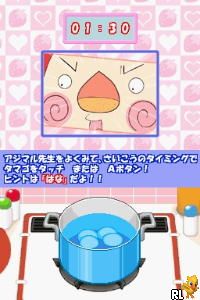
Mirakuru! Mimika DS (Japan) is a classic Nintendo DS game that offers a quirky, puzzle-focused experience rooted in its handheld console origins. The game makes good use of the DS’s dual screens, creating a gameplay style that emphasizes observation, pattern recognition, and timing. Its simple pixel-art visuals and straightforward mechanics help make it easy for players who enjoy casual brainteasers and light-hearted challenges.
Set in a colorful, cartoonish world, Mirakuru! Mimika DS invites players to solve puzzles involving matching, timing, and quick thinking. The art style is charming and the interface intuitive, so newcomers can jump right in. While it doesn’t have complex storylines or elaborate mechanics, its design encourages repeated tries, rewarding players with a sense of progress and discovery. The atmosphere is upbeat and light, making it suitable for casual gaming sessions or quick bursts of fun. Since it runs directly in your browser as an emulated classic, you can enjoy this piece of DS history without any fuss—just click and play.
Why Mirakuru! Mimika DS Is Worth Playing
Mirakuru! Mimika DS stands out because it cleverly uses the Nintendo DS’s dual screens, which serve as both a puzzle area and a feedback display. The visuals lean toward a simple, cartoon style that’s easy on the eyes but never dull, with bright colors and expressive character animations that add charm. Gameplay focuses on quick pattern recognition and timing, requiring just enough concentration to keep things interesting without feeling overwhelming.
What keeps players coming back is the straightforward design paired with increasing difficulty. Puzzles introduce new mechanics and faster-paced challenges as you progress, testing reflexes and memory. Despite its simplicity, Mirakuru! Mimika DS creates a sense of achievement through small, achievable goals—perfect for both quick sessions and longer play periods. Its non-violent, friendly tone makes it accessible for players of all ages. Playing it in your browser makes it easy to dip in and out, turning casual moments into little victories.
Tips to Get Ahead
Getting a grip on Mirakuru! Mimika DS is all about pattern recognition and timing, so these tips can help you improve your game.
- Pay attention to the visual cues on the top screen to anticipate your next move; quick reactions matter.
- Try to memorize common puzzle patterns; repetition helps boost speed and accuracy.
- Pause briefly after each puzzle to see what worked and what didn’t before moving on.
- Watch the game’s pace; don’t rush if you’re unsure—patience often pays off.
- Use the dual screens effectively by connecting the puzzle area with the feedback display for better control.
- If you get stuck, take a short break and try again later; fresh eyes can spot details you missed.
Things to Know Before You Start
Is Mirakuru! Mimika DS difficult for newcomers?
Its difficulty is moderate, gradually increasing but still manageable for casual players who like puzzle games.
How long does a typical session last?
A game session can be just a few minutes or longer if you’re aiming for high scores or trying to complete multiple puzzles in a row.
Is Mirakuru! Mimika DS a good choice for casual players?
Yes, thanks to its simple mechanics and charming visuals, it’s accessible and enjoyable for players of all ages, especially those who like quick, brain-teasing challenges.
Playing Mirakuru! Mimika DS in your browser offers an easy, no-fuss way to experience a nostalgic puzzle game from the Nintendo DS era. Its straightforward mechanics and cheerful design make it a fun choice for casual gaming, whether you have a few minutes or want to focus longer. Jump in and see how well you can solve the puzzles—this classic is ready for you to explore without any downloads or installations.
Related games: you can also try Call of Duty 4 – Modern Warfare (USA) and Crime Scene (USA) (En,Fr,Es), or browse all other games in the Nintendo DS category.
How to Play Mirakuru! Mimika DS (Japan)?
Match patterns and time your moves correctly using the dual screens to solve puzzles. Observe visual cues, memorize patterns, and react quickly to progress through increasing challenges.
Game Controls
Arrow keys for navigation; other keys for selecting and confirming actions.
You may be interested in:
-
 Nintendo DS
♥ 1
Casper’s Scare School – Classroom Capers (USA)
Nintendo DS
♥ 1
Casper’s Scare School – Classroom Capers (USA) -
 Nintendo DS
♥ 1
Zunou Nouryoku Koujou Machine – Touch de Zunoo DS (Japan)
Nintendo DS
♥ 1
Zunou Nouryoku Koujou Machine – Touch de Zunoo DS (Japan) -
 Nintendo DS
♥ 1
Zunou ni Asekaku Game Series! Vol. 1 – Cool 104 Joker & Setline (Japan)
Nintendo DS
♥ 1
Zunou ni Asekaku Game Series! Vol. 1 – Cool 104 Joker & Setline (Japan) -
 Nintendo DS
♥ 9
Zuma’s Revenge (USA)
Nintendo DS
♥ 9
Zuma’s Revenge (USA) -
 Nintendo DS
♥ 1
Zubo (USA) (En,Fr,Es)
Nintendo DS
♥ 1
Zubo (USA) (En,Fr,Es) -
 Nintendo DS
♥ 1
Zubo (Europe) (En,Fr,De,Es,It,Nl,Sv)
Nintendo DS
♥ 1
Zubo (Europe) (En,Fr,De,Es,It,Nl,Sv) -
 Nintendo DS
♥ 1
Zorro – Quest for Justice (USA) (En,Fr,De,Es,It)
Nintendo DS
♥ 1
Zorro – Quest for Justice (USA) (En,Fr,De,Es,It) -
 Nintendo DS
♥ 1
Zorro – Quest for Justice (Europe) (En,Fr,De,Es,It)
Nintendo DS
♥ 1
Zorro – Quest for Justice (Europe) (En,Fr,De,Es,It)
Comments (0)
No comments yet. Be the first to comment!