My Baby – First Steps (USA) (En,Fr,Es)
0 2 0
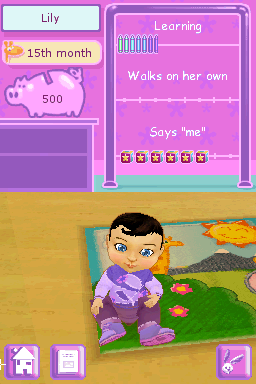
My Baby – First Steps (USA) (En,Fr,Es) is a simple Nintendo DS game that offers a warm, charming experience focused on caring for a virtual baby. Its easy gameplay and gentle mechanics make it accessible for players of all ages, even those without prior gaming experience. This nostalgic title from the Nintendo DS era runs directly in your browser, no downloads or setup needed, so you can start playing right away.
What Is My Baby – First Steps?
This game belongs to the simulation genre, centered on nurturing and caring for a virtual infant. The main goal is to perform basic tasks like feeding, changing, and comforting the baby to keep it happy and healthy. The gameplay is soft and relaxed, emphasizing routine actions that mirror real-life baby care, making it suitable for younger players or newcomers to gaming. It offers a gentle experience that reflects the early days of parenthood in a simple way.
The design is minimalistic, with interaction mainly through touch and simple commands. It’s less about challenge and more about creating a calming, nurturing environment. The game’s progress depends on meeting the baby’s needs, encouraging players to stay attentive and develop a sense of responsibility. Overall, it’s a straightforward simulation that gives a lighthearted look at caring for a tiny bundle of joy.
What Keeps You Coming Back
The appeal comes from its gentle gameplay and the calming routine of caring for the virtual baby. Players often find themselves checking in to manage daily tasks and make sure the baby stays content. The visual style is cute and inviting, reinforcing the relaxing tone and making each session feel comforting rather than stressful. Its simple nature makes it easy to enjoy short, casual play sessions that fit into busy days.
Replayability comes from trying different routines and the satisfaction of completing daily care tasks. While there’s no complex story or challenge, players often enjoy experimenting with ways to comfort or entertain the baby. Its soothing vibe and straightforward mechanics make it a good choice for quick breaks or moments of lighthearted fun, especially for younger audiences or anyone looking for a gentle gaming experience.
Handy Tips
To get the most out of My Baby – First Steps, keep these tips in mind:
- Pay attention to the baby’s needs; ignoring basic tasks can make the game less fun.
- Use the touch controls efficiently to perform actions quickly and keep the baby happy.
- Take breaks if you start feeling overwhelmed; the game is meant to be relaxing, not stressful.
- Try out different routines to see what keeps the baby most content.
- Watch for visual cues that show the baby’s mood or needs.
- Enjoy caring for the baby without rushing — it’s about the experience, not competition.
Player FAQ
Is My Baby – First Steps easy enough for younger children to play?
Yes, its simple mechanics and gentle pace make it suitable for children and beginners, with no complicated controls.
Can I play My Baby – First Steps offline or on any device?
This game runs directly in your browser, so you can play on any device with internet access — no extra downloads needed once it’s loaded.
Is My Baby – First Steps good for players new to gaming?
Absolutely. Its low-pressure gameplay and straightforward interactions make it ideal for newcomers or anyone looking for a relaxing time.
The classic charm of My Baby – First Steps is perfectly preserved in this browser version. Its approachable gameplay makes it a calming choice for anyone interested in a gentle simulation of caring for a baby, all without any fuss.
Related games: you can also try Biohazard – Deadly Silence (Japan) and DS Kageyama Method Dennou Hanpuku – Tadashii Kanji Kakitori-kun – Kondo wa Kanken Taisaku Da yo! (Japan), or browse all other games in the Nintendo DS category.
How to Play My Baby – First Steps (USA) (En,Fr,Es)?
Care for the virtual baby by feeding, changing, and comforting it to keep it happy. Complete daily tasks using simple touch controls to maintain the baby's well-being.
Game Controls
Arrow keys act as the D-pad; Enter is Start; on-screen mapped keys handle the action buttons.
You may be interested in:
-
 Nintendo DS
♥ 1
Casper’s Scare School – Classroom Capers (USA)
Nintendo DS
♥ 1
Casper’s Scare School – Classroom Capers (USA) -
 Nintendo DS
♥ 1
Zunou Nouryoku Koujou Machine – Touch de Zunoo DS (Japan)
Nintendo DS
♥ 1
Zunou Nouryoku Koujou Machine – Touch de Zunoo DS (Japan) -
 Nintendo DS
♥ 1
Zunou ni Asekaku Game Series! Vol. 1 – Cool 104 Joker & Setline (Japan)
Nintendo DS
♥ 1
Zunou ni Asekaku Game Series! Vol. 1 – Cool 104 Joker & Setline (Japan) -
 Nintendo DS
♥ 9
Zuma’s Revenge (USA)
Nintendo DS
♥ 9
Zuma’s Revenge (USA) -
 Nintendo DS
♥ 1
Zubo (USA) (En,Fr,Es)
Nintendo DS
♥ 1
Zubo (USA) (En,Fr,Es) -
 Nintendo DS
♥ 1
Zubo (Europe) (En,Fr,De,Es,It,Nl,Sv)
Nintendo DS
♥ 1
Zubo (Europe) (En,Fr,De,Es,It,Nl,Sv) -
 Nintendo DS
♥ 1
Zorro – Quest for Justice (USA) (En,Fr,De,Es,It)
Nintendo DS
♥ 1
Zorro – Quest for Justice (USA) (En,Fr,De,Es,It) -
 Nintendo DS
♥ 1
Zorro – Quest for Justice (Europe) (En,Fr,De,Es,It)
Nintendo DS
♥ 1
Zorro – Quest for Justice (Europe) (En,Fr,De,Es,It)
Comments (0)
No comments yet. Be the first to comment!