My Chinese Coach – Learn to Speak Chinese (Europe) (En,Fr,De,Es,It)
0 1 0
My Chinese Coach – Learn to Speak Chinese (Europe) (En,Fr,De,Es,It) is a classic Nintendo DS game that helps you learn Chinese through interactive exercises and structured lessons. It fits into the educational lineup of the DS era, combining the handheld’s dual screens with a simple approach to teaching Chinese. Playing it in your browser brings this vintage learning tool into a modern environment, letting you explore its lessons without needing physical hardware or downloads.
Why My Chinese Coach – Learn to Speak Chinese Is Worth Playing
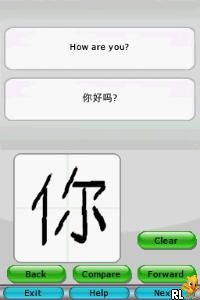
This Nintendo DS game stands out because of its clear, organized layout that guides learners from basic pronunciation to more advanced vocabulary. Its visuals are straightforward but effective, with bright, easy-to-read menus and icons that keep the focus on learning rather than flashy graphics. The interface uses the DS’s touchscreen for writing exercises, which feels natural and helps reinforce character recognition and writing skills. The overall design is practical, aimed at keeping players motivated through steady progress rather than overwhelming complexity.
What keeps players coming back is the structured progression system. It offers small lessons that fit well into short gaming sessions, making it suitable for casual learners or anyone wanting to steadily build their Chinese skills over time. The inclusion of multiple languages—English, French, German, Spanish, Italian—makes it accessible to a wide audience. While it doesn’t turn you into a fluent speaker overnight, it provides a solid foundation in pronunciation, vocabulary, and basic grammar that can complement other learning methods.
Tips to Get Ahead
Start with pronunciation exercises to build a good foundation before moving on to vocabulary. Practicing daily helps you remember better over the long run.
Use the handwriting feature regularly; it helps you remember characters and improves your ability to write Chinese accurately.
Pay attention to the correction prompts during exercises—they show you where your pronunciation or writing can improve.
Take notes of new words and phrases outside the game to reinforce what you learn and expand your vocabulary beyond the lessons.
If you’re stuck on a lesson, go back and review earlier modules to strengthen your understanding before moving forward.
Mix this game with real-world practice, like listening to Chinese audio or speaking with native speakers, to boost your learning experience.
Things to Know Before You Start
Question?
Is My Chinese Coach – Learn to Speak Chinese good for complete beginners?
Yes, it’s designed with beginners in mind, focusing on the basics and progressing gradually.
Question?
How long is a typical session, and is it good for casual learners?
Sessions are usually around 10-20 minutes, making it easy to practice without feeling overwhelmed.
Question?
What kind of difficulty and content can I expect?
The game covers basic vocabulary, pronunciation, and writing, with more challenging material as you go, but it stays accessible for most learners.
Try out My Chinese Coach – Learn to Speak Chinese and start building your language skills today. Its simple lessons and approachable style make it a practical choice for anyone interested in learning Chinese on their own, and it’s available free in your browser.
Related games: you can also try Kidou Gekidan Haro Ichiza – Gundam Mahjong DS – Oyaji ni mo Agarareta Koto nai no ni! (Japan) and Impossible Mission (Europe) (En,Fr,De,Es,It), or browse all other games in the Nintendo DS category.
How to Play My Chinese Coach – Learn to Speak Chinese (Europe) (En,Fr,De,Es,It)?
Complete interactive lessons to learn Chinese pronunciation, vocabulary, and writing. Use the touchscreen and keyboard to practice and review lessons, progressing step-by-step to build your skills.
Game Controls
Arrow keys function as the D-pad; Enter is Start; keyboard keys are used for actions and input.
You may be interested in:
-
 Nintendo DS
♥ 1
Casper’s Scare School – Classroom Capers (USA)
Nintendo DS
♥ 1
Casper’s Scare School – Classroom Capers (USA) -
 Nintendo DS
♥ 1
Zunou Nouryoku Koujou Machine – Touch de Zunoo DS (Japan)
Nintendo DS
♥ 1
Zunou Nouryoku Koujou Machine – Touch de Zunoo DS (Japan) -
 Nintendo DS
♥ 1
Zunou ni Asekaku Game Series! Vol. 1 – Cool 104 Joker & Setline (Japan)
Nintendo DS
♥ 1
Zunou ni Asekaku Game Series! Vol. 1 – Cool 104 Joker & Setline (Japan) -
 Nintendo DS
♥ 9
Zuma’s Revenge (USA)
Nintendo DS
♥ 9
Zuma’s Revenge (USA) -
 Nintendo DS
♥ 1
Zubo (USA) (En,Fr,Es)
Nintendo DS
♥ 1
Zubo (USA) (En,Fr,Es) -
 Nintendo DS
♥ 1
Zubo (Europe) (En,Fr,De,Es,It,Nl,Sv)
Nintendo DS
♥ 1
Zubo (Europe) (En,Fr,De,Es,It,Nl,Sv) -
 Nintendo DS
♥ 1
Zorro – Quest for Justice (USA) (En,Fr,De,Es,It)
Nintendo DS
♥ 1
Zorro – Quest for Justice (USA) (En,Fr,De,Es,It) -
 Nintendo DS
♥ 1
Zorro – Quest for Justice (Europe) (En,Fr,De,Es,It)
Nintendo DS
♥ 1
Zorro – Quest for Justice (Europe) (En,Fr,De,Es,It)
Comments (0)
No comments yet. Be the first to comment!