My Pet Shop (Europe) (En,Fr,De,Es,It)
0 1 0
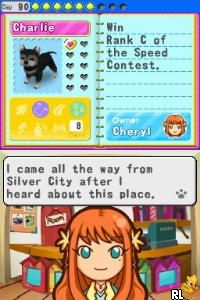
My Pet Shop (Europe) (En,Fr,De,Es,It) is a classic Nintendo DS game that has players managing their own virtual pet shop. It’s designed for fans of simulation and time management, providing a relaxing yet engaging experience on the portable console’s touch interface. Now, you can play it directly in your browser without needing to download anything, so you can jump into managing your pet shop whenever you like.
Getting Into My Pet Shop
The main gameplay involves running a pet store, caring for different animals, and serving customers. The routine is pretty straightforward: feed, clean, and play with the pets, while also handling customer orders and managing shop supplies. Usually, the game starts with organizing the shop, making sure the animals are happy, then responding to customers efficiently to earn more.
As you go along, you’re balancing caring for animals and expanding your shop. You unlock new animals, decorations, and upgrades that boost your shop’s look and efficiency. The game moves at a pace that’s easy to follow—whether you want to take your time or rush through tasks. The touch controls make it simple to select animals, drag items, and navigate menus, so you can enjoy quick sessions or longer management routines.
Standout Features
The visuals have a charming, cartoon-like style, with bright colors and simple animations that make everything feel inviting without being overwhelming. As you care for animals and complete customer requests, your shop grows and upgrades, giving a clear sense of progress. You can customize your shop and choose different layouts, which encourages trying out different setups and styles.
Replayability comes from the variety of animals and customization options, along with the satisfaction of completing daily tasks efficiently. Whether you’re playing for a few minutes or longer, the mechanics are simple enough to enjoy repeatedly. Each playthrough can bring small changes to your shop layout and animal care routines, keeping things fresh.
Strategy and Tips
To get the most out of My Pet Shop, focus on caring for your animals well and providing good customer service. Keeping animals happy helps attract more visitors and boosts sales. Gradually upgrading your shop makes operations smoother and unlocks new features. Managing your time during busy periods can also help you earn more quickly.
- Feed and clean your animals early to keep them happy and prevent unhappy pets from scaring customers away.
- Upgrade your shop regularly to speed up service and improve customer satisfaction.
- Monitor your stock levels for food, toys, and supplies so you don’t run into delays.
- Try out different animal combinations and shop layouts to see what fits your style best.
- Save your progress often if possible, so you don’t lose your setup after long sessions.
Quick Questions
How do I start a new shop in the game?
Follow the initial prompts when you start, and the game will guide you through choosing your first animals and setting up your shop.
What’s a common mistake new players make?
Many rush to expand without keeping animals happy, which can lead to unhappy customers and slower progress.
Can I play My Pet Shop on mobile or touch devices?
Yes, since it runs right in your browser, it works on touchscreens and mobile devices, making it easy to manage whether you’re on a phone or tablet.
My Pet Shop offers a simple, accessible simulation that rewards careful management and strategic upgrades. Its straightforward mechanics make it suitable for players of all ages, and its charm keeps players coming back to improve their shop and grow their business skills.
Related games: you can also try James Cameron's Avatar – The Game (Japan) (NDSi Enhanced) and Hello, Pocoyo! (Europe) (En,Fr,De,Es,It), or browse all other games in the Nintendo DS category.
How to Play My Pet Shop (Europe) (En,Fr,De,Es,It)?
Manage your pet shop by caring for animals, serving customers, and upgrading your shop to make it more efficient and attractive. Balance daily tasks to keep pets happy and grow your business.
Game Controls
Arrow keys for navigation; Enter or space to select and confirm actions.
You may be interested in:
-
 Nintendo DS
♥ 1
Casper’s Scare School – Classroom Capers (USA)
Nintendo DS
♥ 1
Casper’s Scare School – Classroom Capers (USA) -
 Nintendo DS
♥ 1
Zunou Nouryoku Koujou Machine – Touch de Zunoo DS (Japan)
Nintendo DS
♥ 1
Zunou Nouryoku Koujou Machine – Touch de Zunoo DS (Japan) -
 Nintendo DS
♥ 1
Zunou ni Asekaku Game Series! Vol. 1 – Cool 104 Joker & Setline (Japan)
Nintendo DS
♥ 1
Zunou ni Asekaku Game Series! Vol. 1 – Cool 104 Joker & Setline (Japan) -
 Nintendo DS
♥ 9
Zuma’s Revenge (USA)
Nintendo DS
♥ 9
Zuma’s Revenge (USA) -
 Nintendo DS
♥ 1
Zubo (USA) (En,Fr,Es)
Nintendo DS
♥ 1
Zubo (USA) (En,Fr,Es) -
 Nintendo DS
♥ 1
Zubo (Europe) (En,Fr,De,Es,It,Nl,Sv)
Nintendo DS
♥ 1
Zubo (Europe) (En,Fr,De,Es,It,Nl,Sv) -
 Nintendo DS
♥ 1
Zorro – Quest for Justice (USA) (En,Fr,De,Es,It)
Nintendo DS
♥ 1
Zorro – Quest for Justice (USA) (En,Fr,De,Es,It) -
 Nintendo DS
♥ 1
Zorro – Quest for Justice (Europe) (En,Fr,De,Es,It)
Nintendo DS
♥ 1
Zorro – Quest for Justice (Europe) (En,Fr,De,Es,It)
Comments (0)
No comments yet. Be the first to comment!