MySims (Korea)
0 1 0
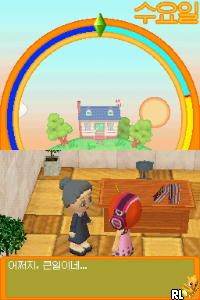
MySims (Korea) is a cute Nintendo DS game that captures the spirit of the popular life simulation series. Originally made for the Nintendo DS, this version offers a simple and easygoing experience that suits casual players and those who enjoy creative gameplay. The game takes you to a colorful world where you can build, customize, and manage your own virtual community. If you like games that mix design, social interaction, and light storytelling, MySims offers a fun experience you can enjoy right in your browser.
Getting Into MySims
In MySims, you start by creating a character and picking a small town to develop. The main gameplay involves completing tasks for the townspeople, which often means building or fixing structures, gathering materials, or designing homes and public spaces. The game encourages creativity through customization options for both characters and environments. You’ll chat with villagers, complete quests, and unlock new areas or items as you go along.
The game follows a simple pattern: accept a task, gather the needed resources, finish the job, and earn rewards. These rewards help you expand the town, buy new furniture, or unlock more customization options. It’s a relaxed, open-ended game where you can switch between activities or focus on specific projects. Designed for short play sessions, it’s perfect for quick breaks or laid-back afternoons. Its straightforward mechanics make it easy for new players to pick up and enjoy without a steep learning curve.
Standout Features
The visuals in MySims lean toward a cartoonish, colorful style typical of Nintendo DS titles, with charming character designs and lively environments that appeal to all ages. The graphics are simple but effective, emphasizing creativity and personality over technical details. As you progress, you unlock new items, areas, and customization options, which encourages continued play and experimentation. The variety of tasks and the freedom to plan your town’s layout add a lot of replay value, since you can come back to try different building styles or finish unfinished projects.
Replayability comes from the open-ended structure and the many customization options. Completing quests unlocks new furniture, accessories, and decorative elements, allowing ongoing personalization. The relaxed pace means you can set your own goals—whether building a perfect town or just enjoying the creative process. Since it’s a classic Nintendo DS title, it offers a straightforward, nostalgic experience that stays engaging thanks to its charming style and freedom to experiment.
Strategy and Tips
Start small with manageable projects to keep the game fun and avoid feeling overwhelmed. Focus on completing villagers’ quests early to unlock useful items and resources. Make a habit of exploring the town regularly—new tasks and items often appear in different areas. Plan your activities around resource respawns to gather materials efficiently. Experiment with different house and public space designs to see what looks best and yields good rewards. Keep your inventory organized to make building and decorating easier and more enjoyable.
- Accept quests that match your current resources so you don’t waste time gathering unnecessary materials.
- Visit villagers often to see what they need and unlock new tasks or rewards faster.
- Save your in-game currency for rare items or special customization options that boost your town’s appeal.
- Use the flexible building system to try out different layouts, then refine your designs based on what feels right.
- Take breaks between big projects to enjoy the game’s relaxing pace and avoid burnout.
Quick Questions
How do I start building my town?
Finish initial quests for villagers, which will unlock building options and resources needed for expansion.
What is a common mistake beginners make?
Trying to do too many things at once without managing resources carefully can slow you down; focus on small, achievable goals first.
Can I play MySims on mobile or touch screens?
This version runs directly in your browser, so you can play it on any device with a web browser, including touch screens, without extra setup.
MySims stays a charming and approachable game for anyone interested in creative simulation. Its simple mechanics and appealing style make it a good choice for casual players looking for a nostalgic yet accessible experience based on this classic Nintendo DS title.
Related games: you can also try Animal Planet – Vet Life (Europe) (En,De,Es,It) and Away – Shuffle Dungeon (Japan), or browse all other games in the Nintendo DS category.
How to Play MySims (Korea)?
Create and customize your town, complete tasks for villagers, and unlock new areas by gathering resources and designing buildings. Focus on building, chatting, and exploring to develop your community at your own pace.
Game Controls
Arrow keys move; space or Enter interacts; other keys perform actions as mapped.
You may be interested in:
-
 Nintendo DS
♥ 1
Casper’s Scare School – Classroom Capers (USA)
Nintendo DS
♥ 1
Casper’s Scare School – Classroom Capers (USA) -
 Nintendo DS
♥ 1
Zunou Nouryoku Koujou Machine – Touch de Zunoo DS (Japan)
Nintendo DS
♥ 1
Zunou Nouryoku Koujou Machine – Touch de Zunoo DS (Japan) -
 Nintendo DS
♥ 1
Zunou ni Asekaku Game Series! Vol. 1 – Cool 104 Joker & Setline (Japan)
Nintendo DS
♥ 1
Zunou ni Asekaku Game Series! Vol. 1 – Cool 104 Joker & Setline (Japan) -
 Nintendo DS
♥ 9
Zuma’s Revenge (USA)
Nintendo DS
♥ 9
Zuma’s Revenge (USA) -
 Nintendo DS
♥ 1
Zubo (USA) (En,Fr,Es)
Nintendo DS
♥ 1
Zubo (USA) (En,Fr,Es) -
 Nintendo DS
♥ 1
Zubo (Europe) (En,Fr,De,Es,It,Nl,Sv)
Nintendo DS
♥ 1
Zubo (Europe) (En,Fr,De,Es,It,Nl,Sv) -
 Nintendo DS
♥ 1
Zorro – Quest for Justice (USA) (En,Fr,De,Es,It)
Nintendo DS
♥ 1
Zorro – Quest for Justice (USA) (En,Fr,De,Es,It) -
 Nintendo DS
♥ 1
Zorro – Quest for Justice (Europe) (En,Fr,De,Es,It)
Nintendo DS
♥ 1
Zorro – Quest for Justice (Europe) (En,Fr,De,Es,It)
Comments (0)
No comments yet. Be the first to comment!