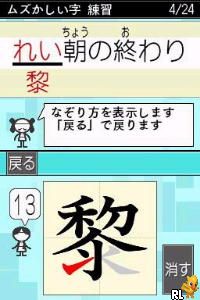
Nazotte Oboeru – Otona no Kanji Renshuu – Kanzen Ban (Japan)
0 1 0
Nazotte Oboeru – Otona no Kanji Renshuu – Kanzen Ban (Japan) is a classic Nintendo DS game that makes practicing Japanese kanji characters simple and accessible. Its straightforward design means you can pick it up easily, whether you’re just starting out or looking for something casual. The familiar DS interface and focused gameplay offer a nostalgic feel while serving as a practical way to improve your recognition skills directly in your browser, with no downloads needed.
What Is Nazotte Oboeru – Otona no Kanji Renshuu – Kanzen Ban?
This Nintendo DS game revolves around a learning method where players identify the correct kanji by their shape. It belongs to the educational puzzle genre, combining visual recognition with memorization. The game displays a series of kanji characters, asking players to choose the right one from multiple options, encouraging quick thinking and pattern recognition.
The experience is straightforward but effective: players build reading and writing skills through repeated, focused exercises. It’s suited for adult learners or those who prefer a relaxed approach to practicing kanji, rather than intense memorization or game challenges. Since it’s played in a browser, it runs instantly and smoothly, making it easy to incorporate into short study sessions or casual play.
What Keeps You Coming Back
The game’s simple mechanics are complemented by a clean interface and a focus on learning efficiency. Multiple-choice questions give instant feedback, helping you see your progress and spot areas to improve. Repeating the correct selection process helps reinforce memory, making it a useful tool for retention.
It stays engaging because the difficulty increases gradually, and more complex kanji characters are introduced as you advance. The absence of tricky mechanics or time limits allows for steady, relaxed practice. Its minimal design encourages repeated play without feeling tiresome.
Handy Tips
Start with the basic kanji characters and work your way up to more complex ones as your recognition improves.
- Pay attention to shape and stroke hints in some exercises.
- Use short, regular sessions to help reinforce what you learn without getting overwhelmed.
- If you’re stuck, review previous characters to strengthen your recognition skills.
- Make use of the immediate feedback to understand your mistakes and improve.
- Mix different difficulty levels to challenge yourself and keep things interesting.
Player FAQ
Is Nazotte Oboeru – Otona no Kanji Renshuu – Kanzen Ban suitable for beginners?
Yes, it’s designed to be accessible for learners at different levels, especially those starting with basic kanji recognition. The multiple-choice format is simple and easy to understand right away.
Can children or younger players enjoy this game?
While mainly aimed at adult learners, children who already have some familiarity with kanji may find it helpful. However, it might not be ideal for absolute beginners or very young children without basic reading skills.
Do I need an internet connection to play Nazotte Oboeru – Otona no Kanji Renshuu – Kanzen Ban?
Since it runs directly in your browser as an emulation, it doesn’t need an internet connection after the initial load. The game is self-contained once loaded, so you can practice offline whenever you like.
Playing Nazotte Oboeru – Otona no Kanji Renshuu – Kanzen Ban here offers quick access to a Nintendo DS favorite, perfect for casual review or practice. Its simple, effective approach continues to make it a handy choice for anyone looking to sharpen their kanji skills without fuss.
Related games: you can also try Fashion Studio – Paris Collection (USA) (En,Fr,Es) and Barbie as the Island Princess (USA), or browse all other games in the Nintendo DS category.
How to Play Nazotte Oboeru – Otona no Kanji Renshuu – Kanzen Ban (Japan)?
Select the correct kanji from multiple options based on the shape; repeat to improve recognition and memory through simple, relaxed exercises.
Game Controls
Arrow keys or keyboard to navigate; Enter to select.
You may be interested in:
-
 Nintendo DS
♥ 1
Casper’s Scare School – Classroom Capers (USA)
Nintendo DS
♥ 1
Casper’s Scare School – Classroom Capers (USA) -
 Nintendo DS
♥ 1
Zunou Nouryoku Koujou Machine – Touch de Zunoo DS (Japan)
Nintendo DS
♥ 1
Zunou Nouryoku Koujou Machine – Touch de Zunoo DS (Japan) -
 Nintendo DS
♥ 1
Zunou ni Asekaku Game Series! Vol. 1 – Cool 104 Joker & Setline (Japan)
Nintendo DS
♥ 1
Zunou ni Asekaku Game Series! Vol. 1 – Cool 104 Joker & Setline (Japan) -
 Nintendo DS
♥ 9
Zuma’s Revenge (USA)
Nintendo DS
♥ 9
Zuma’s Revenge (USA) -
 Nintendo DS
♥ 1
Zubo (USA) (En,Fr,Es)
Nintendo DS
♥ 1
Zubo (USA) (En,Fr,Es) -
 Nintendo DS
♥ 1
Zubo (Europe) (En,Fr,De,Es,It,Nl,Sv)
Nintendo DS
♥ 1
Zubo (Europe) (En,Fr,De,Es,It,Nl,Sv) -
 Nintendo DS
♥ 1
Zorro – Quest for Justice (USA) (En,Fr,De,Es,It)
Nintendo DS
♥ 1
Zorro – Quest for Justice (USA) (En,Fr,De,Es,It) -
 Nintendo DS
♥ 1
Zorro – Quest for Justice (Europe) (En,Fr,De,Es,It)
Nintendo DS
♥ 1
Zorro – Quest for Justice (Europe) (En,Fr,De,Es,It)
Comments (0)
No comments yet. Be the first to comment!