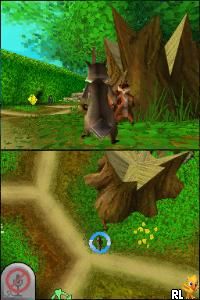
Over the Hedge (USA)
0 1 0
Over the Hedge (USA) is a Nintendo DS game that brings the animated film’s story and characters into a playful, easy-to-pick-up platform experience. Made for fans of light adventure and puzzles, it offers simple yet engaging gameplay that fits nicely into short gaming breaks. As a Nintendo DS title, it uses the dual screens to add some variety, and now you can play it directly in your browser without needing to download anything.
Getting Into Over the Hedge
The game involves guiding a group of woodland animals through different levels filled with obstacles, puzzles, and mini-challenges. The main idea is to explore, gather items, and complete tasks in each stage. You start by choosing a level and then moving your characters around to reach specific goals, like collecting food or avoiding enemies. Timing and strategic movement are key, so planning your actions carefully can really help you succeed.
The modes are simple, mainly focusing on single-player progress through levels that gradually become more challenging. It’s not about complex mechanics—success comes from quick thinking and adapting to each scenario. Since you’re playing in a browser emulator, you can jump in for quick tries or spend more time mastering each level’s layout and challenges. The game is designed to be easy to get into, with clear goals and a gentle learning curve suitable for players of all ages.
Standout Features
Visually, Over the Hedge captures the charm of the animated film with colorful settings and character sprites that are easy to recognize. The graphics stay true to the cartoon style, which appeals to fans of the movie and younger players alike. Progression is tied to completing levels to unlock new areas and characters, giving a good sense of achievement as you move forward.
Replayability comes from the variety of levels and different ways to approach each challenge. Some stages encourage trying different strategies to get higher scores or faster times. With multiple levels and objectives, you can revisit earlier stages to improve your performance or explore alternative routes. Its straightforward design means you can jump back in easily, whether for quick play or longer sessions to improve your skills.
Strategy and Tips
Getting the most out of Over the Hedge is about understanding each level’s layout and timing your moves well. Here are some tips:
- Gather all the items you can before finishing a level to boost your score and unlock extra content.
- Observe enemy patterns closely to avoid setbacks; patience often pays off.
- Use the environment—hide behind objects or wait for enemies to pass.
- Plan your route before moving, especially in levels with multiple goals or tricky layouts.
- Take your time at the start to learn how everything works; rushing can cause mistakes.
- If you get stuck, go back and practice or try different approaches without penalty.
Quick Questions
How do I start playing Over the Hedge?
The game loads directly in your browser, so just select it and start playing—no downloads needed.
What’s a common mistake beginners make?
Trying to rush through levels without paying attention to enemy patterns or the layout often leads to setbacks.
Can I play Over the Hedge on mobile or touch devices?
Since it runs in your browser, it works on many touchscreen devices, but controls are mainly set for mouse or keyboard, which might make things a little trickier.
This version of Over the Hedge offers a fun, simple way to enjoy the game right in your browser. Its approachable gameplay makes it suitable for newcomers or anyone looking for quick, light challenges. With colorful visuals and straightforward mechanics, it’s a nice way to enjoy the game without any hassle.
Related games: you can also try Narnia Koku Monogatari – Lion to Majo (Japan) and 7 Wonders II (USA), or browse all other games in the Nintendo DS category.
How to Play Over the Hedge (USA)?
Guide woodland animals through levels by moving, collecting items, and avoiding obstacles. Complete objectives to unlock new areas and improve your score in each stage.
Game Controls
Arrow keys for movement; other keys for actions as mapped in the emulator.
You may be interested in:
-
 Nintendo DS
♥ 1
Casper’s Scare School – Classroom Capers (USA)
Nintendo DS
♥ 1
Casper’s Scare School – Classroom Capers (USA) -
 Nintendo DS
♥ 1
Zunou Nouryoku Koujou Machine – Touch de Zunoo DS (Japan)
Nintendo DS
♥ 1
Zunou Nouryoku Koujou Machine – Touch de Zunoo DS (Japan) -
 Nintendo DS
♥ 1
Zunou ni Asekaku Game Series! Vol. 1 – Cool 104 Joker & Setline (Japan)
Nintendo DS
♥ 1
Zunou ni Asekaku Game Series! Vol. 1 – Cool 104 Joker & Setline (Japan) -
 Nintendo DS
♥ 9
Zuma’s Revenge (USA)
Nintendo DS
♥ 9
Zuma’s Revenge (USA) -
 Nintendo DS
♥ 1
Zubo (USA) (En,Fr,Es)
Nintendo DS
♥ 1
Zubo (USA) (En,Fr,Es) -
 Nintendo DS
♥ 1
Zubo (Europe) (En,Fr,De,Es,It,Nl,Sv)
Nintendo DS
♥ 1
Zubo (Europe) (En,Fr,De,Es,It,Nl,Sv) -
 Nintendo DS
♥ 1
Zorro – Quest for Justice (USA) (En,Fr,De,Es,It)
Nintendo DS
♥ 1
Zorro – Quest for Justice (USA) (En,Fr,De,Es,It) -
 Nintendo DS
♥ 1
Zorro – Quest for Justice (Europe) (En,Fr,De,Es,It)
Nintendo DS
♥ 1
Zorro – Quest for Justice (Europe) (En,Fr,De,Es,It)
Comments (0)
No comments yet. Be the first to comment!