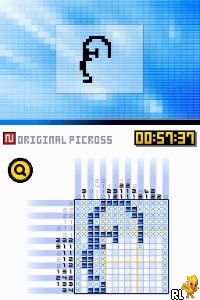
Picross DS (USA) (En,Fr,Es)
0 2 0
Picross DS (USA) (En,Fr,Es) is a well-loved Nintendo DS puzzle game that appeals to fans of logical challenges. Its simple yet engaging gameplay makes it easy for newcomers to pick up, while still offering enough depth to keep seasoned players entertained. The mechanics are straightforward, and the interface is intuitive, making it accessible for players of all ages. You can spend hours working through puzzles without needing complicated setups.
What Is Picross DS?
Picross DS is a puzzle game where players use numbers as clues to fill in a grid, revealing pixel art images as they progress. The goal is to shade squares correctly based on the numerical hints for each row and column, which calls for careful logical thinking. Its calm pace and clear visual feedback make it a good choice for quick sessions or longer puzzle marathons.
The gameplay involves solving puzzles that get more difficult as you go, each hiding a different image within the grid. Controls are simple: tap to fill or mark squares. When you make a mistake, the game shows visual cues to help you correct it. Since the puzzles rely solely on logic, they’re accessible to anyone who enjoys pattern recognition and problem-solving, without the need for memorization or quick reflexes.
What Keeps You Coming Back
What makes Picross DS appealing is the variety of puzzles and the satisfaction of finishing detailed images. The game includes puzzles of different sizes, offering a good mix of challenges. As you solve more puzzles, you notice your skills improving, and you start tackling more complex images. It creates a natural sense of progress.
Extras like multiple difficulty levels and a hint system are helpful if you get stuck. Still, the main reward is the feeling of achievement after completing each picture. The soothing soundtrack and clean interface keep the focus on the puzzles. You might find yourself replaying puzzles to beat your best times, trying different solving orders, or just enjoying the calming process of revealing images.
Handy Tips
If you’re new to Picross DS or want to sharpen your skills, here are some tips:
- Use the flag feature to mark squares you’re sure are empty; it helps avoid accidental mistakes.
- Start with smaller puzzles if you’re just beginning, then gradually move on to larger grids for more challenge.
- Pay attention to the numerical patterns in clues; they often hint at the longest runs.
- If you get stuck, use hints sparingly to learn new strategies rather than just completing the puzzle.
- Take breaks, especially with bigger puzzles that demand sustained focus.
- Observe completed images for visual clues that can help with similar puzzles later.
Player FAQ
Is Picross DS easy for beginners to learn?
Yes, the rules are simple enough for new players to understand quickly, making it accessible for all ages and skill levels.
Can I play Picross DS offline and without an internet connection?
Absolutely. Once you have it loaded, the game runs completely offline, so you can enjoy puzzles anywhere.
Is Picross DS suitable for younger children?
Yes, its non-violent, logic-based gameplay makes it suitable for children, as long as they understand the basics of shading and marking squares.
Picross DS remains a classic puzzle game that offers a relaxing yet mentally engaging experience. Its straightforward mechanics and variety of puzzles make it a great choice for fans of logic puzzles and pixel art. Playing it on your browser makes it easy to enjoy a piece of Nintendo DS history whenever you like, without downloads or installations.
Related games: you can also try Gaitame Baibai Trainer – Kabutore FX (Japan) and Broken Sword – Shadow of the Templars – The Director's Cut (Europe) (En,Fr,De,Es,It), or browse all other games in the Nintendo DS category.
How to Play Picross DS (USA) (En,Fr,Es)?
Use the keyboard to select and fill or mark squares in the grid based on number clues, revealing a hidden pixel art image through logical deduction.
Game Controls
Arrow keys move the cursor; Enter or space to fill or mark squares; other keys for menu actions.
You may be interested in:
-
 Nintendo DS
♥ 1
Casper’s Scare School – Classroom Capers (USA)
Nintendo DS
♥ 1
Casper’s Scare School – Classroom Capers (USA) -
 Nintendo DS
♥ 1
Zunou Nouryoku Koujou Machine – Touch de Zunoo DS (Japan)
Nintendo DS
♥ 1
Zunou Nouryoku Koujou Machine – Touch de Zunoo DS (Japan) -
 Nintendo DS
♥ 1
Zunou ni Asekaku Game Series! Vol. 1 – Cool 104 Joker & Setline (Japan)
Nintendo DS
♥ 1
Zunou ni Asekaku Game Series! Vol. 1 – Cool 104 Joker & Setline (Japan) -
 Nintendo DS
♥ 9
Zuma’s Revenge (USA)
Nintendo DS
♥ 9
Zuma’s Revenge (USA) -
 Nintendo DS
♥ 1
Zubo (USA) (En,Fr,Es)
Nintendo DS
♥ 1
Zubo (USA) (En,Fr,Es) -
 Nintendo DS
♥ 1
Zubo (Europe) (En,Fr,De,Es,It,Nl,Sv)
Nintendo DS
♥ 1
Zubo (Europe) (En,Fr,De,Es,It,Nl,Sv) -
 Nintendo DS
♥ 1
Zorro – Quest for Justice (USA) (En,Fr,De,Es,It)
Nintendo DS
♥ 1
Zorro – Quest for Justice (USA) (En,Fr,De,Es,It) -
 Nintendo DS
♥ 1
Zorro – Quest for Justice (Europe) (En,Fr,De,Es,It)
Nintendo DS
♥ 1
Zorro – Quest for Justice (Europe) (En,Fr,De,Es,It)
Comments (0)
No comments yet. Be the first to comment!