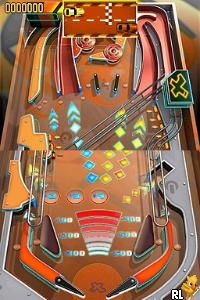
Powershot Pinball Constructor (Europe) (En,Fr,De,Es,It)
0 1 0
Powershot Pinball Constructor (Europe) (En,Fr,De,Es,It) is a classic Nintendo DS game that lets players design and play their own pinball machines right in their browser. It combines elements of creative construction with traditional pinball action, appealing to those who enjoy puzzle design or arcade gameplay. If you like tinkering with game mechanics or testing custom pinball tables, this game provides a simple way to explore those ideas without needing to download anything.
Getting Into Powershot Pinball Constructor
The main idea is to create custom pinball tables and then try them out. The game starts with an easy-to-use interface where you can place bumpers, flippers, targets, and pathways to build a machine that challenges you. After setting up your layout, you launch the ball and watch it bounce and spin through your creation. Your goal is to keep the ball in play as long as possible and hit as many targets as you can for points.
Most of the time, you switch between building your table and playing it. During construction, you can experiment with different setups, trying out new ideas or improving your scores. Once you’re happy with your design, you launch the ball and see how it performs. The game tracks your scores and progress, encouraging you to refine your designs or test out new configurations for better results.
Standout Features
This game from the Nintendo DS era has simple but clear visuals that show different table elements well. The graphics are clean and straightforward, focusing on gameplay clarity rather than flashy effects. The interface makes it easy to add, move, or delete parts, allowing quick adjustments to your designs. You can create anything from simple tables to more complex layouts with multiple bumpers and targets, which keeps the game interesting to replay.
The challenge comes from designing tables that are more difficult and beating your own high scores. The game rewards trying new ideas, and its mechanics are easy to pick up. Since there are no fixed levels or story modes, replayability depends on your creativity and your desire to improve or challenge friends with custom setups. Because it runs in your browser, you can access it anytime you want to test or experiment with new ideas.
Strategy and Tips
Getting the best results involves understanding how different parts work together and planning your layout carefully. Here are some suggestions:
- Start with simple designs to see how each element influences the ball before adding more complexity.
- Place bumpers and targets thoughtfully to maximize points and create interesting ball paths.
- Use flippers wisely; their placement is crucial for controlling the ball and avoiding quick drain.
- Test your design often, making adjustments based on how the ball behaves during play.
- Try to build balanced tables that challenge your reflexes without being too frustrating.
- Pay attention to how different layouts affect gameplay and learn from each iteration to improve your skills.
Quick Questions
How do I start designing my pinball table?
Pick components from the construction menu, place them on the grid, then launch a ball to see how your layout works.
What’s a common mistake beginners make?
Many try to make complex designs too early, which can lead to unpredictable ball movement and frustration. Starting simple helps you learn how everything works.
Can I play Powershot Pinball Constructor on mobile or touch devices?
Since it plays in your browser, you can probably use it on touch screens, but controls might not be perfect for mobile. It works best on a desktop or laptop.
Powershot Pinball Constructor offers a straightforward way to enjoy designing and playing pinball tables. Its simple mechanics and focus on experimentation make it a good choice for puzzle and arcade fans alike.
Related games: you can also try Feel the Magic – XY-XX (USA) (En,Ja) and Anpanman to Asobo – ABC Kyoushitsu (Japan), or browse all other games in the Nintendo DS category.
How to Play Powershot Pinball Constructor (Europe) (En,Fr,De,Es,It)?
Design your own pinball tables by placing bumpers, targets, and pathways, then launch the ball to score points. Switch between building and playing to test and improve your creations.
Game Controls
Arrow keys for movement and navigation; spacebar or Enter to launch or interact.
You may be interested in:
-
 Nintendo DS
♥ 1
Casper’s Scare School – Classroom Capers (USA)
Nintendo DS
♥ 1
Casper’s Scare School – Classroom Capers (USA) -
 Nintendo DS
♥ 1
Zunou Nouryoku Koujou Machine – Touch de Zunoo DS (Japan)
Nintendo DS
♥ 1
Zunou Nouryoku Koujou Machine – Touch de Zunoo DS (Japan) -
 Nintendo DS
♥ 1
Zunou ni Asekaku Game Series! Vol. 1 – Cool 104 Joker & Setline (Japan)
Nintendo DS
♥ 1
Zunou ni Asekaku Game Series! Vol. 1 – Cool 104 Joker & Setline (Japan) -
 Nintendo DS
♥ 9
Zuma’s Revenge (USA)
Nintendo DS
♥ 9
Zuma’s Revenge (USA) -
 Nintendo DS
♥ 1
Zubo (USA) (En,Fr,Es)
Nintendo DS
♥ 1
Zubo (USA) (En,Fr,Es) -
 Nintendo DS
♥ 1
Zubo (Europe) (En,Fr,De,Es,It,Nl,Sv)
Nintendo DS
♥ 1
Zubo (Europe) (En,Fr,De,Es,It,Nl,Sv) -
 Nintendo DS
♥ 1
Zorro – Quest for Justice (USA) (En,Fr,De,Es,It)
Nintendo DS
♥ 1
Zorro – Quest for Justice (USA) (En,Fr,De,Es,It) -
 Nintendo DS
♥ 1
Zorro – Quest for Justice (Europe) (En,Fr,De,Es,It)
Nintendo DS
♥ 1
Zorro – Quest for Justice (Europe) (En,Fr,De,Es,It)
Comments (0)
No comments yet. Be the first to comment!