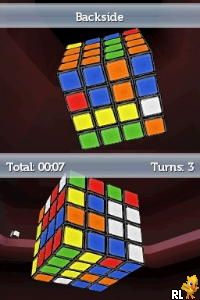
Rubik’s Puzzle World (Europe) (En,Fr,De,Es,It)
0 1 0
Rubik’s Puzzle World (Europe) (En,Fr,De,Es,It) is a classic Nintendo DS game that brings the iconic Rubik’s Cube puzzle to your handheld console in a digital form. It’s a good pick for puzzle fans, casual players, or anyone who enjoys mental challenges. The mechanics are simple, and the gameplay feels familiar, making it accessible for players of all ages looking for a relaxing yet engaging experience.
Getting Into Rubik’s Puzzle World
The main gameplay involves solving virtual Rubik’s Cubes of different sizes and difficulty levels. Players turn the cube’s sides using touch controls or buttons, trying to make all the colors match on each face. There are different modes, like a timed challenge and a free mode where you can practice at your own pace. Usually, you pick a puzzle, solve it, then check your time or accuracy before moving on.
The game follows a simple cycle: select a puzzle, manipulate the cube to solve it, then see your score or time. This setup encourages trying again and again, especially as players aim to beat their best times or improve their solving skills. The interface is designed for quick access, so you can jump straight into puzzles—great for short gaming sessions or longer puzzle marathons.
Standout Features
The visuals are minimal but clear, with colorful representations of the cube that are easy to see and move. The interface keeps things straightforward, helping players concentrate on solving puzzles without distraction. The game tracks your progress, showing your best times and how many puzzles you’ve finished, which makes you want to keep playing over time.
Progression is simple—solving puzzles unlocks new challenges or difficulty levels that get tougher as you improve. The straightforward design makes it easy for newcomers, while the variety of puzzle sizes and modes keeps experienced players interested. Since puzzles are generated randomly or picked from a set, each session can feel fresh, encouraging you to refine your strategies and solve puzzles faster as you go.
Strategy and Tips
To get better at Rubik’s Puzzle World, try to learn common patterns and practice efficient moves. Patience matters; rushing can cause missteps and failed attempts. Keep an eye on your best times to stay motivated, and don’t be afraid to restart puzzles if you’re stuck. Regular practice helps you recognize patterns quicker and develop better solving techniques.
- Start with smaller cubes to learn how everything works before moving on to larger, more complex puzzles.
- Use the timer to challenge yourself but focus on accuracy before speed.
- Learn common cube patterns and algorithms if you want to improve your speed.
- Review puzzles where you made mistakes to understand your common errors.
- Take short breaks between attempts to stay focused and avoid frustration.
Quick Questions
How do I start a new puzzle in Rubik’s Puzzle World?
You can pick a new puzzle from the main menu or puzzle library, which appears instantly on the touchscreen or with button navigation.
What’s the most common mistake beginners make?
Many players try to solve the cube without understanding basic patterns, which leads to unnecessary moves and longer times. Starting with simple patterns helps you become more efficient.
Can I play Rubik’s Puzzle World on a mobile device or with touch controls?
Yes, the game is designed for the Nintendo DS, which uses touch controls, so you can move the cube directly with your finger or stylus. It also runs smoothly in your browser without extra setup.
Rubik’s Puzzle World offers a straightforward, puzzle-focused experience rooted in the classic Rubik’s Cube mechanics. It’s suitable for quick sessions or regular practice, and you can play it right in your browser without downloads. Its simplicity and replay value make it a reliable digital version of a timeless game.
Related games: you can also try New Super Mario Bros. 5: Clone Tag Team 2 (Old Music) and Deal or No Deal (Netherlands), or browse all other games in the Nintendo DS category.
How to Play Rubik’s Puzzle World (Europe) (En,Fr,De,Es,It)?
Select a puzzle, use the keyboard or mouse to rotate the cube's sides and match all colors on each face. Complete puzzles to improve your time and unlock harder levels, trying to solve faster each time.
Game Controls
Arrow keys or mouse to turn cube sides; spacebar or click to confirm moves.
You may be interested in:
-
 Nintendo DS
♥ 1
Casper’s Scare School – Classroom Capers (USA)
Nintendo DS
♥ 1
Casper’s Scare School – Classroom Capers (USA) -
 Nintendo DS
♥ 1
Zunou Nouryoku Koujou Machine – Touch de Zunoo DS (Japan)
Nintendo DS
♥ 1
Zunou Nouryoku Koujou Machine – Touch de Zunoo DS (Japan) -
 Nintendo DS
♥ 1
Zunou ni Asekaku Game Series! Vol. 1 – Cool 104 Joker & Setline (Japan)
Nintendo DS
♥ 1
Zunou ni Asekaku Game Series! Vol. 1 – Cool 104 Joker & Setline (Japan) -
 Nintendo DS
♥ 9
Zuma’s Revenge (USA)
Nintendo DS
♥ 9
Zuma’s Revenge (USA) -
 Nintendo DS
♥ 1
Zubo (USA) (En,Fr,Es)
Nintendo DS
♥ 1
Zubo (USA) (En,Fr,Es) -
 Nintendo DS
♥ 1
Zubo (Europe) (En,Fr,De,Es,It,Nl,Sv)
Nintendo DS
♥ 1
Zubo (Europe) (En,Fr,De,Es,It,Nl,Sv) -
 Nintendo DS
♥ 1
Zorro – Quest for Justice (USA) (En,Fr,De,Es,It)
Nintendo DS
♥ 1
Zorro – Quest for Justice (USA) (En,Fr,De,Es,It) -
 Nintendo DS
♥ 1
Zorro – Quest for Justice (Europe) (En,Fr,De,Es,It)
Nintendo DS
♥ 1
Zorro – Quest for Justice (Europe) (En,Fr,De,Es,It)
Comments (0)
No comments yet. Be the first to comment!