Scrabble Interactive – 2007 Edition (Europe) (En,Fr)
0 1 0
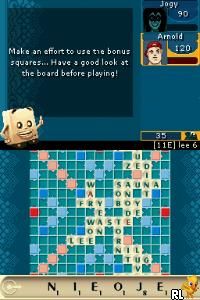
Scrabble Interactive – 2007 Edition (Europe) (En,Fr) is a classic Nintendo DS game that brings the timeless word game into your portable gaming library. With its straightforward design and familiar mechanics, it offers a nostalgic yet engaging experience rooted in the era of the Nintendo DS. This game invites players to test their vocabulary skills against AI opponents or friends, all within the comfort of a handheld console that was once a staple of gaming. Now, thanks to the browser emulator, you can enjoy this puzzle classic free in your browser without any installations or fuss.
Step Into the World of Scrabble Interactive – 2007 Edition
The game keeps the clean, simple visuals of the original Nintendo DS release, with clear, easy-to-read letters and a minimalistic board layout. Its graphical style emphasizes function over flair, focusing on the core experience of placing words and thinking strategically. The sound design echoes the era’s charm—subtle chimes and the satisfying click of tiles as they are placed—creating a calming atmosphere perfect for casual play. The interface is designed for quick access, with menus and options that are easy to navigate for both new players and seasoned veterans. Despite its simplicity, the game captures the familiar tension of competing against an AI or a friend, with a straightforward presentation that keeps distractions at bay.
How the Gameplay Hooks You
Playing Scrabble Interactive – 2007 Edition involves forming valid words on a grid, aiming for high scores while blocking your opponent. The pacing is steady, encouraging thoughtful placement rather than frantic moves, so each turn offers a chance to plan your strategy. As you play, the difficulty level can increase by adjusting the AI’s skill or by offering more challenging tile distributions. You can enjoy quick sessions or longer, more deliberate matches, making it easy to fit into short breaks or longer gaming periods. The core gameplay—drawing tiles, forming words, and scoring—stays interesting thanks to the variety of possible word combinations and strategic options.
Pro Tips for Scrabble Interactive – 2007 Edition
To get the most out of your game and score higher, consider these strategies:
- Look for chances to place words across multiple bonus tiles for extra points.
- Save high-value letters like Q, Z, and X for strategic placements or to extend existing words.
- Practice common two- and three-letter words to build on your tiles quickly.
- Keep track of the remaining tiles to anticipate your opponent’s possible moves.
- Balance between creating high-scoring words and keeping your rack manageable.
- Use the exchange option wisely if your tiles aren’t helping you form good words.
Frequently Asked Questions
Can I play Scrabble Interactive – 2007 Edition in short sessions?
Yes, the turn-based format makes it easy to pause and pick up again later, fitting well into quick gaming breaks.
Does the game get repetitive after multiple plays?
While the core rules stay the same, the variety of word options and strategies keep each game feeling fresh.
Is the experience suitable for players of all ages?
Absolutely; its simple rules and familiar gameplay appeal to both young players learning vocabulary and adults testing their skills.
Enjoying Scrabble Interactive – 2007 Edition on this site offers a faithful version of the classic game, perfect for puzzle fans and word game lovers alike. Its straightforward approach and strategic depth make it a solid choice for quick or longer sessions of brain-teasing fun.
Related games: you can also try GoldenEye 007 (Italy) and Chuukana Janshi Tenho Painyan Remix (Japan), or browse all other games in the Nintendo DS category.
How to Play Scrabble Interactive – 2007 Edition (Europe) (En,Fr)?
Form words on the grid to score points, aiming to use high-value letters and bonus tiles while blocking your opponent. Take turns placing tiles until the game ends, then compare scores.
Game Controls
Arrow keys navigate; Enter confirms selections; other keys handle tile placement and actions.
You may be interested in:
-
 Nintendo DS
♥ 1
Casper’s Scare School – Classroom Capers (USA)
Nintendo DS
♥ 1
Casper’s Scare School – Classroom Capers (USA) -
 Nintendo DS
♥ 1
Zunou Nouryoku Koujou Machine – Touch de Zunoo DS (Japan)
Nintendo DS
♥ 1
Zunou Nouryoku Koujou Machine – Touch de Zunoo DS (Japan) -
 Nintendo DS
♥ 1
Zunou ni Asekaku Game Series! Vol. 1 – Cool 104 Joker & Setline (Japan)
Nintendo DS
♥ 1
Zunou ni Asekaku Game Series! Vol. 1 – Cool 104 Joker & Setline (Japan) -
 Nintendo DS
♥ 9
Zuma’s Revenge (USA)
Nintendo DS
♥ 9
Zuma’s Revenge (USA) -
 Nintendo DS
♥ 1
Zubo (USA) (En,Fr,Es)
Nintendo DS
♥ 1
Zubo (USA) (En,Fr,Es) -
 Nintendo DS
♥ 1
Zubo (Europe) (En,Fr,De,Es,It,Nl,Sv)
Nintendo DS
♥ 1
Zubo (Europe) (En,Fr,De,Es,It,Nl,Sv) -
 Nintendo DS
♥ 1
Zorro – Quest for Justice (USA) (En,Fr,De,Es,It)
Nintendo DS
♥ 1
Zorro – Quest for Justice (USA) (En,Fr,De,Es,It) -
 Nintendo DS
♥ 1
Zorro – Quest for Justice (Europe) (En,Fr,De,Es,It)
Nintendo DS
♥ 1
Zorro – Quest for Justice (Europe) (En,Fr,De,Es,It)
Comments (0)
No comments yet. Be the first to comment!