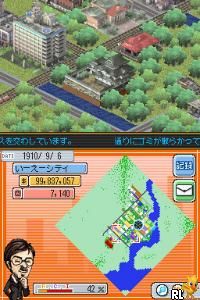
SimCity DS (USA) (En,Fr,De,Es,It,Nl)
0 1 0
SimCity DS (USA) (En,Fr,De,Es,It,Nl) is a well-loved Nintendo DS game that draws players into the world of city-building and urban planning. It provides a simple and accessible experience, ideal for those who want to manage a city without complicated controls or overwhelming mechanics. Its portability and straightforward interface make it easy for casual players and longtime fans to pick up. Plus, this browser version runs instantly without any downloads needed.
What Is SimCity DS?
SimCity DS is a city simulation game where the main goal is to develop and oversee a busy, functioning city. You handle everything from zoning residential, commercial, and industrial areas to balancing budgets, keeping services running, and dealing with emergencies. The game focuses on strategic planning and resource management, encouraging you to build a city that grows and adapts.
Compared to its PC versions, SimCity DS simplifies many features while still offering enough depth for casual experimenting. You can draw roads, place buildings, and set policies using the Nintendo DS’s touchscreen, which makes city planning feel intuitive and tactile. The game encourages trying out different layouts and strategies, so each playthrough can feel fresh.
What Keeps You Coming Back
Part of what makes SimCity DS appealing is the open-ended gameplay and the satisfaction of watching your city develop. With various scenarios and challenges, like handling disasters or managing budgets, the game stays interesting. Its simple mechanics make it easy to start and stop, but the deeper layers of planning keep you coming back for more.
Many players enjoy customizing their cities and experimenting with layouts and policies to see what works best. The pacing allows for quick sessions or longer planning periods, so you can play briefly or spend more time refining your city. The variety of objectives and the opportunity to create unique cities help keep the game engaging over time.
Handy Tips
If you’re new to SimCity DS, here are some tips to help you get started:
- Start small: Focus on essential services and infrastructure first to keep your budget in check.
- Balance zones: Mix residential, commercial, and industrial areas to keep traffic flowing and your city lively.
- Keep an eye on your funds: Watch your budget and adjust taxes and expenses as needed to stay financially healthy.
- Handle emergencies quickly: Use emergency services promptly to prevent small issues from becoming bigger problems.
- Try different layouts: Experiment with road and zone arrangements to improve traffic and land use.
- Save often: Save your game regularly with multiple files so you can try different strategies without losing progress.
Player FAQ
Is SimCity DS suitable for beginners?
Yes, thanks to its simple controls and clear interface, it’s a good choice for newcomers and casual players.
Is it appropriate for younger players?
Absolutely. Its straightforward mechanics and non-violent theme make it suitable for kids, while still offering enough depth for older players.
Do I need an internet connection to play?
Nope. The game runs completely offline and can be played directly in your browser, with no additional downloads needed. It’s a true single-player experience here.
SimCity DS offers a classic city-building experience that’s easy to learn but rewarding to master. Its straightforward gameplay and replay value make it appealing to fans of simulation games, especially when played right in your browser. This version captures what made the original fun, letting you create and manage your city whenever you like.
Related games: you can also try Happy Cooking (USA) and Popstars (Germany) (NDSi Enhanced), or browse all other games in the Nintendo DS category.
How to Play SimCity DS (USA) (En,Fr,De,Es,It,Nl)?
Build and manage a city by zoning areas, balancing budgets, and handling emergencies to grow your urban environment. Use the touchscreen or controls to place roads, buildings, and set policies, aiming for a thriving, well-functioning city.
Game Controls
Arrow keys act as the D-pad; Enter is Start; on-screen mapped keys handle the action buttons.
You may be interested in:
-
 Nintendo DS
♥ 1
Casper’s Scare School – Classroom Capers (USA)
Nintendo DS
♥ 1
Casper’s Scare School – Classroom Capers (USA) -
 Nintendo DS
♥ 1
Zunou Nouryoku Koujou Machine – Touch de Zunoo DS (Japan)
Nintendo DS
♥ 1
Zunou Nouryoku Koujou Machine – Touch de Zunoo DS (Japan) -
 Nintendo DS
♥ 1
Zunou ni Asekaku Game Series! Vol. 1 – Cool 104 Joker & Setline (Japan)
Nintendo DS
♥ 1
Zunou ni Asekaku Game Series! Vol. 1 – Cool 104 Joker & Setline (Japan) -
 Nintendo DS
♥ 9
Zuma’s Revenge (USA)
Nintendo DS
♥ 9
Zuma’s Revenge (USA) -
 Nintendo DS
♥ 1
Zubo (USA) (En,Fr,Es)
Nintendo DS
♥ 1
Zubo (USA) (En,Fr,Es) -
 Nintendo DS
♥ 1
Zubo (Europe) (En,Fr,De,Es,It,Nl,Sv)
Nintendo DS
♥ 1
Zubo (Europe) (En,Fr,De,Es,It,Nl,Sv) -
 Nintendo DS
♥ 1
Zorro – Quest for Justice (USA) (En,Fr,De,Es,It)
Nintendo DS
♥ 1
Zorro – Quest for Justice (USA) (En,Fr,De,Es,It) -
 Nintendo DS
♥ 1
Zorro – Quest for Justice (Europe) (En,Fr,De,Es,It)
Nintendo DS
♥ 1
Zorro – Quest for Justice (Europe) (En,Fr,De,Es,It)
Comments (0)
No comments yet. Be the first to comment!