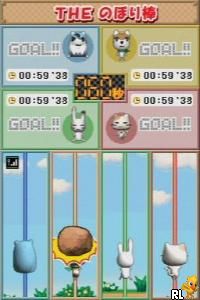
Simple DS Series Vol. 6 – The Party Game (Japan)
0 1 0
Simple DS Series Vol. 6 – The Party Game is a classic Nintendo DS title that captures the spirit of party gaming from the handheld’s era. As part of the Simple DS Series, this game offers a straightforward, pick-up-and-play experience designed to entertain groups of friends or casual players looking for quick fun. Its focus on social interaction and mini-games makes it a good choice for those wanting lighthearted multiplayer sessions on their DS or in-browser emulator.
Set against the backdrop of a portable console known for its dual-screen setup and touch controls, this game uses the DS’s strengths to create simple yet engaging party moments. With a variety of mini-games, the game encourages players to compete or cooperate in short bursts, making it suitable for parties or quick gaming breaks. The visuals are minimalistic but practical, relying on clear icons and bright colors to keep the mood lively. Its design favors accessibility over complexity, making it easy for players of all ages to join in without a steep learning curve.
Why Simple DS Series Vol. 6 – The Party Game Is Worth Playing
This game’s main appeal is its ease of access and focus on multiplayer fun, which was a common feature of many DS titles. The mini-games are simple yet varied, from reflex challenges to quick puzzle-like tasks. Playing with friends adds to the fun, but it’s also suitable for solo players who want quick bursts of entertainment. The graphics are intentionally straightforward, using the DS’s dual screens to keep things organized and easy to understand, avoiding clutter or confusing layouts.
What keeps players coming back is the unpredictability of the mini-games and the cheerful, relaxed atmosphere. The game doesn’t take itself too seriously, creating a laid-back environment where everyone can join in, regardless of skill level. The sound design is minimal but effective, with cheerful tunes and sound effects that reinforce the playful vibe. Overall, it’s a dependable party game with enough variety to keep things fresh, especially during short, spontaneous sessions. Its simplicity may not satisfy hardcore gamers looking for depth, but for casual fun, it hits the spot.
Tips to Get Ahead
Focus on quick reflexes to win mini-games that rely on timing.
- Watch your opponents’ patterns and adjust your strategy accordingly.
- Stay relaxed during fast-paced challenges to keep your accuracy up.
- Practice using the touch controls—tapping and dragging quickly will help.
- Choose mini-games that suit your strongest skills to score points faster.
- Learn the rules of each game to avoid making unnecessary mistakes.
Things to Know Before You Start
Is Simple DS Series Vol. 6 – The Party Game difficult?
The game is meant for quick, accessible fun, so most mini-games are simple with minimal difficulty barriers.
How long does a typical session last?
Each round only takes a few minutes, making it perfect for short gaming breaks or spontaneous party moments.
Is this game suitable for casual players?
Definitely. Its simple mechanics and friendly atmosphere make it good for players of all ages and skill levels, especially during quick multiplayer matches.
Jump into Simple DS Series Vol. 6 – The Party Game and enjoy its easygoing multiplayer fun. Its straightforward design and variety of mini-games make it a reliable choice for casual gaming, whether alone or with friends. It’s a compact dose of party action that plays well in your browser, ready whenever you want to share a few quick rounds of lighthearted competition.
Related games: you can also try Simple DS Series Vol. 12 – The Party Unou Quiz (Japan) and Rhapsody – A Musical Adventure (Europe) (En,Fr), or browse all other games in the Nintendo DS category.
How to Play Simple DS Series Vol. 6 – The Party Game (Japan)?
Compete in quick mini-games by using reflexes and simple touch or keyboard controls to outscore your opponents or cooperate to finish tasks. The game cycles through different challenges for fun, fast-paced play.
Game Controls
Arrow keys navigate; Enter or space confirm actions; mouse or touch for controls.
You may be interested in:
-
 Nintendo DS
♥ 1
Casper’s Scare School – Classroom Capers (USA)
Nintendo DS
♥ 1
Casper’s Scare School – Classroom Capers (USA) -
 Nintendo DS
♥ 1
Zunou Nouryoku Koujou Machine – Touch de Zunoo DS (Japan)
Nintendo DS
♥ 1
Zunou Nouryoku Koujou Machine – Touch de Zunoo DS (Japan) -
 Nintendo DS
♥ 1
Zunou ni Asekaku Game Series! Vol. 1 – Cool 104 Joker & Setline (Japan)
Nintendo DS
♥ 1
Zunou ni Asekaku Game Series! Vol. 1 – Cool 104 Joker & Setline (Japan) -
 Nintendo DS
♥ 9
Zuma’s Revenge (USA)
Nintendo DS
♥ 9
Zuma’s Revenge (USA) -
 Nintendo DS
♥ 1
Zubo (USA) (En,Fr,Es)
Nintendo DS
♥ 1
Zubo (USA) (En,Fr,Es) -
 Nintendo DS
♥ 1
Zubo (Europe) (En,Fr,De,Es,It,Nl,Sv)
Nintendo DS
♥ 1
Zubo (Europe) (En,Fr,De,Es,It,Nl,Sv) -
 Nintendo DS
♥ 1
Zorro – Quest for Justice (USA) (En,Fr,De,Es,It)
Nintendo DS
♥ 1
Zorro – Quest for Justice (USA) (En,Fr,De,Es,It) -
 Nintendo DS
♥ 1
Zorro – Quest for Justice (Europe) (En,Fr,De,Es,It)
Nintendo DS
♥ 1
Zorro – Quest for Justice (Europe) (En,Fr,De,Es,It)
Comments (0)
No comments yet. Be the first to comment!