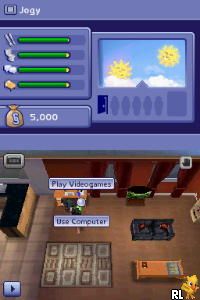
Sims 2, The – Apartment Pets (Europe) (En,Fr,De,Es,It,Nl)
0 5 0
Sims 2, The – Apartment Pets (Europe) (En,Fr,De,Es,It,Nl) is a charming Nintendo DS classic that brings the life simulation experience to handheld gaming. Its straightforward gameplay makes it easy for newcomers to get started, while still offering enough depth for dedicated players to enjoy. As a title from the Nintendo DS era, it’s perfect for quick sessions or longer playthroughs, all playable directly in your browser without any fuss.
What Is Sims 2, The – Apartment Pets?
This game fits within the life simulation genre, focusing on managing a virtual apartment filled with adorable pets. The core gameplay revolves around caring for different animals, customizing your living space, and fulfilling various pet-related tasks. It’s all about creating a cozy environment and keeping your virtual pets happy, which makes it approachable and relaxing for players of all ages.
The experience is casual but engaging, with simple objectives like feeding, playing with, and decorating your apartment. The game offers a gentle progression system, encouraging players to expand their pet collection and decorate their space as they go. It’s designed for quick, satisfying sessions that don’t require complex mechanics or long-term commitments.
What Keeps You Coming Back
One of the main attractions is the variety of pets and customization options. Different animals respond uniquely to care, and players can experiment with various furniture and decorations to personalize their space. Since there’s no strict ending, you can spend time nurturing your pets and refining your apartment at your own pace.
Plus, the game features a range of mini-tasks and challenges that encourage replayability. Whether it’s trying out new pet combinations or decorating themes, each session offers a new way to enjoy the experience. The simple interface and accessible mechanics make it easy to pick up and put down, keeping players engaged without feeling overwhelmed.
Handy Tips
Getting started? Focus on keeping your pets happy by balancing feeding, playing, and cleaning. Keep an eye on their needs to prevent any fuss or unhappiness.
- Experiment with different furniture and decorations to find what makes your pets happiest and your apartment look best.
- Care for multiple pets at once to unlock new interactions and fun combinations.
- Complete small tasks regularly to earn rewards and unlock new items or pets.
- Try out different layouts to discover what maximizes space and style.
- Save your progress often if the game allows, to keep your customization efforts safe.
Player FAQ
Is Sims 2, The – Apartment Pets easy for new players?
Yes, the game’s mechanics are simple and intuitive, making it accessible for players of all ages and experience levels.
Can younger children enjoy Sims 2, The – Apartment Pets?
Absolutely, its gentle gameplay and friendly visuals make it suitable for younger players, with no complex controls or mature content.
Do I need an internet connection to play Sims 2, The – Apartment Pets?
Since it runs directly in your browser, it doesn’t require an internet connection once loaded, making it perfect for offline play.
Sims 2, The – Apartment Pets offers a relaxing, lighthearted simulation experience that’s easy to pick up and enjoy. Its focus on pet care and apartment customization keeps players coming back for casual fun, all playable right here in your browser. It’s a charming title that captures the essence of life simulation on the Nintendo DS, now available for endless play without downloads or installations.
Related games: you can also try Karada, Yorokobu Shokuji & Exercise – Kenkou Kentei (Japan) and Boku to Sim no Machi – Racing (Japan), or browse all other games in the Nintendo DS category.
How to Play Sims 2, The – Apartment Pets (Europe) (En,Fr,De,Es,It,Nl)?
Care for your virtual pets by feeding, playing, and decorating your apartment. Complete small tasks to keep pets happy and unlock new items, customizing your space as you go.
Game Controls
Arrow keys act as the D-pad; Enter is Start; other keys handle actions.
You may be interested in:
-
 Nintendo DS
♥ 1
Casper’s Scare School – Classroom Capers (USA)
Nintendo DS
♥ 1
Casper’s Scare School – Classroom Capers (USA) -
 Nintendo DS
♥ 1
Zunou Nouryoku Koujou Machine – Touch de Zunoo DS (Japan)
Nintendo DS
♥ 1
Zunou Nouryoku Koujou Machine – Touch de Zunoo DS (Japan) -
 Nintendo DS
♥ 1
Zunou ni Asekaku Game Series! Vol. 1 – Cool 104 Joker & Setline (Japan)
Nintendo DS
♥ 1
Zunou ni Asekaku Game Series! Vol. 1 – Cool 104 Joker & Setline (Japan) -
 Nintendo DS
♥ 9
Zuma’s Revenge (USA)
Nintendo DS
♥ 9
Zuma’s Revenge (USA) -
 Nintendo DS
♥ 1
Zubo (USA) (En,Fr,Es)
Nintendo DS
♥ 1
Zubo (USA) (En,Fr,Es) -
 Nintendo DS
♥ 1
Zubo (Europe) (En,Fr,De,Es,It,Nl,Sv)
Nintendo DS
♥ 1
Zubo (Europe) (En,Fr,De,Es,It,Nl,Sv) -
 Nintendo DS
♥ 1
Zorro – Quest for Justice (USA) (En,Fr,De,Es,It)
Nintendo DS
♥ 1
Zorro – Quest for Justice (USA) (En,Fr,De,Es,It) -
 Nintendo DS
♥ 1
Zorro – Quest for Justice (Europe) (En,Fr,De,Es,It)
Nintendo DS
♥ 1
Zorro – Quest for Justice (Europe) (En,Fr,De,Es,It)
Comments (0)
No comments yet. Be the first to comment!