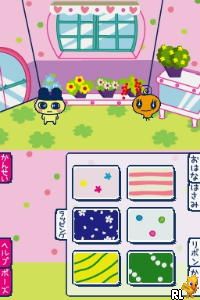
Tamagotch no Puchi Puchi Omisetchi (Japan) (Rev 1)
0 1 0
Tamagotch no Puchi Puchi Omisetchi (Japan) (Rev 1) is a charming relic from the Nintendo DS era, bringing a miniature world of virtual pet care directly into your browser. With pixelated graphics and simple sound design, it offers a nostalgic look back at handheld gaming from the early 2000s. The game’s gentle pace and straightforward mechanics appeal to those who want a relaxing experience that can be played in short bursts or longer sessions. Its Japanese origin suggests the original language is Japanese, which might be tricky for non-Japanese speakers, but the gameplay stays accessible through intuitive interactions and visual cues.
Step Into the World of Tamagotch no Puchi Puchi Omisetchi
The game takes players into a small, colorful universe built around caring for a tiny virtual pet. Its visuals are simple but expressive, with pixel art character sprites and basic backgrounds that remind you of early digital pet toys. The soundtrack features light, repetitive melodies that help create a relaxed, almost meditative atmosphere. Even if you don’t speak Japanese, you can follow the game’s cues thanks to clear icons and animations, making it easy for newcomers to get started. Playing on a Nintendo DS, the game makes good use of the dual-screen setup, often dedicating one screen to the pet’s environment and the other to menus or interactions, which enhances the feeling of caring for a small, self-contained world.
How the Gameplay Hooks You
The main activity involves feeding, cleaning, and playing with the pet, with each action providing small rewards and improving the pet’s happiness and health. The pace is steady, encouraging players to check in regularly without feeling pressured, making it perfect for short or casual play throughout the day. Progress is subtle—your pet’s growth and mood shift based on your attention, offering gentle feedback that keeps you motivated to keep caring for it. The simple design allows for easy pick-up and put-down sessions, yet it rewards patience and regular attention, creating a calming rhythm that fans of virtual pet simulations often enjoy.
Pro Tips for Tamagotch no Puchi Puchi Omisetchi
Get familiar with the icons and actions early on, as the interface is straightforward but subtle. Make a habit of checking in regularly to keep your pet happy and healthy. Use the menus wisely to avoid unnecessary actions—sometimes a quick visit is enough to keep everything in good shape. Watch the pet’s mood indicators to help decide when to feed or clean. Feel free to try different routines to see how your pet reacts; small changes can influence its growth. Most importantly, enjoy the slow pace—this isn’t about rushing, but about caring for a tiny life with patience and attention.
Frequently Asked Questions
Does Tamagotch no Puchi Puchi Omisetchi work well for short play sessions?
Yes, its relaxed pace and simple mechanics make it easy to check in quickly or spend longer periods caring for your pet.
Is the game repetitive after a while?
The gameplay stays straightforward, and its repetitive nature adds to its soothing quality, rather than causing frustration.
Can I play this game offline or on mobile devices?
Since it runs directly in your browser, it needs no installation and can be played on any device with internet access, though it’s best suited for desktop or laptop screens.
Tamagotch no Puchi Puchi Omisetchi offers a gentle journey into caring for a tiny virtual pet. Its simple mechanics and calming feel make it perfect for anyone looking for a relaxing, no-pressure activity, available free in your browser whenever you have a few quiet moments.
Related games: you can also try American Girl – Kit Mystery Challenge! (USA) and Luxor – Pharaoh's Challenge (USA), or browse all other games in the Nintendo DS category.
How to Play Tamagotch no Puchi Puchi Omisetchi (Japan) (Rev 1)?
Feed, clean, and play with your virtual pet to keep it happy and healthy. Check on it regularly and use simple icons to interact, watching its mood and health improve over time.
Game Controls
Arrow keys act as the D-pad; Enter is used to select actions and navigate menus.
You may be interested in:
-
 Nintendo DS
♥ 1
Casper’s Scare School – Classroom Capers (USA)
Nintendo DS
♥ 1
Casper’s Scare School – Classroom Capers (USA) -
 Nintendo DS
♥ 1
Zunou Nouryoku Koujou Machine – Touch de Zunoo DS (Japan)
Nintendo DS
♥ 1
Zunou Nouryoku Koujou Machine – Touch de Zunoo DS (Japan) -
 Nintendo DS
♥ 1
Zunou ni Asekaku Game Series! Vol. 1 – Cool 104 Joker & Setline (Japan)
Nintendo DS
♥ 1
Zunou ni Asekaku Game Series! Vol. 1 – Cool 104 Joker & Setline (Japan) -
 Nintendo DS
♥ 9
Zuma’s Revenge (USA)
Nintendo DS
♥ 9
Zuma’s Revenge (USA) -
 Nintendo DS
♥ 1
Zubo (USA) (En,Fr,Es)
Nintendo DS
♥ 1
Zubo (USA) (En,Fr,Es) -
 Nintendo DS
♥ 1
Zubo (Europe) (En,Fr,De,Es,It,Nl,Sv)
Nintendo DS
♥ 1
Zubo (Europe) (En,Fr,De,Es,It,Nl,Sv) -
 Nintendo DS
♥ 1
Zorro – Quest for Justice (USA) (En,Fr,De,Es,It)
Nintendo DS
♥ 1
Zorro – Quest for Justice (USA) (En,Fr,De,Es,It) -
 Nintendo DS
♥ 1
Zorro – Quest for Justice (Europe) (En,Fr,De,Es,It)
Nintendo DS
♥ 1
Zorro – Quest for Justice (Europe) (En,Fr,De,Es,It)
Comments (0)
No comments yet. Be the first to comment!