Tele 7 Jeux Inedits – Mots Fleches (France)
0 1 0
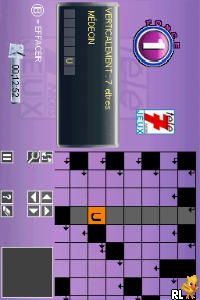
Tele 7 Jeux Inedits – Mots Fleches (France) is a simple Nintendo DS game that focuses on word puzzles. If you like brain teasers and vocabulary puzzles, especially in a handheld format that feels nostalgic, this game offers a straightforward way to pass the time. It’s ideal for quick sessions or longer playthroughs, fitting nicely into casual gaming routines.
Getting Into Tele 7 Jeux Inedits – Mots Fleches
The game is about filling in missing words based on clues, similar to crossword puzzles but with a more streamlined style. You see a list of clues, and your task is to pick or type words that match the hints. There are no complex stories or characters; instead, the focus is on vocabulary and recognizing patterns. Each puzzle presents unique clues and word lengths, keeping things interesting as you progress through different levels.
During a play session, you’ll see clues and grids, some of which might be partially filled. You choose from available letters or type in words that fit. The game gives quick feedback—if your answer is right, you move on; if not, you’re prompted to try again. It’s suitable for quick plays or longer puzzle sessions, making it accessible for all ages and skill levels.
Standout Features
The visuals are simple and focus on the puzzles rather than fancy graphics. The interface is clean, with easy-to-read fonts and straightforward navigation on the Nintendo DS touchscreen. This minimal design helps you stay focused on solving puzzles without distractions. Progression is based on completing puzzle sets, encouraging you to keep going to unlock new challenges or higher difficulty levels.
Replaying the game keeps it fresh thanks to the variety of puzzles and the chance to improve your speed and accuracy. The puzzles get harder as you go, rewarding those who enjoy a steady challenge. Since new puzzles can be added or randomized, it’s easy to keep coming back without feeling like it’s the same every time. Its portability and quick start make it perfect for short breaks or commutes.
Strategy and Tips
To get better at the game, try recognizing common word patterns and familiar prefixes or suffixes. Keep an eye on the length of words to narrow down your choices. Practice helps—you’ll get better at spotting clues’ themes and related vocabulary, which speeds things up.
- Begin with the easiest clues to fill in some letters and make the tougher ones easier.
- Pay attention to where correct letters go; they can help eliminate impossible options elsewhere.
- If you’re stuck, go back to previous clues—they might help confirm or rule out certain words.
- Use the game’s feedback to learn typical puzzle structures and expand your vocabulary.
- Take brief breaks between puzzles to stay fresh, especially on tougher levels.
Quick Questions
How do I start playing?
Select the game from the emulator menu, and it loads right away. No extra steps needed.
What’s a common mistake for beginners?
Many try filling words without paying attention to overlapping letters. Focusing on clues with more known letters first often helps avoid mistakes.
Can I play this on a mobile device or touchscreen?
Yes, since it runs in your browser’s emulator, it works well with touch controls on phones and tablets, making puzzle-solving straightforward and fun.
Tele 7 Jeux Inedits – Mots Fleches gives a clear, easy-to-pick-up word puzzle experience. Its simple design and gradual difficulty make it good for players of all ages who want a quick mental challenge. Playing through your browser gives instant access to this classic Nintendo DS title, offering a relaxing way to sharpen your vocabulary and puzzle skills without needing to download anything.
Related games: you can also try Labyrinth (Europe) (Fr,Nl) (Ravensburger) and Kung Fu Panda (Spain), or browse all other games in the Nintendo DS category.
How to Play Tele 7 Jeux Inedits – Mots Fleches (France)?
Read the clues and fill in the missing words by typing or selecting letters. Complete puzzles to progress to new levels and challenge your vocabulary skills.
Game Controls
Arrow keys navigate; Enter confirms; on-screen keys are used for input and selection.
You may be interested in:
-
 Nintendo DS
♥ 1
Casper’s Scare School – Classroom Capers (USA)
Nintendo DS
♥ 1
Casper’s Scare School – Classroom Capers (USA) -
 Nintendo DS
♥ 1
Zunou Nouryoku Koujou Machine – Touch de Zunoo DS (Japan)
Nintendo DS
♥ 1
Zunou Nouryoku Koujou Machine – Touch de Zunoo DS (Japan) -
 Nintendo DS
♥ 1
Zunou ni Asekaku Game Series! Vol. 1 – Cool 104 Joker & Setline (Japan)
Nintendo DS
♥ 1
Zunou ni Asekaku Game Series! Vol. 1 – Cool 104 Joker & Setline (Japan) -
 Nintendo DS
♥ 9
Zuma’s Revenge (USA)
Nintendo DS
♥ 9
Zuma’s Revenge (USA) -
 Nintendo DS
♥ 1
Zubo (USA) (En,Fr,Es)
Nintendo DS
♥ 1
Zubo (USA) (En,Fr,Es) -
 Nintendo DS
♥ 1
Zubo (Europe) (En,Fr,De,Es,It,Nl,Sv)
Nintendo DS
♥ 1
Zubo (Europe) (En,Fr,De,Es,It,Nl,Sv) -
 Nintendo DS
♥ 1
Zorro – Quest for Justice (USA) (En,Fr,De,Es,It)
Nintendo DS
♥ 1
Zorro – Quest for Justice (USA) (En,Fr,De,Es,It) -
 Nintendo DS
♥ 1
Zorro – Quest for Justice (Europe) (En,Fr,De,Es,It)
Nintendo DS
♥ 1
Zorro – Quest for Justice (Europe) (En,Fr,De,Es,It)
Comments (0)
No comments yet. Be the first to comment!