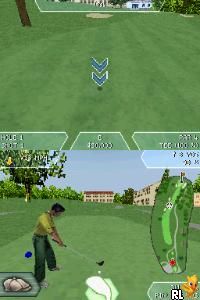
Tiger Woods PGA Tour 08 (USA) (En,Fr)
0 1 0
Tiger Woods PGA Tour 08 (USA) (En,Fr) is a classic Nintendo DS golf game that captures the essence of professional golf with simple controls and accessible gameplay. Designed for fans of the sport and casual players alike, it offers a solid simulation experience on the handheld that you can play directly in your browser. If you like golf games that focus on realism and competition, this title provides a good introduction to the genre without being overly complicated.
Getting Into Tiger Woods PGA Tour 08
The main gameplay involves choosing your golfer, selecting a tournament or practice session, and swinging to hit the ball. The game uses the Nintendo DS’s touchscreen to aim and control power, which feels natural for anyone familiar with the console’s controls. You usually play through a series of holes, with the game scoring your performance based on shot accuracy and distance.
Modes include tournament play, where you compete against AI opponents across multiple rounds, and practice mode to work on your swing and shot placement. There are skill challenges and different courses, so you get variety if you play multiple times. Each round takes about 10-20 minutes, making it easy to enjoy quick gaming sessions or longer ones if you’re aiming to improve your scores.
Standout Features
Visually, Tiger Woods PGA Tour 08 on the Nintendo DS manages to recreate the golf course environments within the system’s limited graphics capabilities. You’ll see recognizable fairways, greens, and hazards. While not extremely detailed, the visuals are clear enough to tell different holes and obstacles apart, and the interface is simple and functional.
The progression system encourages replaying, with unlockable courses and tournaments as you improve. Its straightforward mechanics and variety of modes make it easy to pick up and play repeatedly. The game offers different difficulty settings, so both newcomers and seasoned golfers can find a challenge that suits them. Overall, it provides decent replay value for those looking for quick, satisfying rounds.
Strategy and Tips
Getting the most out of the game means mastering the touchscreen controls for aiming and swinging. Try to develop a consistent swing timing rather than aiming for perfect power every time.
- Use practice mode to learn how different courses behave and how wind or terrain can influence your shots.
- Select your club carefully based on distance and course conditions to get better results.
- Pay attention to visual cues for shot power and direction to improve your accuracy.
- Keep your swing smooth; rushing or jerky movements tend to hurt your shots.
- Watch your stamina and focus during longer rounds to stay in control.
Quick Questions
How do I start a game in Tiger Woods PGA Tour 08?
Just pick a tournament or practice mode from the main menu, then select your golfer and course to start playing.
What’s a common mistake for beginners?
Many new players try to hit hard with their shots, which can lead to inaccuracy. Focusing on steady, controlled swings usually works better.
Can I play this game on mobile or touch devices?
Since it runs in your browser here, you can play it on any device that supports a browser, including mobile phones, with touchscreen controls working as they should.
This classic Nintendo DS game, tiger woods pga tour 08, offers a straightforward golf experience that players can enjoy without fuss. Its simple controls and variety of modes make it a good choice for quick rounds or more focused practice, all accessible directly in your browser.
Related games: you can also try Indiana Jones and the Staff of Kings (Europe) (En,Fr,De,Es,It) and Teenage Mutant Ninja Turtles – Arcade Attack (Europe) (En,Fr,De,Es,It,Nl), or browse all other games in the Nintendo DS category.
How to Play Tiger Woods PGA Tour 08 (USA) (En,Fr)?
Choose your golfer, aim and swing using the touchscreen controls to hit the ball across holes. Complete tournaments or practice to improve your skills and unlock new courses.
Game Controls
Arrow keys navigate; Enter selects; other keys perform swing and menu actions.
You may be interested in:
-
 Nintendo DS
♥ 1
Casper’s Scare School – Classroom Capers (USA)
Nintendo DS
♥ 1
Casper’s Scare School – Classroom Capers (USA) -
 Nintendo DS
♥ 1
Zunou Nouryoku Koujou Machine – Touch de Zunoo DS (Japan)
Nintendo DS
♥ 1
Zunou Nouryoku Koujou Machine – Touch de Zunoo DS (Japan) -
 Nintendo DS
♥ 1
Zunou ni Asekaku Game Series! Vol. 1 – Cool 104 Joker & Setline (Japan)
Nintendo DS
♥ 1
Zunou ni Asekaku Game Series! Vol. 1 – Cool 104 Joker & Setline (Japan) -
 Nintendo DS
♥ 9
Zuma’s Revenge (USA)
Nintendo DS
♥ 9
Zuma’s Revenge (USA) -
 Nintendo DS
♥ 1
Zubo (USA) (En,Fr,Es)
Nintendo DS
♥ 1
Zubo (USA) (En,Fr,Es) -
 Nintendo DS
♥ 1
Zubo (Europe) (En,Fr,De,Es,It,Nl,Sv)
Nintendo DS
♥ 1
Zubo (Europe) (En,Fr,De,Es,It,Nl,Sv) -
 Nintendo DS
♥ 1
Zorro – Quest for Justice (USA) (En,Fr,De,Es,It)
Nintendo DS
♥ 1
Zorro – Quest for Justice (USA) (En,Fr,De,Es,It) -
 Nintendo DS
♥ 1
Zorro – Quest for Justice (Europe) (En,Fr,De,Es,It)
Nintendo DS
♥ 1
Zorro – Quest for Justice (Europe) (En,Fr,De,Es,It)
Comments (0)
No comments yet. Be the first to comment!