Travel Coach – Europe 2 (Europe) (En,De,Nl,El,Tr)
0 1 0
Travel Coach – Europe 2 (Europe) (En,De,Nl,El,Tr) is a classic Nintendo DS game that offers a travel-themed quiz and puzzle experience. It combines educational content with simple gameplay, inviting players to test their knowledge about European countries, landmarks, and culture while tackling a variety of challenges. Its straightforward mechanics and casual tone make it suitable for quick sessions or longer playthroughs, especially in a browser-based emulator where it runs for free.
Why Travel Coach – Europe 2 Is Worth Playing
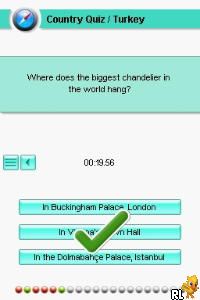
As a Nintendo DS classic, Travel Coach – Europe 2 reflects the style of early handheld games with its clear visuals and pixel art. The game’s interface resembles a travel guide, complete with maps, flags, and icons that highlight its educational focus. Its design is simple and easy to navigate, appealing to a wide age range. The friendly, light atmosphere encourages players to learn about Europe without feeling overwhelmed or pressured.
What keeps players coming back is the variety of question formats and puzzle types. From multiple-choice quizzes to matching games, it offers a gentle challenge that rewards curiosity. The game’s language options—English, German, Dutch, Greek, and Turkish—add accessibility for those interested in language learning or exploring different cultures. While it doesn’t feature intense graphics or complex mechanics, its straightforward approach and educational focus make it a charming and sometimes addictive way to brush up on European geography and culture.
Tips to Get Ahead
To do well in Travel Coach – Europe 2, try to familiarize yourself with key landmarks and flags before playing. Keep a mental map of Europe’s countries to speed up geography questions.
- Answer questions carefully—sometimes the game offers hints or options to skip, which can save time on tougher questions.
- Pay attention to the different question types—multiple choice, matching, or identifying landmarks—and adjust your approach as needed.
- Use in-game hints if they’re available—these can provide clues that make difficult questions easier.
- Aim to complete the game in sessions of manageable length; it’s designed for casual play, so long marathons might lead to fatigue.
- Practice with less familiar languages or landmarks if you want to improve your overall score or knowledge.
Things to Know Before You Start
Is Travel Coach – Europe 2 difficult for casual players?
The game is quite accessible, with difficulty gradually increasing; it’s suitable for anyone interested in learning without getting frustrated.
How long does a session last?
Most sessions last between 15 and 30 minutes, making it a good choice for quick breaks or short gaming periods.
Can I play this on mobile or offline?
This version runs directly in your browser, so you don’t need to download anything. Since it’s emulated, it’s best played on a device with a stable internet connection for smooth performance.
Is Travel Coach – Europe 2 appropriate for children?
Yes, the content is family-friendly and educational, making it suitable for kids and learners of all ages interested in Europe’s geography and culture.
Jump into the game
Travel Coach – Europe 2 offers a fun, educational journey through Europe that’s easy to pick up and enjoy. Its simple style and variety of questions make it a relaxing and informative experience, perfect for anyone curious about the continent. Give it a try and see how much you can learn with this classic Nintendo DS game, now playable free in your browser.
Related games: you can also try Hi! Hamtaro – Ham-Ham Challenge (Europe) (En,Fr,De,Es,It) and Samantha Swift and the Hidden Roses of Athena (Europe) (En,Nl), or browse all other games in the Nintendo DS category.
How to Play Travel Coach – Europe 2 (Europe) (En,De,Nl,El,Tr)?
Answer geography, culture, and landmark questions about Europe by selecting options or matching items to progress through the quiz and puzzles.
Game Controls
Use arrow keys to navigate and Enter to select or confirm actions.
You may be interested in:
-
 Nintendo DS
♥ 1
Casper’s Scare School – Classroom Capers (USA)
Nintendo DS
♥ 1
Casper’s Scare School – Classroom Capers (USA) -
 Nintendo DS
♥ 1
Zunou Nouryoku Koujou Machine – Touch de Zunoo DS (Japan)
Nintendo DS
♥ 1
Zunou Nouryoku Koujou Machine – Touch de Zunoo DS (Japan) -
 Nintendo DS
♥ 1
Zunou ni Asekaku Game Series! Vol. 1 – Cool 104 Joker & Setline (Japan)
Nintendo DS
♥ 1
Zunou ni Asekaku Game Series! Vol. 1 – Cool 104 Joker & Setline (Japan) -
 Nintendo DS
♥ 9
Zuma’s Revenge (USA)
Nintendo DS
♥ 9
Zuma’s Revenge (USA) -
 Nintendo DS
♥ 1
Zubo (USA) (En,Fr,Es)
Nintendo DS
♥ 1
Zubo (USA) (En,Fr,Es) -
 Nintendo DS
♥ 1
Zubo (Europe) (En,Fr,De,Es,It,Nl,Sv)
Nintendo DS
♥ 1
Zubo (Europe) (En,Fr,De,Es,It,Nl,Sv) -
 Nintendo DS
♥ 1
Zorro – Quest for Justice (USA) (En,Fr,De,Es,It)
Nintendo DS
♥ 1
Zorro – Quest for Justice (USA) (En,Fr,De,Es,It) -
 Nintendo DS
♥ 1
Zorro – Quest for Justice (Europe) (En,Fr,De,Es,It)
Nintendo DS
♥ 1
Zorro – Quest for Justice (Europe) (En,Fr,De,Es,It)
Comments (0)
No comments yet. Be the first to comment!