Uno 52 (USA)
0 1 0
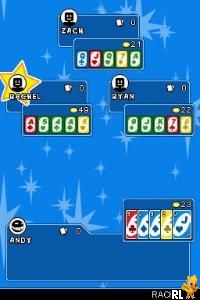
Uno 52 (USA) is a digital version of the well-loved card game, designed within a classic Nintendo DS style. It keeps the familiar rules and relaxed fun that have made Uno popular among players of all ages. The pixel art and simple sound effects give it a nostalgic feel, recalling the handheld’s early days, while providing an easy way to play a familiar game right in your browser — no downloads required. Whether for a quick round or a casual challenge, it invites players into a universe of matching colors and strategic moves.
Step Into the World of Uno 52
The setting is simple: a clean, stylized digital table with all the focus on the cards. The visuals lean toward a retro look, with bright, contrasting colors and bold outlines that resemble classic handheld games. The sounds are light and unobtrusive, with simple beeps and chimes that accompany card draws and plays, creating a welcoming atmosphere. The interface is straightforward, with clear buttons and card layouts that make it easy for anyone to jump right in, whether you’re experienced or just starting out. The game runs smoothly in your browser, keeping the nostalgic feel of the Nintendo DS original while offering a modern, accessible experience.
How the Gameplay Hooks You
Uno 52’s gameplay is built around quick, engaging rounds that focus on strategic choices without being too complicated. Each match moves along fast—players try to get rid of all their cards before the others, with turns passing smoothly from one to the next. The pace encourages short bursts of play, perfect for quick breaks or casual sessions. Its simple mechanics—matching colors or numbers and playing special cards—keep the tension up without needing deep mastery, making every game easy and enjoyable. Wins and losses naturally guide you to improve your tactics or start fresh, encouraging repeated plays that sharpen your instincts and strategies.
Pro Tips for Uno 52
Getting better at Uno 52 can come down to a few useful strategies:
- Keep an eye on what cards your opponents play and hold onto wild cards for moments when they can really change the game.
- Try to keep a balanced hand—having a mix of colors and numbers makes it easier to adapt to different situations.
- Use action cards wisely to mess with opponents’ plans or make them draw more cards.
- Be alert when calling “Uno” and watch how your opponents react; forgetting to call it can cost you.
- Save wild cards for key moments—they can give you a real edge when you need it most.
- Stay calm during quick rounds; impulsive moves might lead to penalties or missed opportunities.
Frequently Asked Questions
Can I play Uno 52 in short sessions or do matches tend to last a long time?
Answer: The game is designed for quick rounds, so it’s easy to play a few in a short amount of time. Matches usually last just a few minutes, fitting into busy schedules.
Does Uno 52 get boring after playing a lot?
Answer: Its simple rules and random card draws keep each game feeling fresh. While the core gameplay stays the same, the unpredictability of opponents’ moves keeps things interesting over multiple rounds.
Is Uno 52 only playable online in the browser, or can I play offline?
Answer: It runs directly in the browser, so there’s no need to download anything. Once loaded, you can play without an internet connection, depending on your browser’s capabilities.
As a classic Nintendo DS game, Uno 52 captures the essence of the familiar card game, offering quick, accessible fun suited for casual players. Playing it in your browser makes it easy to enjoy Uno’s straightforward strategy without any fuss, making it a reliable choice whenever you want a quick game.
Related games: you can also try Jewel Quest – Mysteries – Curse of the Emerald Tear (Europe) and Iron Man (Europe) (En,Fr,De,Es,It), or browse all other games in the Nintendo DS category.
How to Play Uno 52 (USA)?
Match cards by color or number to get rid of all your cards before opponents. Use strategy and action cards to block or challenge others while managing your hand.
Game Controls
Keyboard controls replace the controller; arrow keys navigate, and action keys select and play cards.
You may be interested in:
-
 Nintendo DS
♥ 1
Casper’s Scare School – Classroom Capers (USA)
Nintendo DS
♥ 1
Casper’s Scare School – Classroom Capers (USA) -
 Nintendo DS
♥ 1
Zunou Nouryoku Koujou Machine – Touch de Zunoo DS (Japan)
Nintendo DS
♥ 1
Zunou Nouryoku Koujou Machine – Touch de Zunoo DS (Japan) -
 Nintendo DS
♥ 1
Zunou ni Asekaku Game Series! Vol. 1 – Cool 104 Joker & Setline (Japan)
Nintendo DS
♥ 1
Zunou ni Asekaku Game Series! Vol. 1 – Cool 104 Joker & Setline (Japan) -
 Nintendo DS
♥ 9
Zuma’s Revenge (USA)
Nintendo DS
♥ 9
Zuma’s Revenge (USA) -
 Nintendo DS
♥ 1
Zubo (USA) (En,Fr,Es)
Nintendo DS
♥ 1
Zubo (USA) (En,Fr,Es) -
 Nintendo DS
♥ 1
Zubo (Europe) (En,Fr,De,Es,It,Nl,Sv)
Nintendo DS
♥ 1
Zubo (Europe) (En,Fr,De,Es,It,Nl,Sv) -
 Nintendo DS
♥ 1
Zorro – Quest for Justice (USA) (En,Fr,De,Es,It)
Nintendo DS
♥ 1
Zorro – Quest for Justice (USA) (En,Fr,De,Es,It) -
 Nintendo DS
♥ 1
Zorro – Quest for Justice (Europe) (En,Fr,De,Es,It)
Nintendo DS
♥ 1
Zorro – Quest for Justice (Europe) (En,Fr,De,Es,It)
Comments (0)
No comments yet. Be the first to comment!