Wiffle Ball (Europe) (En,Fr,De,Es,It)
0 1 0
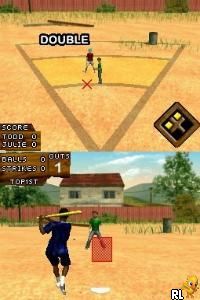
Wiffle Ball (Europe) (En,Fr,De,Es,It) is a straightforward Nintendo DS game that gives a simple take on the casual sport of wiffle ball. It’s designed for players who enjoy easy, pick-up-and-play sports games and manages to capture the feel of backyard baseball without any fuss. If you’re after a quick, fun sports experience that you can play right in your browser, this game offers a nostalgic reminder of handheld gaming from the Nintendo DS days.
Getting Into Wiffle Ball
The main gameplay focuses on basic batting, pitching, and fielding. As a player, you’ll take turns hitting a lightweight plastic ball with a small bat, trying to score runs while stopping the other team from doing the same. The game relies on timing and placement rather than complicated controls, making it accessible for players of all skill levels. Matches tend to be short, just a few minutes long, which makes it great for quick gaming sessions or casual breaks.
Wiffle Ball features a few game modes that bring some variety. You can play a single game against AI or challenge a friend in local multiplayer. Its simple interface and minimal setup mean you can jump into a game almost instantly. While it doesn’t have elaborate career or unlockable content, it’s all about fun and quick competition. Trying different strategies or improving your timing with each match keeps things interesting.
Standout Features
The visuals are simple but effective, with colorful sprites that give off a cheerful backyard vibe. The cartoonish style helps show the game’s light tone and makes it easy to follow the ball’s path and player movements. As a Nintendo DS classic, the design stays simple but effective, and it runs smoothly in the browser emulator without any lag.
The game doesn’t focus on long-term progression or customization, but its replay value comes from quick, casual matches that you can play over and over. Its straightforward mechanics invite experimentation, and the simplicity makes it easy for newcomers to pick up and enjoy without feeling overwhelmed. Short sessions make it perfect for quick breaks, and playing multiplayer keeps things fresh if you want to challenge friends or try different tactics.
Strategy and Tips
To get the best out of Wiffle Ball, focus on timing and placement during batting and pitching. Here are some tips:
- Watch the pitcher’s wind-up to anticipate where the ball will go.
- Practice your swing timing to hit the ball accurately and score more runs.
- Mix up your pitching styles to throw off your opponent, especially in multiplayer games.
- Use the field’s angles to your advantage when catching or throwing to prevent runs.
- Keep matches quick and stick to simple, reliable plays rather than risky moves.
- Adjust your approach based on how your opponent plays — patience often beats power here.
Quick Questions
How do I start a game in Wiffle Ball?
Just pick the game mode from the main menu, choose your opponent — AI or local multiplayer — and jump right in.
What’s a common mistake beginners make?
Many new players swing too early or too late, missing the ball. Timing your swing with the pitch is key.
Can I play Wiffle Ball on mobile or touch devices?
The game runs in your browser, so it works well on touchscreens, making it easy to play on phones and tablets without extra setup.
Wiffle Ball offers a laid-back, easy-to-pick-up experience that captures the fun of backyard wiffle ball games. Its simple gameplay, quick matches, and multiplayer options make it a solid choice for anyone wanting a casual sports game you can enjoy right in your browser.
Related games: you can also try Lost in Blue (USA) and GoldenEye – Au Service du Mal (France), or browse all other games in the Nintendo DS category.
How to Play Wiffle Ball (Europe) (En,Fr,De,Es,It)?
Take turns batting and pitching to score runs and stop the other team. Focus on timing and placement for quick, fun matches that last a few minutes each.
Game Controls
Use the keyboard to control batting, pitching, and fielding actions.
You may be interested in:
-
 Nintendo DS
♥ 1
Casper’s Scare School – Classroom Capers (USA)
Nintendo DS
♥ 1
Casper’s Scare School – Classroom Capers (USA) -
 Nintendo DS
♥ 1
Zunou Nouryoku Koujou Machine – Touch de Zunoo DS (Japan)
Nintendo DS
♥ 1
Zunou Nouryoku Koujou Machine – Touch de Zunoo DS (Japan) -
 Nintendo DS
♥ 1
Zunou ni Asekaku Game Series! Vol. 1 – Cool 104 Joker & Setline (Japan)
Nintendo DS
♥ 1
Zunou ni Asekaku Game Series! Vol. 1 – Cool 104 Joker & Setline (Japan) -
 Nintendo DS
♥ 9
Zuma’s Revenge (USA)
Nintendo DS
♥ 9
Zuma’s Revenge (USA) -
 Nintendo DS
♥ 1
Zubo (USA) (En,Fr,Es)
Nintendo DS
♥ 1
Zubo (USA) (En,Fr,Es) -
 Nintendo DS
♥ 1
Zubo (Europe) (En,Fr,De,Es,It,Nl,Sv)
Nintendo DS
♥ 1
Zubo (Europe) (En,Fr,De,Es,It,Nl,Sv) -
 Nintendo DS
♥ 1
Zorro – Quest for Justice (USA) (En,Fr,De,Es,It)
Nintendo DS
♥ 1
Zorro – Quest for Justice (USA) (En,Fr,De,Es,It) -
 Nintendo DS
♥ 1
Zorro – Quest for Justice (Europe) (En,Fr,De,Es,It)
Nintendo DS
♥ 1
Zorro – Quest for Justice (Europe) (En,Fr,De,Es,It)
Comments (0)
No comments yet. Be the first to comment!