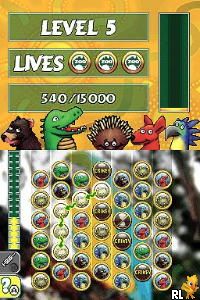
Zoo Quest – Puzzle Fun! (Europe) (En,Fr,De,Es,It,Nl,Sv,No,Da,Fi,Hu)
0 1 0
Zoo Quest – Puzzle Fun! (Europe) (En,Fr,De,Es,It,Nl,Sv,No,Da,Fi,Hu) is a cheerful puzzle game set in a lively zoo filled with colorful animals and playful environments. Originally a Nintendo DS favorite, it now runs right in your browser, making it easy to hop in for a quick session or spend some time solving puzzles without needing to download anything. Its bright visuals and lighthearted sound effects create a whimsical atmosphere that appeals to players of all ages.
Step Into the World of Zoo Quest – Puzzle Fun!
The visuals showcase bright, cartoon-style animals and zoo habitats, all designed with simple but expressive art. The backgrounds are lively, animated animals performing small movements that add character to each scene. The cheerful music and playful sounds complement the environment, making it inviting and fun to explore. Because it’s browser-based, it runs smoothly without extra software, instantly pulling you into its colorful zoo setting.
How the Gameplay Hooks You
Zoo Quest – Puzzle Fun! focuses on matching and arranging animals into specific patterns to move through different levels. The game moves at a steady pace, with each stage setting a clear goal and gradually increasing in difficulty. Its simple mechanics keep things accessible, while the rising challenge keeps you engaged without feeling overwhelming. Repeating levels helps you improve, rewarding patience and careful observation.
As you progress, you unlock new animal species and zoo areas, adding variety and a sense of achievement. The puzzles are bite-sized, perfect for short play sessions. The design encourages casual play, with each level giving a satisfying sense of completion before moving on. The focus on logic and pattern matching keeps things light but addictive, making it a nice choice for a cozy puzzle break in your browser.
Pro Tips for Zoo Quest – Puzzle Fun!
Here are a few tips to help you enjoy the game more:
- Group similar animals first to make complex arrangements easier.
- Think ahead when planning your moves to avoid unnecessary resets.
- Look for clues in the background that might point to the right placements.
- If you get stuck, stepping away for a moment can help you see solutions more clearly.
- Try to finish levels with fewer moves for a higher score and more rewards.
- Use hints only when needed; overusing them can limit your problem-solving skills.
Frequently Asked Questions
Can I pause and pick up where I left off in Zoo Quest – Puzzle Fun!?
Since the game runs in your browser, your progress is usually saved automatically during your session. However, closing the page might reset your current level because there’s no dedicated save feature.
Does the game get repetitive after a while?
The game keeps things fresh with different animal combinations and increasingly tricky puzzles. Its casual style and gradual difficulty make it suitable for both quick play and longer sessions.
Is Zoo Quest – Puzzle Fun! suitable for all ages?
Yes, its simple mechanics and cheerful visuals make it accessible for children and relaxing for adults. The puzzles are straightforward but still offer a satisfying challenge, especially for fans of pattern matching and logical thinking.
Zoo Quest – Puzzle Fun! is a lighthearted puzzle game wrapped in a lively zoo theme. If you’re after a quick mental break or a gentle challenge, this classic from the Nintendo DS era offers a charming experience you can enjoy right in your browser.
Related games: you can also try Mind Your Language – Learn Japanese! (Europe) (En,Fr,De,Es,It) and Napoleon Dynamite – The Game (USA), or browse all other games in the Nintendo DS category.
How to Play Zoo Quest – Puzzle Fun! (Europe) (En,Fr,De,Es,It,Nl,Sv,No,Da,Fi,Hu)?
Match and arrange animals into specific patterns to clear levels and unlock new zoo areas. Complete each puzzle with minimal moves to earn higher scores and progress through the colorful zoo environment.
Game Controls
Use keyboard arrow keys to move and select; press space or Enter to confirm actions.
You may be interested in:
-
 Nintendo DS
♥ 1
Casper’s Scare School – Classroom Capers (USA)
Nintendo DS
♥ 1
Casper’s Scare School – Classroom Capers (USA) -
 Nintendo DS
♥ 1
Zunou Nouryoku Koujou Machine – Touch de Zunoo DS (Japan)
Nintendo DS
♥ 1
Zunou Nouryoku Koujou Machine – Touch de Zunoo DS (Japan) -
 Nintendo DS
♥ 1
Zunou ni Asekaku Game Series! Vol. 1 – Cool 104 Joker & Setline (Japan)
Nintendo DS
♥ 1
Zunou ni Asekaku Game Series! Vol. 1 – Cool 104 Joker & Setline (Japan) -
 Nintendo DS
♥ 9
Zuma’s Revenge (USA)
Nintendo DS
♥ 9
Zuma’s Revenge (USA) -
 Nintendo DS
♥ 1
Zubo (USA) (En,Fr,Es)
Nintendo DS
♥ 1
Zubo (USA) (En,Fr,Es) -
 Nintendo DS
♥ 1
Zubo (Europe) (En,Fr,De,Es,It,Nl,Sv)
Nintendo DS
♥ 1
Zubo (Europe) (En,Fr,De,Es,It,Nl,Sv) -
 Nintendo DS
♥ 1
Zorro – Quest for Justice (USA) (En,Fr,De,Es,It)
Nintendo DS
♥ 1
Zorro – Quest for Justice (USA) (En,Fr,De,Es,It) -
 Nintendo DS
♥ 1
Zorro – Quest for Justice (Europe) (En,Fr,De,Es,It)
Nintendo DS
♥ 1
Zorro – Quest for Justice (Europe) (En,Fr,De,Es,It)
Comments (0)
No comments yet. Be the first to comment!