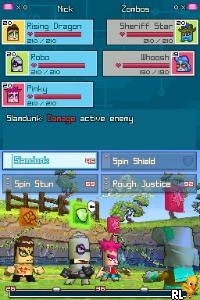
Zubo (USA) (En,Fr,Es)
0 1 0
Zubo (USA) (En,Fr,Es) is a charming Nintendo DS game that offers a simple yet engaging experience. Its colorful visuals and straightforward mechanics make it easy for new players to pick up and enjoy without a steep learning curve. Designed for the handheld’s touch-screen interface, the game invites players into a lively world where collecting, battling, and customizing are at the heart of the fun. As a classic from the Nintendo DS era, it’s accessible and great for quick sessions or longer playthroughs.
What Is Zubo?
Zubo is a role-playing game that combines collection and battle mechanics within a bright, cartoonish universe. The game focuses on capturing and training creatures called Zubo, which players can use in turn-based battles. Its gameplay emphasizes strategic thinking paired with simple controls, appealing to a variety of ages. The goal is to build a team of Zubo, customize their looks and skills, and move through different challenges in a colorful setting.
Players explore various environments, solve puzzles, and face off against opponents in battles that are easy to understand but offer enough depth to keep things interesting. The story is lighthearted, centered around quests and collecting tasks rather than complex plots. It’s designed to be easy to pick up, focusing on fun interactions rather than demanding gameplay. Its straightforward mechanics make it suitable for newcomers to RPGs or anyone looking for a relaxed experience on their Nintendo DS.
What Keeps You Coming Back
The game’s appeal lies in its collection aspect. As players encounter new Zubo, they can customize their appearance and stats, encouraging repeated play to complete the roster. The turn-based battle system is quick to learn but offers enough variety to experiment with different team setups. This makes each session feel fresh, whether you’re trying to beat a tough opponent or just collecting Zubo for fun.
Extras like mini-games and side quests add variety beyond the main storyline. Customization options for Zubo, including accessories and visual styles, give players a sense of ownership over their team. The game also rewards strategic planning, especially when facing stronger opponents, motivating players to think carefully about their tactics. These elements combine to create a game that’s easy to enjoy multiple times, whether for a few minutes or longer stretches.
Handy Tips
If you’re starting out with Zubo, here are some tips to help you get the most out of it:
- Focus on upgrading your Zubo’s abilities early to make battles smoother.
- Try different team combinations to see what works best.
- Use items wisely in battles; save them for tougher opponents.
- Complete side quests for extra rewards and to unlock special customization options.
- Pay attention to match-ups and environments; some Zubo are stronger against certain types.
Player FAQ
Is Zubo easy for a beginner to pick up?
Yes, with simple controls and accessible mechanics, it’s a good choice for newcomers and younger players.
Can I play Zubo offline or do I need an internet connection?
This classic Nintendo DS game runs fully offline, so you can enjoy it without needing an internet connection. The game is playable directly here in your browser, with no downloads required.
Is Zubo suitable for all ages?
Definitely. Its colorful art style and straightforward gameplay make it appealing to children and casual players alike.
Playing Zubo on this site offers instant access with no setup or downloads, making it a simple way to enjoy this nostalgic Nintendo DS classic. Its approachable gameplay and charming design make it a fun option for players of all experience levels.
Related games: you can also try Petz – Horsez – Kouma to Issho ni Tanoshiku Asobou (Japan) and Mugen no Frontier – Super Robot Taisen OG Saga (Japan), or browse all other games in the Nintendo DS category.
How to Play Zubo (USA) (En,Fr,Es)?
Collect and train Zubo creatures, then battle opponents using simple turn-based moves. Explore environments, customize your Zubo, and complete quests for fun and progress.
Game Controls
Arrow keys for movement; Enter or space for actions; keyboard controls replace the touchscreen.
You may be interested in:
-
 Nintendo DS
♥ 1
Casper’s Scare School – Classroom Capers (USA)
Nintendo DS
♥ 1
Casper’s Scare School – Classroom Capers (USA) -
 Nintendo DS
♥ 1
Zunou Nouryoku Koujou Machine – Touch de Zunoo DS (Japan)
Nintendo DS
♥ 1
Zunou Nouryoku Koujou Machine – Touch de Zunoo DS (Japan) -
 Nintendo DS
♥ 1
Zunou ni Asekaku Game Series! Vol. 1 – Cool 104 Joker & Setline (Japan)
Nintendo DS
♥ 1
Zunou ni Asekaku Game Series! Vol. 1 – Cool 104 Joker & Setline (Japan) -
 Nintendo DS
♥ 9
Zuma’s Revenge (USA)
Nintendo DS
♥ 9
Zuma’s Revenge (USA) -
 Nintendo DS
♥ 1
Zubo (Europe) (En,Fr,De,Es,It,Nl,Sv)
Nintendo DS
♥ 1
Zubo (Europe) (En,Fr,De,Es,It,Nl,Sv) -
 Nintendo DS
♥ 1
Zorro – Quest for Justice (USA) (En,Fr,De,Es,It)
Nintendo DS
♥ 1
Zorro – Quest for Justice (USA) (En,Fr,De,Es,It) -
 Nintendo DS
♥ 1
Zorro – Quest for Justice (Europe) (En,Fr,De,Es,It)
Nintendo DS
♥ 1
Zorro – Quest for Justice (Europe) (En,Fr,De,Es,It) -
 Nintendo DS
♥ 1
Zoo Vet – Endangered Animals (USA)
Nintendo DS
♥ 1
Zoo Vet – Endangered Animals (USA)
Comments (0)
No comments yet. Be the first to comment!