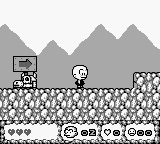
B.C. Kid 2 (Europe)
0 2 1
B.C. Kid 2 (Europe) is a classic Game Boy platformer that provides a simple yet enjoyable action experience. Designed for fans of retro handheld adventures, it challenges players with easy controls and tricky levels. If you like pixel art, traditional platform mechanics, and a nostalgic vibe, this game offers a solid dose of 8-bit fun that runs right in your browser, no downloads needed.
Getting Into B.C. Kid 2
The main gameplay of B.C. Kid 2 involves moving through side-scrolling levels filled with obstacles, enemies, and hidden secrets. Your goal is to progress by jumping over gaps, defeating foes, and collecting items. The game calls for precise timing and pattern recognition, turning each level into a test of reflexes and strategy. You’ll often revisit areas once you unlock new abilities or discover hidden paths, encouraging exploration and patience.
The game doesn’t have complex modes or multiple characters; it follows a straightforward path that rewards repeated attempts to improve your play. Learning enemy behaviors and memorizing level layouts makes future runs easier. Although it’s relatively short, the challenge lies in completing levels efficiently and finding all secrets, which can add quite a bit to your playtime.
Standout Features
Visually, B.C. Kid 2 has charming pixel art typical of the Game Boy era, with colorful sprites and backgrounds that stand out despite hardware limits. Its animations are smooth enough to give movement a lively feel, and the levels are varied enough to keep things interesting from start to finish. The progression system is simple—completing each level unlocks the next—but there’s enough challenge to motivate multiple tries to beat your previous times and find hidden items.
Replay value comes from trying to beat your best times and discovering secret paths or power-ups that make future runs easier. Even though it’s a linear game, the difficulty curve encourages refining your skills and pushing further into the stages. Playing in your browser makes it easy to jump back in whenever you want a quick retro platforming session.
Strategy and Tips
To get the most out of B.C. Kid 2, focus on learning enemy patterns and timing your jumps carefully. Exploring each level thoroughly can reveal hidden areas and helpful power-ups. Here are some tips:
- Observe enemy movements so you can avoid damage and plan your attacks.
- Take your time exploring for secret paths and bonus items.
- Use safe spots to plan your moves instead of rushing through levels.
- Practice jump timing, especially over tricky pits and moving platforms.
- Keep an eye out for hidden items that can give extra lives or advantages.
- Repeat difficult sections to memorize the best approach and timing.
Quick Questions
How do I start playing B.C. Kid 2?
The game loads instantly in your browser—just click start and explore the levels right away, no setup needed.
What’s a common mistake beginners make?
Many rush through levels without paying attention to enemy patterns or searching for secrets, which can lead to unnecessary hits or missed power-ups.
Can I play B.C. Kid 2 comfortably on mobile or touch devices?
Yes, since it runs directly in your browser, it works on mobile and touchscreens, with controls adapted for tapping and swiping, so it’s easy to play even on smaller screens.
B.C. Kid 2 offers a straightforward platforming challenge that’s easy to pick up but still demands skill to beat your best times or find hidden goodies. Playing it in your browser makes it quick to access, perfect for quick gaming sessions or revisiting a classic anytime.
Related games: you can also try Alien vs Predator – The Last of His Clan (Japan) and Play 3-pun Yosou Umaban Club (Japan), or browse all other games in the Game Boy category.
How to Play B.C. Kid 2 (Europe)?
Move through levels by jumping over gaps, defeating enemies, and collecting items. Learn enemy patterns and explore hidden areas to complete levels faster and find secrets.
Game Controls
Arrow keys control movement; action buttons are mapped to keyboard keys for jumping and attacking.








Comments (0)
No comments yet. Be the first to comment!