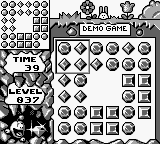
Brain Drain (USA)
0 1 0
Brain Drain (USA) is a classic Game Boy puzzle game that mixes quick thinking with strategic moves. As a well-known title from the Game Boy era, it offers a straightforward yet challenging experience based on simple mechanics. Its portability and minimalist design have kept it popular among players looking for a compact puzzle challenge you can take anywhere.
Brain Drain: Gameplay Overview
The game revolves around manipulating falling blocks to clear the playing field. You control a shape that drops into a grid filled with different colored blocks. The main goal is to arrange these blocks so you can complete horizontal lines, which then disappear from the screen. This setup is similar to other falling block puzzles but emphasizes making decisions quickly and understanding space well.
The gameplay is time-sensitive, so you need to think fast as the blocks keep coming. New shapes appear constantly, and you have to rotate and position them before they lock into place. Success depends on predicting what’s coming next and clearing lines efficiently to prevent the screen from filling up. As you advance, the game speeds up, demanding quicker reflexes and better planning to reach higher scores.
Modes, Levels and Progression
Brain Drain offers a simple single-player mode where your progress depends on how long you can keep clearing lines and avoid stacking too high. There aren’t multiple difficulty levels or modes; instead, the game gets faster as you go, naturally making things harder. This pace creates a smooth increase in challenge that tests your reflexes and pattern recognition.
The real challenge is beating your high score or hitting specific clearing goals. Since it’s styled like an arcade game, there aren’t traditional levels, but the rising speed and pressure to keep the stacks low make it addictive. Many players find themselves coming back to improve their skills and beat their best scores, which keeps the game interesting over time.
Winning Strategies
Quick placement and avoiding gaps are crucial for lasting longer. Try to create solid lines rather than aiming for multiple clears at once early on.
- Keep an eye on the next shape to plan your moves ahead.
- Stack blocks evenly to avoid creating tricky gaps or high stacks that are hard to clear.
- Practice rotating shapes quickly to make decisions faster.
- Focus on clearing lines rather than waiting for the perfect setup; speed often beats patience.
- Stay calm as the pace picks up. Panicking can lead to mistakes and end your game early.
Common Questions About Brain Drain
How does the difficulty change as I play?
The game gets faster over time, making each round more challenging. It doesn’t have difficulty settings; instead, it’s designed to push you to improve your speed and decision-making as you go along.
Are there different modes or levels?
No, it’s a single continuous mode focused on how long you can last and your high score. The challenge is purely about surviving and scoring well before the screen fills up.
Is there replay value for casual players?
Absolutely. The game’s simple setup encourages trying to beat your best scores. Its endless nature, combined with the increasing speed, makes it a game you can return to repeatedly, especially if you enjoy sharpening quick reflexes and recognizing patterns.
Brain Drain keeps things compact and engaging, with straightforward mechanics and a steadily rising challenge. Playing here in your browser gives instant access to a game that tests your reflexes and planning without any fuss. Its simplicity makes each session a gentle call to improve your puzzle skills over time.
Related games: you can also try Adventures of Rocky and Bullwinkle, The (USA) (Beta) and Adventure Island (USA, Europe), or browse all other games in the Game Boy category.
How to Play Brain Drain (USA)?
Drop and rotate falling blocks to complete horizontal lines and clear the screen. Keep clearing lines to prevent the stack from reaching the top as the game speeds up over time.
Game Controls
Arrow keys control movement and rotation; other keys handle game functions.








Comments (0)
No comments yet. Be the first to comment!