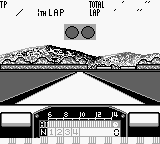
F1 Pole Position (USA, Europe)
0 4 0
F1 Pole Position (USA, Europe) is a classic Game Boy racing game that captures the excitement of Formula 1 racing in a simple, approachable way. Designed for quick play, it appeals to fans of retro titles and newcomers alike. Its straightforward controls and easy-to-understand gameplay make it great for quick sessions or casual play. This game runs directly in your browser, so you can experience a piece of handheld gaming history without needing downloads or installations.
What Is F1 Pole Position?
F1 Pole Position is a racing game where you drive Formula 1 cars, racing against the clock and other drivers on various circuits. It emphasizes speed, precision, and tight turns, offering a straightforward experience focused on timing and control. The gameplay is simple enough for new players to pick up quickly and start racing without a steep learning curve.
The main goal is to finish laps as fast as possible while avoiding obstacles and staying in control at high speeds. The game has a top-down view typical of early racing titles on the Game Boy, with simple graphics that evoke the thrill of F1 racing. It’s a single-player game that encourages players to improve their times and master each circuit, emphasizing skills over complex mechanics.
What Keeps You Coming Back
F1 Pole Position offers a straightforward yet challenging racing experience that encourages repeated tries. Its tight controls and predictable physics make mastering each track satisfying, as players learn the best racing lines and when to brake. The simplicity means you can jump in anytime, trying to beat your best lap or improve your previous scores.
Replay value comes from the variety of circuits and the desire to improve times. As you progress, the difficulty increases, pushing you to refine your technique. Short sessions make it easy to play in quick bursts, and the competitive aspect of beating personal records keeps players coming back. The no-frills design focuses on skill and timing, making each race feel rewarding and worth another shot.
Handy Tips
If you want to get better at F1 Pole Position, here are some tips:
- Keep your steering smooth and controlled to stay fast through turns.
- Brake early before sharp corners to avoid losing control.
- Learn each circuit’s layout to anticipate tricky sections and plan your approach.
- Maintain steady acceleration, avoiding sudden jerks that can cause spins.
- Use the in-game timers to track your best laps and try to beat them.
- Stay patient; precise driving often leads to faster times.
Player FAQ
Is F1 Pole Position easy for beginners?
Yes, with simple controls and straightforward gameplay, it’s suitable for players of all ages. It’s easy to pick up and enjoy, even if you’re new to racing games.
Can younger players enjoy F1 Pole Position?
Definitely. Its simple mechanics and minimal complexity make it accessible for children and casual players. No need for online connections or complicated menus, making it friendly for all ages.
Does F1 Pole Position require an internet connection?
Nope, this browser version works entirely offline, so you can play anytime without needing a connection. It’s a hassle-free way to enjoy a classic racing game whenever you want.
F1 Pole Position offers quick, fun racing sessions that reward skill and practice. Its simple design and timeless appeal make it a good addition to any retro collection, especially for fans of early handheld racing games. Playing it here, right in your browser, means you can enjoy this classic without any fuss or delay.
Related games: you can also try Aretha III (Japan) and Crayon Shin-chan – Ora to Shiro wa Otomodachi dayo (Japan), or browse all other games in the Game Boy category.
How to Play F1 Pole Position (USA, Europe)?
Race against the clock on various circuits, steering your F1 car smoothly, braking before turns, and trying to beat your best lap times. Focus on control and timing to improve your speed each run.
Game Controls
Arrow keys control steering and acceleration; other keys handle braking and gear changes.








Comments (0)
No comments yet. Be the first to comment!