InfoGenius Systems – Spell Checker and Calculator (USA)
0 1 0
InfoGenius Systems – Spell Checker and Calculator (USA) is a straightforward Game Boy title that combines two everyday functions into a simple package. Its core idea—checking spelling and doing basic calculations—might not seem exciting, but it offers a nostalgic look at early handheld software geared toward practical tasks. As part of the Game Boy’s diverse catalog, this game feels more like a utility than a typical adventure or puzzle, making it an interesting relic for those curious about how early portable tech handled common chores.
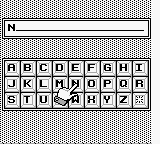
Playing this Game Boy classic, which runs right in your browser, gives a glimpse into how developers approached educational and productivity software in the 1990s. Its visuals stick to the pixelated style typical of the platform, featuring simple menus and monochrome screens that give off a minimalistic vibe. The interface is functional, prioritizing ease of use over design, which makes it accessible even for newcomers. What keeps it interesting is its straightforward setup—no complex mechanics or elaborate stories, just spelling and calculation exercises. Despite its age and simplicity, it can be surprisingly satisfying for those who enjoy retro tools with a purpose.
Why InfoGenius Systems – Spell Checker and Calculator Is Worth Playing
This game stands out because of its clear utility, feeling more genuine than many other educational titles. Its main features are exactly what they say: a spell checker and calculator, designed to be accessible for all ages. Its minimal visuals and simple layout help keep focus on the task, making it good for quick practice or light training. For those with a fondness for early portable tech, it offers a look at how software was once built to be both practical and approachable on limited hardware.
The experience is quiet and unpretentious, with no extras—just a clean interface where you can type words or numbers and see results immediately. While it’s not a game that tests reflexes or puzzles, it brings a nostalgic feeling and reminds us that utility-focused software could still be engaging. It’s a rare example of a program that isn’t about entertainment but still holds sentimental value for those who remember the simplicity of early handheld devices.
Tips to Get Ahead
Getting the most out of this classic is pretty straightforward, but a few tips might help you use it more smoothly.
- Check your spelling carefully to avoid mistakes and improve your score.
- If available, use the calculator’s memory functions to speed up multi-step calculations.
- Try practicing with different word lengths to sharpen your speed and accuracy.
- Get familiar with the interface so switching between functions feels quick and easy.
- Set a timer if you want to challenge yourself and get faster responses.
- Keep sessions short to stay focused; it’s meant for quick practice rather than long sessions.
Things to Know Before You Start
Is InfoGenius Systems – Spell Checker and Calculator too easy or too hard?
It’s designed for casual use, so most people find it accessible. Those looking for a challenge might find the pace a bit slow, but it works well as a practice tool.
How long does a typical session last?
Most sessions are just a few minutes long, making it easy to squeeze in a quick exercise during a break or while waiting.
Can I play this game offline or on mobile devices?
Since it runs right in the browser, you don’t need to download anything. It works instantly and is easy to access from any device with internet, but it’s not designed as a mobile app or for offline play.
Does the game have any difficulty settings or modes?
Nope. It’s pretty straightforward and isn’t built with adjustable difficulty levels—more like a utility than a game meant to challenge you.
Is InfoGenius Systems – Spell Checker and Calculator suitable for children or older players?
Its simplicity makes it good for kids learning spelling and math basics, but it can also appeal to adults who enjoy vintage software or want a quick, no-frills practice tool.
Try out this browser-based version of a classic utility and see how it holds up. Whether for nostalgia or a quick educational boost, the spell checker and calculator offer a neat slice of Game Boy history worth exploring.
Related games: you can also try InfoGenius Systems – Personal Organizer (Europe) and Chachamaru Panic (Japan), or browse all other games in the Game Boy category.
How to Play InfoGenius Systems – Spell Checker and Calculator (USA)?
Type words to check their spelling or enter numbers for calculations. Use the menu to select options and see results immediately, practicing basic editing and math skills.
Game Controls
Arrow keys navigate menus; Enter confirms selections; keyboard input types text.








Comments (0)
No comments yet. Be the first to comment!