Megaman (Europe)
0 14 0
Megaman (Europe) is a classic Game Boy game that takes players into a pixelated world filled with robotic enemies and tricky levels. This portable relic offers a simple yet tough experience, capturing the spirit of early 90s handheld gaming. As a side-scrolling platformer, it invites players to master timing, precision, and resourcefulness to move forward. Its straightforward design and nostalgic feel make it a great choice for anyone wanting a quick dose of vintage gaming right in their browser.
Step Into the World of Megaman
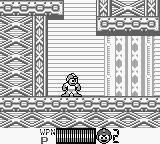
This Game Boy classic features monochrome visuals that highlight pixel art craftsmanship, with blocky character sprites and basic backgrounds. The sound relies on catchy chiptunes and beeps that reflect the era’s technological limits, yet they add energy to the game. The mood is one of steady determination—each level feels like a puzzle that needs careful planning and quick reactions. Despite its simplicity, the game creates a sense of tension as you navigate hazards and dodge enemy patterns.
The interface is minimal but effective, with clear on-screen cues and controls that are easy to pick up. Playing on an emulated browser version keeps the original look and feel, so you can focus on the gameplay. It offers a glimpse back to the early days of portable gaming, where each win feels earned and every loss motivates you to try again.
How the Gameplay Hooks You
The core gameplay involves moving through side-scrolling levels, dodging obstacles, and defeating enemies with a limited set of weapons. Progress is straightforward but demands adaptability, as each stage introduces new challenges and enemy placements. The difficulty gradually increases, rewarding patience and smart use of power-ups. The pace balances moments of fast action with quieter sections, helping you stay engaged without feeling overwhelmed.
As you go further, you pick up on enemy patterns and level layouts, which are key to making progress. The game encourages trying different approaches or weapon upgrades, giving a sense of growing mastery. Its simple design makes it easy to pick up for short sessions, no need for long tutorials or complex mechanics. The challenge is in timing, recognizing patterns, and managing resources—all wrapped in a straightforward package.
Pro Tips for Megaman
Get familiar with enemy patterns before jumping into the action.
- Save your special weapons for tougher enemies or boss fights.
- Take your time to learn each level’s layout; rushing can lead to unnecessary deaths.
- Use small, controlled jumps to avoid hazards instead of reckless leaps.
- Watch for visual cues that warn of attacks or obstacles.
- Practice boss patterns separately if possible—patience makes a difference.
Frequently Asked Questions
Can I save my progress in Megaman?
This version doesn’t have a save feature, so you’ll need to finish levels in one go or start over each time.
Is Megaman good for short gaming sessions?
Absolutely. Each level is short enough for quick play, though it might take several tries to finish. It’s perfect for fitting into small gaming windows.
Does the game get repetitive or stay challenging?
The level design and enemy patterns keep the gameplay interesting, but playing for a long time without variety can feel repetitive. The challenge stays, especially if you’re aiming for a perfect run.
Playing Megaman here offers a faithful taste of retro handheld gaming, where every jump and shot matters. Its simple mechanics and nostalgic pixel art make it a good pick for fans of vintage Game Boy titles looking for a quick, satisfying challenge in your browser.
Related games: you can also try Bikkuri Nekketsu Shinkiroku! – Dokodemo Kin Medal (Japan) and Defender & Joust (USA, Europe), or browse all other games in the Game Boy category.
How to Play Megaman (Europe)?
Move through side-scrolling levels, dodge obstacles, and defeat enemies using limited weapons. Learn enemy patterns and level layouts to progress and defeat bosses.
Game Controls
Arrow keys control movement; action buttons are mapped to keyboard keys for jumping and shooting.








Comments (0)
No comments yet. Be the first to comment!